MDX (Children and Members)

MDX queries are complex compared to the SQL or TSQL queries. It is perceived as complex because the underlying data source is not two dimensional. But simple MDX expressions are not very complex, 😀 as that is why they are simple.


Members and the Children properties of the MDX provide different set of outputs for the hierarchies.


SELECT [Measures].[Internet Sales Amount] ON columns,
[Product].[Category].Children on rows
from [Adventure Works]
where [Date].[Calendar Year].&[2003]


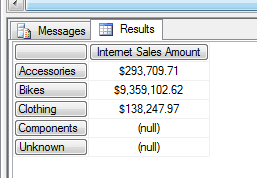
As you see below, when you specify the Children the it excludes the ‘All’ member of the hierarchy.

image


select [Measures].[Internet Sales Amount] on columns,
[Product].[Category].Members on rows
from [Adventure Works]
where [Date].[Calendar Year].&[2003]

‘Members’ brings you the results with the ‘All’.


image

Inheritance in relational database

This article describes about the inheritance in the relational database and how we can handle that in the Entity Framework. First let me discuss about the database inheritance.

I searched the Internet and found there are databases which support inheritance natively. PostgreSQL has this feature, something similar to this.

INHERITS FROM (tablename[, othertable...])


Then I read few chapters from some books. I have given the same exact points that I read from the books. I made some statements bold as I have a personal strong vertical nodding with them. :p

From the Book SQL Server MVP Deep Dives


There’s both a technical and cultural impedance mismatch between the object world

and the database world. Relational databases don’t readily represent inheritance……


Too often the solution is to use an application layer object-relational mapper, such

as NHibernate or the Entity Framework. This provides a poor abstraction for the database……


From the Book Beginning Database design from Novice to Professional (Apress)

Inheritance in a data model is not as common as you might think at first. Humans are very good at categorizing things into hierarchies, and once people get hold of the idea of inheritance in data modeling, there can be a temptation to use it everywhere……..

“Is A a type of B?”

only meant that using inheritance might be a possible way of making sense of a problem.


I strongly believe on what is mentioned above. We do not need to use inheritance structure unless we have a very specific need for it. Because the inheritance in the OOP is very different from the inheritance (or what we call the inheritance relationship) in the database.

Let’s have a simple example of Person and  Student and Lecturer. image
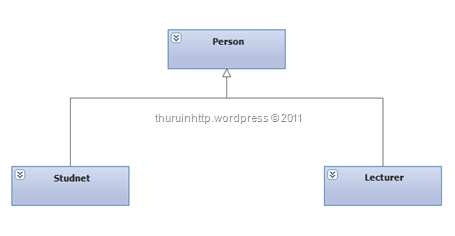
In the context of OOP, most of the cases we have our super classes declared as abstract. So we could have the code as like this.

abstract class Person { }

class Student : Person { }

class Lecturer : Person { }


But in the databases we do not have something called abstract table. Look at this structure which has the inheritance modeled in the database level.

image 

As you can see, though this looks like as it’s having some kind of inheritance it is not clean and not pure.

There can be only person who is neither a student nor a lecturer. There can be people who are students and lectures (of course this makes sense but think a scenario where a person can be either of them, not both)

And just by giving an Id we cannot say what type of a person he is. (we need to perform an OUTER JOIN for this) Just to make things more accurate we have to enforce some constraints.

First create another table with two columns (for minimum) with PersonTypeID and PersonType.
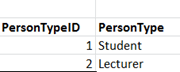
image


Add the PersonTypeID as Foreign Key (FK) to the Person table with NOT NULL constraint (Here we enforce that one person can be either Student or Lecturer)
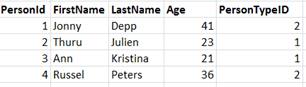
image

So here Jonny and Russel are Lecturers and Thuru and Ann are students.

Still there are some works we have to do. Let me explain, we added the PersonTypeID column with as FK and enforced that a person can belong to one type but we didn’t enforce that a person cannot be in both. I can still have Thuru in lecturer table.

That means I have enforced the rule only in the Person table not in the Student table and Lecturer table.

To overcome this problem, we have to refer the PersonTypeID column in the Person table with the Student table and Lecturer table.

So we add a column in the Student table and in the Lecturer table which refers to the PersonTypeID of the Person table. But we cannot create FK in the student table or in the lecturer table since the PersonTypeID of the Person table is not unique. (as we know to the FK referring column should be unique) So to make them unique we have to create a unique constraint in the Person table.

Like the following.

ALTER TABLE Person ADD CONSTRAINT UQ_PersonID_Type UNIQUE (PersonId,PersonTypeID)

Here the unique key can be constructed with the combination of PersonID and PersonTypeID. (or you can make the combination as Primary Key (PK) as well)

Then we can have the StudentID and PersonTypeID columns in the Student table and LecturerID and PersonTypeID columns in the Lecturer table as FKs of the PersonID and PersonTypeID of the Person table.

Here Student has the PersonTypeID = 1 and Lecturer has the PersonTypeID = 2. This is not going to change, so when creating the Student table (or Lecturer table) we can use the PERSISTED keyword in TSQL


CREATE TABLE Student (

StudentID INT PRIMARY KEY,

PersonTypeID AS 1 PERSISTED,

GPA FLOAT NOT NULL,

CONSTRAINT FK_Student FOREIGN KEY (StudentID,PersonTypeID) REFERENCES Person(PersonID,PersonTypeID)


Here I have used the computed columns for the PersonTypeID, you can use the CHECK constraint as well. As our intention is to not allowing any other values than the corresponding PersonTypeID in the table.

Here is the complete diagram of the tables.
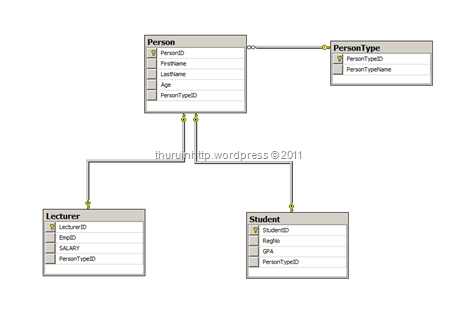
image

The complete TSQL Code

CREATE TABLE PersonType (

  PersonTypeID INT IDENTITY (1,10) NOT NULL PRIMARY KEY,

  PersonTypeName VARCHAR(50) UNIQUE

  )


CREATE TABLE Person (

PersonID INT IDENTITY (1,1) NOT NULL,

FirstName VARCHAR(50) NOT NULL,

LastName VARCHAR(50),

Age INT NOT NULL,

PersonTypeID INT NOT NULL,

CONSTRAINT FK_PersonType FOREIGN KEY (PersonTypeID) REFERENCES PersonType(PersonTypeID)

)

ALTER TABLE Person

    ADD CONSTRAINT PK_PersonID PRIMARY KEY (PersonID)

   
ALTER TABLE Person

ADD CONSTRAINT UQ_ID_Type UNIQUE (PersonID,PersonTypeID)


CREATE TABLE Student (

  StudentID INT NOT NULL PRIMARY KEY,

  RegNo VARCHAR(50) NOT NULL,

  GPA FLOAT NOT NULL,

  PersonTypeID AS 1 PERSISTED,

  CONSTRAINT FK_Student FOREIGN KEY (StudentID,PersonTypeID) REFERENCES Person(PersonID,PersonTypeID)

  )

CREATE TABLE Lecturer (

  LecturerID INT NOT NULL PRIMARY KEY,

  EmpID VARCHAR(50) NOT NULL,

  SALARY MONEY NOT NULL,

  PersonTypeID AS 2 PERSISTED,

  CONSTRAINT FK_Lect FOREIGN KEY (LecturerID,PersonTypeID) REFERENCES Person(PersonID,PersonTypeID)

  )

So implementing the inheritance in the database is tricky and we have to be carful in the CRUD operations. It is recommended to write proper SPs with transactions to handle the situation.

Because though we have conceptually implemented the rules, there can be a situation where there is a Student record in the Person table without the corresponding row in the Student table. (that means we do not have the abstract behavior in the table)

Now let’s take a look where a person can be a student as well as a Lecturer. In this case we have the Person to PersonType as N : M relationship. Where a person can take many person types and one person type can have many persons (sorry here I have to put people, but that creates ambiguity in the context, so let us have plural of person as persons 😀 )

So we had to have a mapping table for the PersonID and the PersonTypeID.

That is the difference we are going to have. And the foreign key constraints of the Student table and the Lecturer table refers the mapping table.

So we can define more flexible inheritance scenarios in the relational databases, but this is full in the context of the database. And I still go with the first saying mentioned in the top of this post. Do not use unless you have a proper need for inheritance.

Some say they go for this kind of database design considering the future extendibility. Database extendibility is big area as far as I know, defining an inheritance structure is not enough for that. And I have very few ideas about that so I don’t discuss that here. Additional reading : http://www.saas-attack.com/DatabaseExtensibility/tabid/161/Default.aspx

This is a complex structure and when using the a ORM framework like EF it has plenty of limitations. I’m not aware of the EF much, so if anyone knows how to map this in the EF while keeping the constraints as they are, feel free to make a comment.

Let’s JOIN

JOIN is one of the common task we perform against databases. This post explains it using TSQL.

INNER JOIN

In a simple JOIN condition we normally do not specify the word INNER, so when we write just JOIN it means an INNER JOIN. INNER JOIN returns only the matching the rows of the tables.

The queries can be executed against the Adventure Works LT database

A simple INNER JOIN between two tables

SELECT SP.ProductID, SP.Name, SPC.Name AS ‘Category’
    FROM SalesLT.Product AS SP INNER JOIN SalesLT.ProductCategory AS SPC
        ON SP.ProductCategoryID = SPC.ProductCategoryID

INNER JOINs can be specified in the WHERE clause as well, but it is recommended to keep them in the FROM. This has no performance issues at all, because even when you specify the JOIN condition in WHERE clause SQL Server executes an INNER JOIN internally.

OUTER JOINS

OUTER JOINS are used to return all rows from one table and matching rows from the other tables. It fills the NULLS where the matching rows cannot be found.

Again the keyword OUTER is optional, but we have to specify whether it is LEFT, RIGHT or FULL OUTER JOIN. When you specify LEFT OUTER JOIN the table in the left side of the JOIN clause is considered as the outer table; means that all rows from this table will be returned with the matching rows of the other table and NULLs replaces where the matching is not there.

Same applies to RIGHT OUTER JOIN, when you use the RIGHT OUTER JOIN the table in the right side of the JOIN is your outer table. So you can get the same results in both LEFT and RIGHT outer JOINs by changing the place of the tables.

SELECT SC.FirstName, SH.SubTotal FROM SalesLT.Customer AS SC
    INNER JOIN SalesLT.SalesOrderHeader AS SH
        ON SC.CustomerID = SH.CustomerID

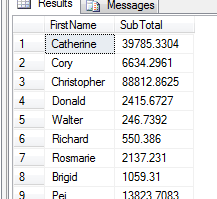
This results only the Customers who have placed orders with their first name along with the sub total. (It returns 32 rows)

image

When specify a LEFT OUTER JOIN like this

SELECT SC.FirstName, SH.SubTotal FROM SalesLT.Customer AS SC
    LEFT OUTER JOIN SalesLT.SalesOrderHeader AS SH
        ON SC.CustomerID = SH.CustomerID

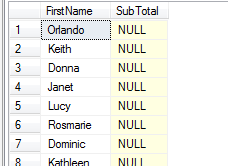
It returns all the rows of the Customer table with the sub total where filling NULLs against the customers who have not placed any orders. Since OUTER JOIN pulls all the rows from the outer table, this returns the exact number of rows that the Customer table has. (847 rows)

image


In this case if you specify the RIGHT OUTER JOIN it pulls all the rows from the OrderHeader table and matching rows from the Customer table. Since the OrderHeader table has FOREIGN KEY of CustomerID and it is NOT NULLABLE, it returns the same result as the INNER JOIN does.

As a generic decision we can say that if the table has a referential integrity defined with NOT NULL constraint, when we specify the OUTER JOIN based on that table (either LEFT or RIGHT) this gives the exact results as INNER JOIN does.


Apart from LEFT and RIGHT OUTER JOINs FULL OUTER JOIN returns all the rows from all the tables specified, by filling NULLs in both sides. This is useful in finding the unmatched rows when there is no referential integrity is defined among the tables.

CROSS JOIN

CROSS JOIN is another type which is the Cartesian product. It matches all rows from one table with all rows from the other table, thus returning m * n rows where m is the number of rows of the first table and n being the number of rows in the second table.

Since CROSS matches every row with all the rows, it does not have an ON condition. (apparently it doesn’t need to have one)

SELECT SC.FirstName, SH.SubTotal FROM SalesLT.Customer AS SC
    CROSS JOIN SalesLT.SalesOrderHeader AS SH

The above query returns 21104 rows (847 rows from Customer table and 37 rows from OrderHeader table)

SELF JOIN

SELF JOIN can be used in the scenarios where the same table has to be joined with itself. For example if you want to find the name of the employees and the name of their supervisors (where the supervisor also an employee) you make SELF JOINs.

There is no any special keyword for SELF JOIN. (as it is not a special operation, it is just a special case where we can use all the other JOIN types)

SQL Server recommends to use CTEs when there are complex and recursive SELF JOINs scenarios occur.

Sequence Column and IDENTITY

When you design tables you need a column to be updated automatically with a sequence number, ultimately which you may use as a Primary key of the table. (Some we use other columns as primary key)

But in case if you haven’t included a sequence column how you can include one.

Take a look,

Create a table in a database

image

Insert 10 rows

image


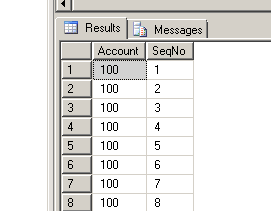
Now the table is populated like this

image


We have to Edit the SeqNo column but no way, since we don’t have any way identify the row uniquely.

First delete the SeqNo column

image

Now Add an IDENTITY column

image

Now the work is done

image


To make the new SeqNo column as Primary Key

image

Work Done Winking smile

MSDN Trackback : http://social.msdn.microsoft.com/Forums/en-US/csharplanguage/thread/158d58b0-0f3a-4d34-bff5-b51d2fad5416

Selecting the Top N in each Category

When we write queries in TSQL selecting the top ‘n’ number of rows is easy. It can be achieved by a query similar to the following.

SELECT TOP(10) Names FROM [Users]
WHERE IsActive = 'True'
ORDER BY ApprovedOn DESC

But when selecting the items which are from different tables and with subcategories this is quite tricky.

I had a scenario where Users can comment on each service/product. Each service/product is listed under a sub category. The need is the query should list down the recent 5 comments under each service sub category with the details of who made the comment.

Apparently I have to JOIN 4 tables. Selecting the TOP(n) from each category is challenging. I searched the Internet and some solutions say that execute the queries to get the top 5 in each category and combine them using the UNION. That doesn’t sound good and in my scenario the number of categories is dynamic. (So If I have to go with the above solution I have to write COUNT for sub categories and then follow that with bulky TSQL stored procedure).

This is a method I tried by combining some techniques mentioned in the Internet.

Table Structure (Tables contain more fields, but in the picture only the related fields are shown)

Capture

There two ways you can write the query. First using a temporary table which is not advisable in terms of efficiency. Second is using sub queries.

Using Temporary tables.

DECLARE @Temp TABLE
(
    Row INT,
    RealServiceID BIGINT,
    CategoryName VARCHAR(100),
    ServiceName VARCHAR(100),
    Comment VARCHAR(MAX),
    Username VARCHAR(50)
)

INSERT INTO @Temp
SELECT ROW_NUMBER() OVER
(PARTITION BY SC.CategoryID ORDER BY SC.CategoryName) AS Row, 

RS.RealServiceID, SC.CategoryName, RS.ServiceName, CM.Comment, US.Username
    FROM RealServices AS RS
              JOIN Comments AS CM ON
        RS.RealServiceID = CM.CommentOn JOIN
            ServiceCategory AS SC ON RS.CategoryID = SC.CategoryID
        JOIN Users AS US ON CM.UserID = US.UserID
    ORDER BY SC.CategoryName, CM.CommentOn

SELECT * FROM @Temp WHERE Row <= 5

Using Sub queries

SELECT RowNumber, RealServiceID, CategoryID, CategoryName, ServiceName,
    Comment, Username, SubmissionDate
FROM (
    SELECT ROW_NUMBER() OVER
(PARTITION BY SC.CategoryID ORDER BY SC.CategoryName, CM.CommentOn) AS RowNumber,
        RS.RealServiceID,
        SC.CategoryID,
        SC.CategoryName,
        RS.ServiceName,
        CM.Comment,
        US.Username,
        CM.SubmissionDate

    FROM RealServices AS RS
        JOIN Comments AS CM ON
        RS.RealServiceID = CM.CommentOn JOIN
            ServiceCategory AS SC ON RS.CategoryID = SC.CategoryID
        JOIN Users AS US ON CM.UserID = US.UserID
    ) AS InnerTable
WHERE RowNumber <= 5
 ORDER BY ServiceName, SubmissionDate DESC

Feel free to make comments on this Smile

SQL Server Protocols

Based on some missing images this document might appear in a broken flow

SQL Server is the Microsoft’s Enterprise Data Management system. Recent release is SQL Server 2008 R2 (x64 bit only). We all know about the Database Management System and Database related concepts.
SQL Server comes with two powerful tools SQL Server Management Studio and SQL Server Configuration Manager.

To start learning SQL Server 2008 you should have an instance of database engine. Install it and connect to using SQL Server Management Studio.

To connect to the default instance type (local) or . (a dot) or server name. In your local machine the server name would be your machine’s name, in my case Thurupathan-PC or type localhost Typically you can specify the <server name>/<instance name>. If you do not provide the instance name it will connect to the default instance.

The parameters you can specify as server are

  • (local) – to connect to the local default instance
  • . – to connect to the default instance
  • localhost – to your local machine to default instance (Thurupathan-PC also same)
  • server name/instance name (ex – Thurupathan-PC/Sharepoint)

Here server is the physical (or a virtual ) machine. You can install more than one instance of database engine in one server.

You are connected to the default instance. Download the Adventure Works 2008 database from http://www.codeplex.com . This comes as a .msi file you can just double click it to install. (I didn’t explain the Restore Database process here for older Adventure works scripts, but I’ll explain restoring the database using another example). You do need to have the adventure works database in order to do the following exercise.

Then you are done with the learning track of the SQL Server 2008 or SQL Server 2008 R2.

Here I do not explain from the very beginning SELECT statements as you can Google for plenty of SQL statement tutorials. I explain only some specific things related to SQL Server configurations.

SQL Server runs on top of SQL Server OS which runs on a Windows OS. It has four protocols to connect with the database engine. You can view them through the SQL Server Configuration Manager.

MS SQL Server uses the port 1433 as its default port.

The default MSSQLSERVER instance can be configured with 4 different protocols.

  • Shared Memory – This protocols is used to run the server in the local machine.(You can right click and make it enable and disable)
  • Named Pipes – This used serve the machines in the local network. (typically in a specific broadcasting domain)
  • TCP/IP – This TCP/IP as we all know used to connect over the Internet, beyond a single broadcasting domain.
  • VIA – Virtual Interface Adapter is used to connect machines using specific machines by specifying the NIC number. This is also used to make transactions with different Database management systems.(I’m searching for some good explanation for VIA)

You can get a question that if Shared Memory, Named Pipes and TCP/IP are enabled which will be used for a connection. The Shared Memory cannot gain access to an external machine so no need to talk about that.

If the server and the client are in a single broadcasting domain what will be used ? Named Pipes or TCP/IP. It is based on which order the protocols are configured. You can change the order by switching to the SQL Native Client 10.0 Configuration and Client Protocols.Named Pipes are typically faster than the TCP/IP.

And Finally by executing this query (in SQL Server Management Studio) you can view the currently used protocol. (After executing in your local machine you’ll get the Shared Memory as result)

SELECT net_transport FROM sys.dm_exec_connections WHERE session_id = @@SPID;

You can disable various protocols and try to the above query to get different results. (If you are enabling or disabling the protocols you should have to disconnect from the instance and restart the service to take effect)