Silverlight Dispatcher

Threading in Silverlight is simple and have very few classes and limited functionality.

In Silverlight we rarely go for the threading since the platform itself is asynchronous. Click to read how to do asynchronous programming in C# 5.0

In Silverlight the  main thread is incorporated with the Dispatcher, and we can use the BeginInvoke method of the Dispatcher class to update the UI from a different thread. According to the MSDN documentation Dispatcher in Silverlight is intended for the UI updates.

I’m using a dummy method which returns a string reversed of its input. And let’s assume it takes 4 seconds to complete the task.

So we need a thread to do the work, without blocking the UI. Once the task completed we have to display the string in the UI.

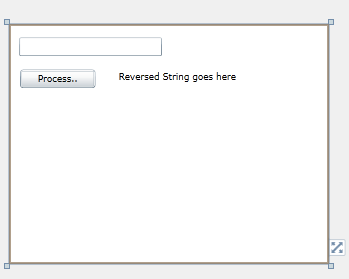
Here’s my simple and the dirty UI, a TextBox, a Button and a TextBlock to show the output.

image

Here’s the code goes under the Button click event , you can do the work in a thread and return the updates to the UI safely using Dispatcher.

{
string name = textBox1.Text;
Thread thread =new Thread(() =>
{  _reversedString = ReverseString(name);
   this.Dispatcher.BeginInvoke(() =>
     {
              textBlock1.Text = _reversedString;
     });
});
thread.Name =Reverse String Thread;
thread.Start();
}

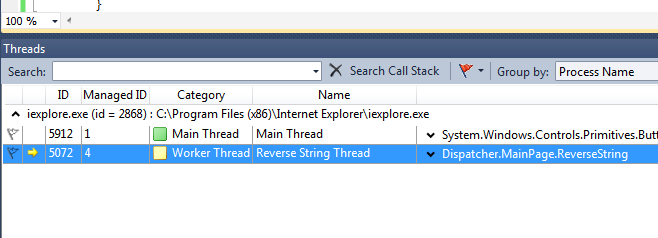
When hitting the debug and break point we can ensure that our thread is really started and running.

1

Code for the ReverseString method

private string ReverseString(string input)
{
     char[] array = input.ToCharArray();
    Array.Reverse(array);
    Thread.Sleep(4000);
    return new String(array);
}

Let’s discuss how Dispatcher can communicate across threads.

You can clearly notice that, I got the Dispatcher object using this.Dispatcher. This gives the Dispatcher of the Page (MainPage).

Dispatcher is a member of the DependencyObject class. So all the elements mainly UI controls have the Dispatcher property.

Silverlight is a Single Threaded Apartment (STA) Model. And as mentioned earlier it is incorporated with the main thread of the Silverlight. It is the thread responsible of the creation of the UI elements.

Trying to create UI elements from custom threads will throw thread exceptions as they try get the one and only Dispatcher from a different thread.

Here I compare the difference Dispatcher obrtained. First I got the Dispatcher of the RootVisual. Second the TextBlock control. Third I get the Dispatcher reference of the Deplyoment.

System.Windows.Threading.Dispatcher appDisptcher = Application.Current.RootVisual.Dispatcher;
System.Windows.Threading.Dispatcher textBlockDispatcher = textBlock1.Dispatcher;
System.Windows.Threading.Dispatcher deploymentDispatcher = System.Windows.Deployment.Current.Dispatcher;
if (appDisptcher.Equals(textBlockDispatcher))
{
    MessageBox.Show(Root Visual Dispatcher is same as TextBlock Dispatcher);
    
    if (appDisptcher.Equals(deploymentDispatcher))
    {
          MessageBox.Show(All three are same indeed);
    }
}

You can see that all Dispatchers equal. So Dispatcher works from one golden rule that is Silverlight is Single Threaded Apartment (STA) model where with that main thread Dispatcher is incorporated.

Adapter Pattern

Adapter pattern is often mentioned as wrapper in normal convention. It is a pattern which introduces loose coupling when creating a middle interface between two unmatched types. The name itself, self describes itself.  Rolling on the floor laughing

Think we have a class which renders a dataset on the screen. So we’ve a working class like this.

class Renderer { private readonly IDbDataAdapter _adapter; public Renderer(IDbDataAdapter dataAdaper) { _adapter = dataAdaper; } public void Render() { Console.WriteLine("Writing data...."); DataSet dataset = new DataSet(); _adapter.Fill(dataset); DataTable table = dataset.Tables.OfType<DataTable>().First<DataTable>(); foreach (DataRow row in table.Rows) { foreach (DataColumn column in table.Columns) { Console.Write(row[column].ToString()); Console.Write(" "); } Console.WriteLine(); } Console.WriteLine("/n Render complete"); } }

Severe bug is, that it renders only the first table of the DataSet, but forget about the bug as of now and let’s focus on the design. Freezing

Simply Renderer does these things.

  • It has a constructor which takes an IDbDataAdapter and set it to its readonly property.
  • The Render() calls the Fill method of the IDbDataAdapter by passing a DataSet
  • Takes the first table of the DataSet
  • Displays the data


So it’s obvious any class that implements IDbDataAdapter would be a perfect candidate for the Renderer class.

Now move on to the scenario. Airplane

Think we have a data object class Game.

public class Game { public string Id { get; set; } public string Name { get; set; } public string Description { get; set; } }

And we have a class for rendering the game objects on the screen.

public class GameRenderer { public string ListGames(IEnumerable<Game> games) { // do the rendering return game.ToString(); } }

We have the Render class to do the rendering work for us. So we do not need to write the same code again. Only thing we’ve to do is connecting GameRenderer to our Renderer.

But we’ve got problems. Steaming mad

  • We need an IDbDataAdapter implementation to use the Renderer.
  • Render() is a parameter less method with no return types, which has to be mapped with the ListGames(IEnumerable<Game> games) which returns a string.

We need to have a class which works between GameRenderer and Renderer. That’s the adapter class we’re going to write. (GameCollectionDBAdapter)

So our GameCollectionDBAdapter should to be an IDbDataAdapter to work with the Renderer. In the other end it should be some other type to conform with the GameRenderer.

Create a new interface called IGameColllectionRenderer. This is the interface which conforms our adapter class with the GameRenderer.

The diagram explains the things clearly.

adapter

Not neat indeed. Shifty

So now you’ve got the idea.

The rest of the code goes here.

Code for IGameColllectionRenderer

public interface IGameColllectionRenderer { string ListGames(IEnumerable<Game> games); }

Code for the GameCollectionDBAdapter which is a IDbDataAdapter and  IGameColllectionRenderer.

public class GameCollectionDBAdapter : IDbDataAdapter, IGameColllectionRenderer { private IEnumerable<Game> _games; public string ListGames(IEnumerable<Game> games) { _games = games; Renderer renderer = new Renderer(this); renderer.Render(); return _games.Count().ToString(); } public int Fill(DataSet dataSet) { DataTable table = new DataTable(); table.Columns.Add(new DataColumn() { ColumnName = "Id" }); table.Columns.Add(new DataColumn() { ColumnName = "Name" }); table.Columns.Add(new DataColumn() { ColumnName = "Description" }); foreach (Game g in _games) { DataRow row = table.NewRow(); row.ItemArray = new object[] { g.Id, g.Name, g.Description }; table.Rows.Add(row); } dataSet.Tables.Add(table); dataSet.AcceptChanges(); return _games.Count(); } }


Here IDbDataAdapter is not fully implemented, Fill method alone enough to run the code. But you have to have blank implementations of the other methods with throw NotImplementedException.

A slight change in your GameRenderer

public class GameRenderer { private readonly IGameColllectionRenderer _gameControllerRenderer; public GameRenderer(IGameColllectionRenderer gameCollectionRenderer) { _gameControllerRenderer = gameCollectionRenderer; } public string ListGames(IEnumerable<Game> games) { return _gameControllerRenderer.ListGames(games); } }

Finally the Main method

Thumbs up

class Program { static void Main(string[] args) { List<Game> games = new List<Game>() { new Game() { Id = "2323", Name = "Need for Sleep", Description = "A game for sleepers" }, new Game() { Id = "w4334", Name = "MK4", Description = "Ever green fighter game" } }; GameRenderer gr = new GameRenderer(new GameCollectionDBAdapter()); gr.ListGames(games); Console.ReadKey(); } }

Singleton Pattern

Singleton pattern is a simple design pattern in software practice and sometimes considered as an anti-pattern due its tight coupling nature.

A very simple non thread safe implementation of the Singleton pattern would be like this.

Singleton non thread safe

class Singleton
{
  privatestatic Singleton _instance;
  private Singleton()
  {
    Console.WriteLine(Singleton instantiated);
  }
 
publicstatic Singleton SingletonInstance
{
  get
   {
        if (_instance ==null)
            {
               // delay the object creation to demonstrate the thread saftey.
               Thread.Sleep(1500);
            _instance =new Singleton();
            }
      return     _instance;
  }
 }
}

Run the above class using Main method shown below, you can notice Singleton constructor is called twice by the both threads, since it is not thread safe. ( You can use the same Main methid implementation for all 3 Singleton implementations)

Main method implementation

class Program
{
staticvoid Main(string[] args)
{
new Thread(() => { Singleton sin1 = Singleton.SingletonInstance; }).Start();
Singleton sin2 = Singleton.SingletonInstance;
 
Console.ReadKey();
}
}
Singleton thread safe

Making the above implementation to a thread safe code is not a complex task, we can use our same old locking technique.

class Singleton
{
privatestatic Singleton _instance;
privatestaticobject _lock =newobject();
 
private Singleton()
{
Console.WriteLine(Singleton instantiated);
}
 
publicstatic Singleton SingletonInstance
{
get
{
lock (_lock)
{
if (_instance ==null)
  {
      // delay the object creation to demonstrate the thread saftey.
        Thread.Sleep(1500);
         _instance =new Singleton();
   }
return _instance;
}
}
}
}

The above is a perfect Singleton implementation in C#. But is there any other way that we can have the Singleton behavior without compensating our performance into locking. Because locking is a performance drop for sure.

Singleton C# way  – The trendy way

This is a neat and a trendy way to implement the Singleton.

We do not use locks in this implementation and it is very fast yet purely thread safe.

class Singleton
{
    privatestaticreadonly Singleton _instance;
 
    static Singleton()
    {
             _instance =new Singleton();
     }
 
    private Singleton()
   {
       Console.WriteLine(Singleton instantiated);
    }
 
   public static Singleton SingletonInstance
  {
     get
    {
      return _instance;
     }
  }
}

The magic is, static constructor.

A static constructor is used to initialize any static data, or to perform a particular action that needs to be performed once only. It is called automatically before the first instance is created or any static members are referenced.

To remeber simply you can think that the static constructor is called when the class is loaded.

More about static constructors in this MSDN article.

Sending Email from C#

Pure code is here. You can just copy and use it, and you can understand easily from the comments.

string to = "someone@hotmail.com"; // here the username can be any address // this is the address that the reciever will reply to when he/she hits the Reply button // this doesn't have to be the same as the credential address below. string from = "username@gmail.com"; string subject = "My mail from C#"; string body = "<a href=\"http://www.microsoft.com\"> Click here </a><br/><img src=\"http://t0.gstatic.com/images?q=tbn:2LUYVF-U1KxK2M:http://img.bollywoodsargam.com/albumsbolly/Priyanka_Chopra/Priyanka_Chopra_In_Barsaat_Movie_Stills_002_18_08_2005.jpg\"/>"; System.Net.Mail.MailMessage msg = new System.Net.Mail.MailMessage(from, to, subject, body); msg.IsBodyHtml = true; // adding attachement System.Net.Mail.Attachment at = new System.Net.Mail.Attachment(@"C:\Users\Thurupathan\Desktop\myfile.zip"); msg.Attachments.Add(at); // sending from the gmail account // for the hotmail / live / outlook => smtp.live.com port => 587 System.Net.Mail.SmtpClient smtp = new System.Net.Mail.SmtpClient("smtp.gmail.com", 587); // provide credentials System.Net.NetworkCredential gmailAuthentication = new System.Net.NetworkCredential("username@gmail.com", "password"); smtp.Credentials = gmailAuthentication; // SSL enable based on the smtp.EnableSsl = true; try { smtp.Send(msg); } catch (Exception ex) { Console.WriteLine(ex.Message); }

Concurrent Collections and TPL–.NET 4.0

TPL in .NET 4.0 is a cool thing when programming modern PCs which have CPUs with more than one core. CPUs with many cores are popular these days because hardware vendors make CPUs with many cores to cater the Moore’s Law. 🙂 Or they might have tired of shrinking the transistor size up to 32nm. There are smaller versions than that..

Task Parallel Library’s (TPL’s) Task.Factory.StatNew( () => {..} is the .NET 4.0’s replacement for the Thread.QueueUserWorkItem() and asynchronous delegates. In this case TPL is more close to the asynchronous delegates and also it is documented that; TPL can leverage the underlying CPU cores more effectively than asynchronous delegates.

But in the documentation TPL considered as a library for the parallel programming.

And we also have Concurrent Collections in System.Collections.Concurrent namespace which contains the thread safe versions of the normal collections. So this makes easy that we do not need to handle explicit locks while handling the collections from different threads.

Concurrent Collections are slower compared to normal collections and little different, but thread safe. Even in the documentation and MSDN samples concurrent collections are mentioned in the parallel programming paradigm, not in a multi threaded application’s view.

I had some doubt on this, whether is it OK to use them in multi threaded environment; and raised a question in the MSDN, The thread seems to be useful and interesting.

I didn’t repost the question , answers and the code in my blog, as you can see them here

Silverlight and WPF Browser Application

You can see there 2 templates in Visual Studio. One is Silverlight Application in the Silverlight category and the other one is WPF Browser Application in the Windows category.

We know both the Silverlight and the WPF use XAML to define their UI logic, and Silverlight is for web and browsers (not for sure, you can have Silverlight out of the browser applications).

So what is WPF Browser Application ? What is the difference between Silverlight and WPF Browser Application ?

WPF Browser Application needs .NET Framework 3.0 or above to run the application. It has full functionality from .NET Framework. If you develop XBAP, which means your whole web application is written in XAML and WPF.

Silverlight is a small subset of .NET Framework, but it does not need .NET Framework, it has its own small runtime engine. It is a browser add-in, and used for displaying rich contents on the web page. It can also interact with JavaScript. If you develop Silverlight, which means your web page can contains more rich contents, just like Applet or ActiveX control on the web page.

Since WPF Browser Application uses installed .NET Framework of the local machine, it can leverage the libraries that Silverlight does not. Though conceptually that is right WPF Browser Applications run inside a sandbox where it has limited privileges. So to read or write data to the local machine the Application has to be set in the Full Trust mode.

For example you can have access to the ADO.NET library in WPF Browser Application.


image

It throws a SecurityException, because by default WPF Browser Application is set to Partial Trust mode. Go to the Properties of your project and change the security settings to Full Trust and then your code will run.

image

But this is not preferable and a solution unless your client can allow the application to be Full Trusted. This is OK to do an intranet environment.

Execute Batch File without any windows

If you have a need of executing your batch file where you do not want the window to be popped up; here’s the solution to that using VB Script.

Open the notepad and type the following

CreateObject("Wscript.Shell").Run "<your batch file path>",0

Save the above file in any name you want with the extension .vbs

That’s it you are done. Now simply double click the VB Script, your batch process has started without any windows or task bar minimizations.

You can call this .vbs file directly from the .NET code as to start like a process

Process p = new Process();

p.StartInfo.FileName = @”myFile.vbs”;

p.Start();

Note : This Requires Windows Script Host installed in your machine. (by default this installed in most Windows OS)

ref & out in C#

This post explains about the ‘ref’ and ‘out’ keywords in C#. In C# we have two types; 1) value types 2) reference types.

Value types variables are passed as copies to the methods and any changes inside a method does not affect the variable. ‘ref’ keyword is used to pass a value type as a reference type.


Have look on this code sample and the output.

image


Output for the above code

image


This is because the value is passed as a copy.

Let’s see hoe to use the ‘ref’ keyword to pass the value types as references in C#.

In order to do this you have to make the change in the methods declaration and as well when you call the method also you have to mention the ‘ref’ keyword.


Sample show what exactly you have to do.

image

Output shows

image


Now let’s have a look on where to use the ‘out’ keyword. The main purpose of the ‘out’ keyword is that it enables us to create and use uninitialized variables for output. Some ways it can be used to return more than one value.

But ‘out’ keyword is powerful since it uses the local variables to be used in such purposes rather than the traditional use of global variables.

We can accomplish the above task by other ways as well, but still ‘out’ keyword is handy. We can see that the ‘out’ keyword is used in some of the .NET framework methods.

Sample of ‘out’ keyword usage

image


Output as follows

image


Look that x is local variable and it is initialized in another method. This very handy and powerful concept.

As we can see both of these key words we can assure that ‘ref’ and ‘out’ pass the pointers to the methods with some framework built in restrictions.

And another nice feature of the C# compiler is that it checks whether any methods that initialize the x has been called before accessing it.

If you comment the line myMethod(out x);  and compile the code, it will complain that you are trying to use an unassigned variable.

So it is very safe and nice yet powerful as well.