The remote server returned an error: (412) The append position condition specified was not met – Azure Append Blob issue

Azure Blob storage got a new addition recently, that is Append Blob. Based on the Microsoft documentations this is an ideal blob storage service for frequently modified data, which makes it a suitable candidate for the logging.

It is a natural tendency that we see AppendText method and we go for it for simple text based logging and you end up with this exception – The remote server returned an error : (412) The append position condition specified was not met.

This blogger has addressed the issue and provided a workaround in his post.

If you’re looking for a solution, then above link has it. If you want to read about the reason for this issue continue reading.

Investigation

I started the investigation directly by digging into the source code of the Azure Storage SDK in GitHub

In the documentation it is mentioned that AppendText method can be used only in the single write scenarios.

See this section CloudAppendBlob Methods

It is very explicit that in the SDK it has been mentioned that AppendText should be used only in the single writer scenarios, check that in line number 1739 of this file

CloudAppendBlob methods that cannot be used in concurrent access scenarios

  • AppendFromByteArray
  • AppendFromFile
  • AppendFromStream
  • AppendText

Also the Async counter parts of the above methods also cannot be used in concurrent access.

The only method that can be used in concurrent scenarios is AppendBlock / AppendBlockAsync

So Why AppendBlock is special ?

Investigating the source in GitHub it is clear that the call chain goes like this.

AppendText calls AppendFromByteArray, AppendFromByteArray calls AppendFromStream, AppendFromStream calls the internal method UploadFromStreamHelper 

UploadFromStreamHelper cannot handle concurrent scenarios.

Continuing the investigation…..

Still we need to investigate how AppendBlock can handle the concurrent requests. We pass a System.IO.Stream object to AppendBlock method and the AppendBlock method calls  WriteToSync on the passed Stream object.

Do we have a WriteToSync method in the System.IO.Stream ? No.

The Storage SDK has a implementation of WriteToSync as an extenstion method. See this file – line number 65

It is clear that WriteToAsync  has a synchronized call to the blob using the ManualResetEvent, so that is why AppendBlock could handle the concurrent access, but remember this is a blocking call.


Azure Key Vault Logging

This post goes with the series of my posts under the Azure Key Vault.

I assume that you know about Azure Key Vault and have used it, and continue this article. If you’re new to Azure Key Vault, please review the below links.

You can read more about Azure Key Vault and how to use it from this post.

PowerShell script to provision the Key Vault and the C#.NET sample to use it in the GitHub.

An Open source tool to manage Key Vault: Azure Key Vault Manager

Enabling Logging Diagnostics for Azure Key Vault

Recently Azure Key Vault team has announced the logging feature for the Key Vault (which is one of the highly required features).

Logs are written to a storage account in the Azure. So first create a storage account. Then in the PowerShell execute the following commands. Assuming that you have a vault and storage account.

It is good keep the storage account in the same Resource Group of the Key Vault as management would be easy.


We have the vault and storage details in variables, now time to setup the diagnostics


Viewing Logs

Logs are saved as JSON documents in the blob storage of the provided storage account. Do some activities which perform some operations in the Key Vault and get the JSON.

The below is log snippet for retrieving the vault. Note the operation name as VaultGet also the log provides information like the duration and client IP addresses. In the identity section it also provides the used identity information (the Azure Active Directory Identity name) for the specified operation.

The below is another JSON document snippet for the SecretGet operation. Along with the other information the request Uri property gives the details of which secret and the version information.

Disabling the logging Diagnostics

Execute the following line to disable the logging. (assuming the $vault and $storage variables are set as shown above)


Hidden gems of Azure Web Apps

Azure Web Apps is a component of Azure App Service. Developers love Web Apps as this is very simple web server as a service model. Often people ask the question, what is the difference between VMs Cloud Services and Web Apps. I think this post explains the difference in greater details.

Accessing KUDU

Azure Web Apps run on Kudu, an open source engine which is responsible for the management and operation of the Azure Web Service.

You can reach the Kudu environment of your azure web app by simply modifying your URL, example : I have this following site to manage the Azure Key Vault (in dev environments) https://keyvaultmanager.azurewebsites.net/ in order to access the Kudu environment of this site, simple add the .scm part after the web app name part of the URL. Something like this https://keyvaultmanager.scm.azurewebsites.net/

You should be logged in to the Azure Portal in order for this to work. You can configure many settings in the KUDU. You can also access KUDU using the Azure Preview Portal under the Tools section of your web application.

Server Affinity

Web Apps by default has Server Affinity enabled, meaning that the Web Apps service will direct your requests to the same server in the scaled environments. You can leverage the advantages of local in-memory session states. Please not that modern cloud application design principals do not recommend you use local session states, instead they promote the centralized session management.

However, Web Apps having Server Affinity enabled by default is an out of the box feature of the Web Apps.


You can simply set the value to false to disable the server affinity. You can access the above template of your web app using Azure Resource Explorer in the Azure Preview Portal.

If you want a simpler solution add this in your Web App’s App Settings section – clientAffinityEnabled = false

Live Monitoring

This is a great management tool for the production Web Apps. Azure Web Apps enables you to monitor your app live with very low latency monitoring. It also provides a comprehensive log of your application.

You can access from the Azure Preview Portal, under the Tools section of your Web App and click on the Troubleshoot option. The click Live HTTP Traffic


Auto Healing

You can reach this option, using Azure Preview Portal. Click on Tools section of your web app, click on Troubleshoot option and then click Mitigate.

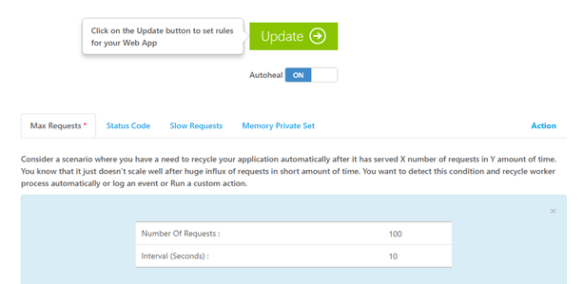
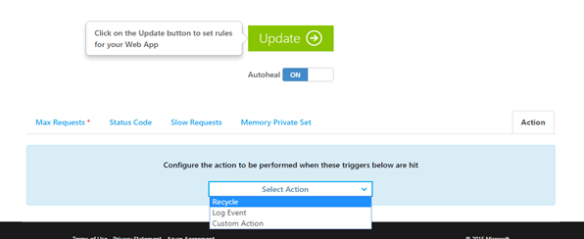
In this option you get to set an alert or logging rule, but the interesting part is that you can enable an recycle rule of your web app. So when a condition is met your web app will be recycled (in IIS application pool will be restarted).


Above I have set a rule to recycle the web app every time if receives 100 requests in 10 seconds. You can add more sophisticated rules and chain them together.


Circuit Breaker Pattern for Cloud based Micro Service Architecture

Modern applications communicate with many external services; these external services could be from third party providers or from the same provider or they are components of the same application. Micro service architecture is a great example for disconnected, individually managed and scalable software components that work together. The communication takes place using simple HTTP endpoints.

Example: Think that you’re developing a modern shopping cart. Product catalog could be one micro service, ordering component would be another one and the user comment and feedback system would be another one. All three services together provide the full shopping cart experience.

Each service is built to be consumed by each other, they might have sophisticated API Management interfaces or just a simple self-documented REST endpoints or undocumented REST endpoints.

Another example is Facebook, it has messenger feature implemented by a totally different team from who manage the feeds page and the Edge Ranking stuff. Each team push updates and individually manage and operate. The entire Facebook experience comes from the whole collection of micro services.

So the communication among these components is essential. Circuit Breaker (CB) manages the communication by acting as a proxy. If a service is down, then no point trying it and wasting the time. If a service is being recovered, then better not to congest it with flooded requests; time to heal should be given to the service.

Circuit Breaker and Retry Logics

It is important to understand when to use Circuit Breaker and when to retry. In case of transient failures, application should retry. Transient failures are temporary failures; a common example would be TimeOutException. It is obvious that we can retry for one more time.

But think an API Management gateway blocks your call for some reason (IP restriction, Request Limit) or any 500 error then you should stop the retry and inform the caller about the issue. And let the service heal. This is where Circuit Breaker helps.

How Circuit Breaker Works?

Circuit Breaker has 3 states.

  • Closed
  • Open
  • Partially Open

Look at the below diagram and follow the context for the explanation.


By default, Circuit Breaker is in the Closed state. The first request comes in and it will be routed to the externa service. Circuit Breaker keeps a counter for the non-transient failures occur in the external service in a given time period. Say that the given time period is 15 seconds and the failure threshold is 10, if the service fails 10 times within 15 seconds for n number of requests then Circuit Breaker goes to Open state. If there’re no or less than 10 failures during 15 seconds, the failure counter will be reset and Circuit Breaker remains in Closed state.

In the Open state, Circuit Breaker does not forward any requests to the external service, regardless of how many requests it receives. It replies to those requests with the last known exception. It remains in the Open state for a specified time period. After the Open state has elapsed Circuit Breaker enters the Partial Open state / Semi Open State.

In the Partial Open state, some of the requests are being forwarded to the external service while others are being rejected as Circuit Breaker is in Open State. In the allowed number of requests Circuit Breaker monitors the success of those calls, and if a specified number of calls are continuously successful then Circuit Breaker resets it counters and goes to the Closed state.

The mechanism of which calls should reach the service during the Partial Open state is up to the implementation. You can simply write an algorithm to reject one call after the other or you can use your own business domain. Example calls from members of Admin role can pass through and others fail.

Partial Open State and preventing Senseless blocking.

This is a bit tricky state because, this state does not have a timeout period. So Circuit Breaker will remain in the Partial Open state until the right number of requests come to satisfy the condition. This might not be preferable in some cases.

Example, consider the service is down at 10:00:00AM and Circuit Breaker goes to Open state. After 3 minutes (at 10:03:00AM) it goes to Partial Open state. From 10:03:00AM to 10:23:00AM only few requests came and some of them will be rejected by the Circuit Breaker, and still Circuit Breaker is waiting for more calls though the service is perfectly back to normal by 10:08:00AM. I named this kind of prevention from the Circuit Breaker as Senseless Blocking.

There are few remedies you can implement to prevent senseless blocking. Simply we can put a timeout period for the Partial Open state or we can do a heartbeat check from the circuit breaker to the external service using a background thread. But be mindful that senseless blocking is an issue in Circuit Breaker pattern.

When not to use Circuit Breaker?

When you do not make frequent calls to the external service, it is better to do it without going through a Circuit Breaker, because when your calls are not frequent there’s a high probability that you might face senseless blocking.

Implementation

I have provided a reusable pattern template for the Circuit Breaker.

Code is available in GitHub : https://github.com/thuru/CloudPatterns/tree/master/CloudPatterns/CircuitBreakerPattern



Advanced Caching Techniques

These are the techniques, how objects are stored and retrieved from a cache.

  • Read Through
  • Write Through
  • Read Ahead

Last week I wrote about Cache-Aside pattern and provided a code sample of a minimal implementation of Cache-Aside pattern to get started with Redis. (intentionally tested using Redis on Azure). The code sample also has a provider class and a practical implementation of the pattern which can directly be used in MVC / Web API projects.

In this post let’s discuss more into the conceptual engineering aspect of the caching strategies. I address the scenarios and also how to implement them using a language. The steps are explained in English so the real implementation can be done using any programing language.

Read Through

This is a very simple and a straight forward approach and very common in use. Application reads the data from the cache. If the data is available in the cache application will get it, else application reads the data from the data store and store it in the cache for the future references.

Objects in the cache are stored for a specific time, any request that comes to the cache within this time frame will be served from the cache. If a write happens to the object within that time frame and

  1. If that write operation invalidates the cache, then next immediate read after the write will hit the data store and update the cache.
  2. If that write does not invalidate the cache, then next immediate read after the write will get stale data.

The code sample of Cache-Aside pattern explains the scenario 1 under the Read Through. This ensures that application does not get stale data. But at the same time this might bring performance issues where write rate is equal or greater than the read of the object.

  • Application reads the data from the cache
  • If data is in the cache application gets it, else it loads from the data store and updates the cache.
  • Application writes data to the data store.
  • Successful write operation would invalidate the corresponding object in the cache.

Write Through

Applications write the data to the cache, not to the data store. The caching service will write the data transparently to the data store. Mostly this update is synchronous, so a typical write operation returns a success when the data is written to the cache and to the data store. Since data is written to the cache, no need to invalidate the object. Modifications to the object in the cache need to be handled in a thread safe way. Applications get the latest data.

  • Application write the data to the cache.
  • Caching service or the application writes the data to the data store
  • A write is considered successful if both the cache and the data store are updated.
  • We can use two different threads one to update the cache and the other to update the data store and wait for both to complete successfully.
  • Using application generated IDs for the objects would help.
  • Updating the objects should be thread safe

Write through also has a delayed update to the data store. This is known as a Write-Behind strategy.

  • Application writes the data to the cache
  • A write is considered success if the write to the cache is success.
  • Later stage (either periodically or based on eviction time or based on any specific parameter) data store will be updated.

This is a very helpful and a high responsive design. Most of the modern applications which has high throughput follow this strategy. Your cache should be reliable and should support at least one stage of master-slave model in order to be reliable. Because if the cache goes down before the write takes place to the data store, then there’s no way to get the data.

Also if any object requires all auditing trails, then this strategy cannot be useful. Example – An application requires all operations on the Products should be logged. A new product is added and then modified. Data store update happens after the modification, so in this case we totally miss the old value and the change log of that product.

Read Ahead

Read the frequent access data from the data store, before the cache object get evicted. For example, there’s a products collection in the cache. This is accessed very often and the eviction time is 120 seconds. So this collection will be removed from the cache after 120 seconds under normal cache implementations.

So the first read after the object has been cleared from the cache go through the Read Through strategy. So that read might take longer time. Read Ahead strategy refreshes the collection before it get evicted. The refresh happens automatically. In the Read Through this refresh happens on demand.

  • There should be a mechanism to observe the cache object life times. (Redis has an implementation that it triggers an event for this)
  • Based on the event, we fire up a worker to load the data to the cache, even before the application requests the data.

Caching is a strategical decision. We can simply use it just to store some objects and also an entire application can be designed and scaled based on the caching as well.


Cached-Aside Pattern using Redis on Azure

Cache-Aside is a common pattern in modern cloud applications. This is a very simple and a straight forward one. The followings are the characteristics of the pattern.

  • When an application needs data, first it looks in the cache.
  • If the data available in the cache, then application will use the data from the cache, otherwise data is retrieved from the data store and the cache entry will be updated.
  • When the application writes the data, first it writes to the data store and invalidates the cache.

How to handle the lookups and other properties and events of the cache are independent, meaning the patters does not enforce any rules on that. These diagrams summarize the idea.

  1. Application checks the cache for the data, if the data in the cache it gets it from the cache.
  2. If the data is not available in the cache application looks for the data in the data store.
  3. Then the application updates the cache with the retrieved data.

  1. Application writes the data to the data store.
  2. Sends the invalidate request to the cache.

Implementation

Project : https://github.com/thuru/CloudPatterns/tree/master/CloudPatterns/CacheAsidePatternWebTemplate

The above project has an implementation of this pattern.

Data objects implement an interface ICacheable and an abstract class CacheProvider<ICacheable> has the abstract implementation of the cache provider. You can implement any cache provider by extending CacheProvider<ICacheable>. GitHub sample contains code for the Azure Redis and AWS Elastic Cache implementations.

Implementation of ICacheable : https://github.com/thuru/CloudPatterns/blob/master/CloudPatterns/CacheAsidePatternWebTemplate/Cache/ICacheable.cs

Implementation of CacheProvider<ICacheable>: https://github.com/thuru/CloudPatterns/blob/master/CloudPatterns/CacheAsidePatternWebTemplate/Cache/CacheProvider.cs

Implementation of AzureRedisCacheProvider : https://github.com/thuru/CloudPatterns/blob/master/CloudPatterns/CacheAsidePatternWebTemplate/Cache/AzureRedisCacheProvider.cs

The template also includes Cache Priming in Global.asax. This could be used to prime your cache (loading the mostly accessed data in the application start)