Dynamic Controls and Static Events with Different output

The title sounds little awkward.. Well. This code explains an easy and a good coding practice in handling dynamic controls and writing events for them.

Let me explain the scenario, one of my friend needs a code for a garment fault detection system; the machine checks the cloths and detects the faults. Each fault has to appear as button and when the user clicks the button it has to do some other thing corresponding to that fault.

The problem is, we are not aware of the number of faults each piece of cloth has. So we have to generated the controls dynamically and the events.

Only one thing we know that, the hardware is capable of detecting 10 different types of faults. So maximum we can get 10 and that’s it.

He was so confused whether to write 10 different event handlers and assign them, to dynamic controls by writing some conditional branching statements.

The code below is simple but powerful, it makes life easier with just 2 methods. Let’s get into the action.

Some how you can get a parameter which says how many controls you have to generate dynamically. I store them in a List (for demonstration)

image

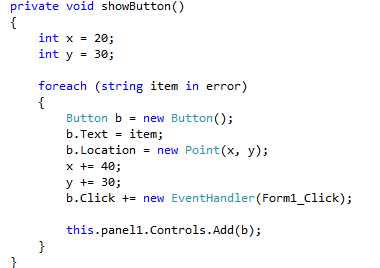
Another method to create the controls and load them to the Windows Form.  (here I’m using a Windows Form application)
image

As you see here I’m not keeping the references of the Button controls, but I’m assigning a single event to all of them.

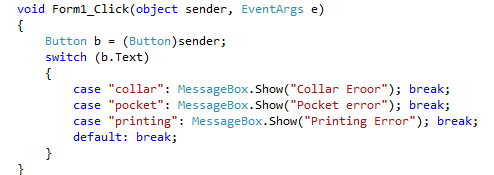
This event is the only thing I have to refer the controls. But let’s see how I use the single event to distinguish the different buttons and ask them to do different tasks.

As I mentioned earlier it so simple…

I’m loading the strings to the List from a method (which I haven’t metioned here, because getting the parameter which decides the number of dynamic controls depends on the scenario you are working on).
image

This is cool, I identify the Buttons with their Text field, you can use any of the fields which is comfortable and suits your need.

The power of this method is; it’s very simple, I’m not keeping any references to the Buttons. The same piece of code can be used to generate the any number of controls without any modifications.

And you have to write only one event handler for all the controls like the above method.

Just imagine 10 controls and 10 references and 10 different even handlers, and dynamically comparing them and calling every time. 😦 It’s too much of a work. But this is really cool.

You can design your actions in a separate library (.dll) and call them in the case : of the switch statements, that gives a good design also. So whenever you want the actions to be modified, you just have to change a seperated .dll file rather changing the main assembly.

Execute Batch File without any windows

If you have a need of executing your batch file where you do not want the window to be popped up; here’s the solution to that using VB Script.

Open the notepad and type the following

CreateObject("Wscript.Shell").Run "<your batch file path>",0

Save the above file in any name you want with the extension .vbs

That’s it you are done. Now simply double click the VB Script, your batch process has started without any windows or task bar minimizations.

You can call this .vbs file directly from the .NET code as to start like a process

Process p = new Process();

p.StartInfo.FileName = @”myFile.vbs”;

p.Start();

Note : This Requires Windows Script Host installed in your machine. (by default this installed in most Windows OS)

ref & out in C#

This post explains about the ‘ref’ and ‘out’ keywords in C#. In C# we have two types; 1) value types 2) reference types.

Value types variables are passed as copies to the methods and any changes inside a method does not affect the variable. ‘ref’ keyword is used to pass a value type as a reference type.


Have look on this code sample and the output.

image


Output for the above code

image


This is because the value is passed as a copy.

Let’s see hoe to use the ‘ref’ keyword to pass the value types as references in C#.

In order to do this you have to make the change in the methods declaration and as well when you call the method also you have to mention the ‘ref’ keyword.


Sample show what exactly you have to do.

image

Output shows

image


Now let’s have a look on where to use the ‘out’ keyword. The main purpose of the ‘out’ keyword is that it enables us to create and use uninitialized variables for output. Some ways it can be used to return more than one value.

But ‘out’ keyword is powerful since it uses the local variables to be used in such purposes rather than the traditional use of global variables.

We can accomplish the above task by other ways as well, but still ‘out’ keyword is handy. We can see that the ‘out’ keyword is used in some of the .NET framework methods.

Sample of ‘out’ keyword usage

image


Output as follows

image


Look that x is local variable and it is initialized in another method. This very handy and powerful concept.

As we can see both of these key words we can assure that ‘ref’ and ‘out’ pass the pointers to the methods with some framework built in restrictions.

And another nice feature of the C# compiler is that it checks whether any methods that initialize the x has been called before accessing it.

If you comment the line myMethod(out x);  and compile the code, it will complain that you are trying to use an unassigned variable.

So it is very safe and nice yet powerful as well.

x64 Microsoft Strategy

I write this post after a real piss off, by the Microsoft’s x64 strategy. They announced that in future all of their applications will be working on x64 architecture. As to the statement SharePoint 2010, Windows Server 2008 R2 and some other came in x64 bit only mode.

Even I did a clean format of my PC and installed x64 Windows 7 in order to run SharePoint 2010 and other as well. But what’s the problem ?

They are not clean in their x64 policy. It is totally messed up with x86 applications. Even in x64 bit Windows 7, Windows Media Player runs in 32 bit mode. And Visual Studio 2010 runs in x86 and there is no x64 version of that. (The reason for that, they say is the difficult of development and the application grows bulky)

And every time I start IE is get starts in the x86 mode. There is another x64 version of browser as well in the list. I was wondering why it is not used as default. After wondering I made my IE9 x64 version as the default browser. That gave me the real piss !@#

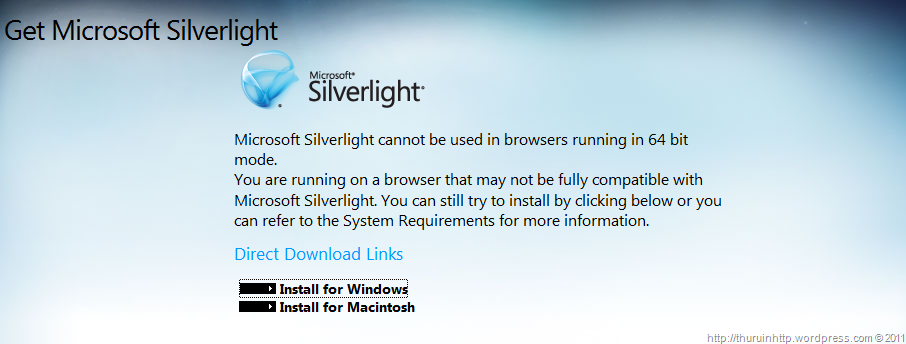
In the IE9  x64 bit release  (the modern browser) Silverlight cannot run. When ever I reach a website with the Silverlight content it asks me to install the Silverlight.

When I click the link this is the message that I get.

image

Pin websites to Task bar – IE9

IE9 offers a great feature that you can pin the websites in the task bar and navigate them very conveniently. The cool feature is once you pinned a website to the task bar, you can access the website like an application. It offers jump list features and direct access to those features. And in the task bar the website icon is displayed; this makes it very cool to have that feature.

If you want to pin a website in your task bar simply drag and drop the site tab to your task bar or press Alt + T and then M and press Add in the dialog box.

To make your websites to be compatible with this feature we have to develop our site in a way that it can be added to the task bar. This MSDN article describes about making the websites in such a way.

But I still have doubts on this feature whether plenty of people will use this or not. Though the indirect Windows marketing strategy is there, still there are some benefits on this method. But based on some HCI principles I really doubt on this feature.

VS 2010 SP1

VS 2010 SP1 has been released and you can download the installer from this location. The SP1 has most of the support tools in x64 mode if you are a x64 user.

The following are some features included in the SP1 this varies based on the features and updates you have already installed in your machine.

SetupUtility
Service Pack 1 Package
WCF RIA Services V1.0 SP1
Microsoft Team Foundation Server 2010 Object Model – ENU
Microsoft Visual Studio 2010 Performance Collection Tools – ENU
Microsoft Visual Studio 2010 IntelliTrace Collection (x64)
Microsoft Visual Studio 2010 Ultimate – ENU
Microsoft Visual Studio 2010 ADO.NET Entity Framework Tools
Dotfuscator Software Services – Community Edition
Microsoft SQL Server Data-tier Application Framework 1.1
Microsoft SQL Server 2008 R2 Data-Tier Application Project
Microsoft SQL Server 2008 R2 Transact-SQL Language Service
Microsoft SQL Server 2008 R2 Management Objects
Microsoft SQL Server 2008 R2 Management Objects (x64)
Microsoft SQL Server System CLR Types
Microsoft SQL Server System CLR Types (x64)
Microsoft F# Redist 2.0
VSTO 4.0 Runtime x64
Visual Studio Tools for Office
Help Viewer v1.1
Microsoft SharePoint Developer Tools
Microsoft Visual C++ 2010  x86 Runtime – 10.0.40219
Microsoft Visual C++ 2010  x64 Runtime – 10.0.40219
NDP40-KB2468871.exe

The estimated download size will be 350 ~ 670 Mbs.

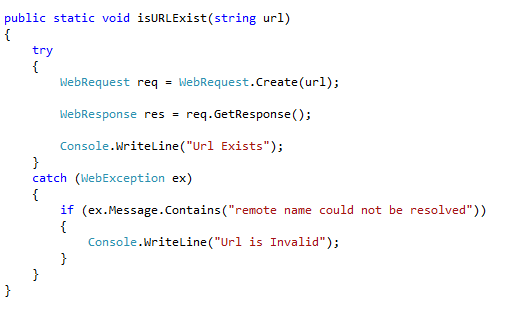
Check whether a URL exist

Use this code snippet to check whether a url exist or not .. . . .. .

MSDN Trackback : http://social.msdn.microsoft.com/Forums/en-US/csharplanguage/thread/c34f4f2e-038d-43da-a9f3-fc1ef64c49c7/#ea274ea3-31e8-4d61-a892-9e1bd4b2a97f

image