checked and unchecked keywords in C#

This post explains about checked and unchecked keywords in C#. In arithmetic calculations when constants are involved compiler detects the overflows in the data types. For example look at the following code.

   1: // int range is from -2,147,483,648 to 2,147,483,647

   2: int i = 2147483647 + 10;

The above will generate a compile time error. But the following won’t and it will give an output –2,147,483,639

   1: int ten = 10;       

   2: int i = 2147483647;

   3: Console.WriteLine(i + ten);

Because the compiler does not detect the overflows when non constants are are involved in the expression.

The above will not even raise an OverflowException. To make sure that the above is validated in runtime, we can use the checked keyword as a block or in line.

As a block

   1: checked

   2: {

   3:     Console.WriteLine(i + 10);

   4: }

Inline

   1: Console.WriteLine(checked(i + 10));

Since checked keyword validates against the overflows and throws an exception, it has a performance hit. So when you are sure that the expression is not going to cause an OverflowException it is better not use the checked keyword.


unchecked does the opposite of the checked. It mainly instructs the compiler not to do the validation for an expression. The following would generate a compile time error if it is not enclosed with the unchecked block. As checked keyword unchecked keyword can also be used in blocks and inline.

   1: unchecked

   2: {

   3:     int a = 2147483647 + 10;

   4:     Console.WriteLine(a);

   5: }

Charting with DotNet HighCharts

This post explains how to use the DotNet HighCharts wrapper for the HighCharts Javascript library. You can download the wrapper from Codeplex.

First create an ASP,NET file and add the following Javascript references.

   1: <script type="text/javascript" src="http://ajax.googleapis.com/ajax/libs/jquery/1.8.2/jquery.min.js"></script>
   1:  

   2: <script src="http://code.highcharts.com/highcharts.js">

   1: </script>

   2: <script src="http://code.highcharts.com/modules/exporting.js">

</script>

Download the wrapper and add the single .dll reference to the project and add the following using statements to the code.

   1: using DotNet.Highcharts;

   2: using DotNet.Highcharts.Options;

   3: using DotNet.Highcharts.Helpers;

   4: using DotNet.Highcharts.Enums;

The wrapper provides pure C# methods for generating the charts and has a method ToHtmlString() which returns the JavaScript version of the chart. This can be set to a ASP.NET Literal control for rendering.

Then here’s a sample for creating a column chart with two series.

   1: DotNet.Highcharts.Highcharts chart = new DotNet.Highcharts.Highcharts("chart").SetXAxis(new XAxis

   2:             {

   3:                 Categories = sales.GetSales().Select(list => list.ProductName).ToArray<string>()

   4:             })

   5:             .SetSeries(new Series []

   6:             {

   7:                 new Series()

   8:                 {

   9:                     Type = ChartTypes.Column,

  10:                     Data = new Data(new object [] {125,824,122}),

  11:                     Name = "Sales"

  12:                 },

  13:                 new Series()

  14:                 {

  15:                     Type = ChartTypes.Column,

  16:                     Data = new Data(new object [] { 57,234,67 }),

  17:                     Name = "Freight"

  18:                 }

  19:             });

‘sales’ is the object data source, and we get the product name from it and the values are hard coded. All charts has a name, here the column chart’s name is ‘chart’ itself. Names should be unique for the page. If you have another chart with same in the same page only the last chart will be displayed.

Then chart has SetXAxis method where set the X-Axis properties.  And the chart has number of series. We feed the data to the series through its Data property which takes an object array.

Finally we serialize the chart as HTML content to the Literal control (ltrChart)

Example of a pie chart generation.

   1: DotNet.Highcharts.Highcharts piechart = new DotNet.Highcharts.Highcharts("pie").SetXAxis(new XAxis

   2:             {

   3:                 Categories = sales.GetSales().Select(list => list.ProductName).ToArray<string>()

   4:             })

   5:             .SetSeries(new Series[]

   6:             {

   7:                 new Series()

   8:                 {

   9:                     Type = ChartTypes.Pie,

  10:                     Data = new Data(new object [] {125,824,122}),

  11:                     Name = "Sales"

  12:                 }

  13:             });

  14:  

  15:             piechartLiteral.Text = piechart.ToHtmlString();

Detecting the Windows Phone Theme Background Color

We often need to detect the WP background theme color to switch the color schemes of our apps.

This is very useful when we utilize the application bar and have some metro icons in our app. In built WP apps have this feature and switch between different icons. For example when you use the Messaging app in dark background mode the icons are white and when the background is in light mode. A very simple feature but how to detect the background theme color of the WP.

Here’s the code snippet for this. PhoneBackgroundBrush is a property of the Application.Current.Resources Dictionary object.

private readonly Color _lightThemeBackground = Color.FromArgb(255, 255, 255, 255); private readonly Color _darkThemeBackground = Color.FromArgb(255, 0, 0, 0); private void DetectPhoneTheme() { SolidColorBrush theme = Application.Current.Resources["PhoneBackgroundBrush"] as SolidColorBrush; if (theme.Color == _lightThemeBackground) { btnBack.IconUri = new Uri("Images/backB.png", UriKind.Relative); BtnNext.IconUri = new Uri("Images/nextB.png", UriKind.Relative); BtnShare.IconUri = new Uri("Images/shareB.png", UriKind.Relative); } else { btnBack.IconUri = new Uri("/Images/backW.png", UriKind.Relative); BtnNext.IconUri = new Uri("/Images/nextW.png", UriKind.Relative); BtnShare.IconUri = new Uri("/Images/shareW.png", UriKind.Relative); } } private readonly Color _lightThemeBackground = Color.FromArgb(255, 255, 255, 255); private readonly Color _darkThemeBackground = Color.FromArgb(255, 0, 0, 0); private void DetectPhoneTheme() { SolidColorBrush theme = Application.Current.Resources["PhoneBackgroundBrush"] as SolidColorBrush; if (theme.Color == _lightThemeBackground) { btnBack.IconUri = new Uri("Images/backB.png", UriKind.Relative); BtnNext.IconUri = new Uri("Images/nextB.png", UriKind.Relative); BtnShare.IconUri = new Uri("Images/shareB.png", UriKind.Relative); } else { btnBack.IconUri = new Uri("/Images/backW.png", UriKind.Relative); BtnNext.IconUri = new Uri("/Images/nextW.png", UriKind.Relative); BtnShare.IconUri = new Uri("/Images/shareW.png", UriKind.Relative); } }

Extension Methods

Extension methods in C# is a great way to add functionality to a closed class. Here the word ‘closed’ refers to both the sealed ones and the classes which you do not have the access to their source code.

Some can argue if we can actually add a method to a sealed class then it violates the sealed concept. In way it is but not indeed.

There are plenty few points you have to be aware of whilst implementing an extension method for a class in C#

■ Extension methods must be defined in a  C# public static class.
■ If you define an extension method for a type, and the type already has the same
method, the type’s method is used and the extension method is ignored.
■ Although extension methods are implemented as static methods,
they are instance methods on the type you are extending. You cannot add static methods
to a type with extension methods.

The last point is bit confusing, how come a method marked as static work as a non static method. This is a special case in C# where one of the basic rules is violated.

So let’s see how you can create an extension method for String type.

public static class StringHelper { public static bool IsNumeric(this string num, out double result) { return Double.TryParse(num, out result); } }

Create a helper class like the above one. But note how the IsNumeric is declared and it’s parameters. In an extension method the first parameter should be always the type on which the extension method is targeted on. And should have the ‘this’ keyword before. Other parameters are custom defined.

Just that it’s simple

double value; string myString = "Thuru"; myString.IsNumeric(out value);

You can call the extension method as it is declared in the String. This is really cool.

And also if you consider the last point of the extension method now you can understand why the static – instance violation is made. Because if the extension method is static then all the string values declared in the scope of this IsNumeric would be effected.

So in the extension method declaration the static is a mere format keyword and makes sense because the methods are under a static class. Real sense of static is not considered. As like having an awkward syntax of having ‘this’ keyword in the parameter list.

Accessing a WCF Service WinRT vs Silverlight

Hi, last few days I got some questions from few folks that they are confused on how to call a WCF service in WinRT (Windows 8). This confusion occurs mainly if you are Silverlight dev or Windows Phone 7.5 dev and you are used to the traditional async method and the CompletedEvent.

In Silverlight these two are very handy and generated by the VS.

Think a very simple WCF service that you get once you create a WCF Application project in the Visual Studio. It comes with a simple method GetData which accepts an int and returns a string.

In Silverlight, VS generates the async method and the async CompletedEvent method for us. so we can simply call the service and get the results like this.

private void Button_Click_1(object sender, RoutedEventArgs e) { Service1Client proxy = new Service1Client(); proxy.GetDataCompleted += (GetDataSender, Ev) => { TxtName.Text = Ev.Result; }; proxy.GetDataAsync(10); }


But in WinRT if you try do the same thing you soon will find that you are missing the CompletedEvent.

This is handled differently using the await and async keywords in C# 5.0 Read it in detail here.

Here’s the implementation detail of how you can call a WCF service in WinRT. Click to enlarge the image.

image

As you see the GetDataAsync method generated by the VS returns an awaitable Task. So it is simple than Silverlight, this what you have to do. Simple at its best.

Capture1 

But it is better to know how things work, but that is beyond the scope of this article and you can learn about it here

But what if you need to have a separate Application logic layer and wants to do some processing in the data returned by the service. (more often you need that)

Here’s a way to get the CompletedEvent architecture from Application logic and notifying it to the UI. I’m having my own even handler here.

Create a Class1 (your application logic layer)

class Class1 { public event EventHandler<MyWebServiceEventArgs> DataProcessed; public void HandleMethod(int value) { ProcessData(value); } private async void ProcessData(int value) { Service1Client proxy = new Service1Client(); string result = await proxy.GetDataAsync(value); DataProcessed(null,new MyWebServiceEventArgs(result)); } }

Create MyWebServiceEventArgs derived from EventArgs

public class MyWebServiceEventArgs : EventArgs { private string _myVar; public string MyProperty { get { return _myVar; } set { _myVar = value; } } public MyWebServiceEventArgs(string result) { _myVar = result; } }


In your UI layer do this

private void BtnClick_Click(object sender, RoutedEventArgs e) { Class1 c1 = new Class1(); c1.DataProcessed += c1_DataProcessed; c1.HandleMethod(10); } void c1_DataProcessed(object sender, MyWebServiceEventArgs e) { TxtName.Text = e.MyProperty; }


Open-mouthed smile I brought the Silverlight CompletedEvent model to WinRT.

But you can simply live a happy life with async and await keywords.

Silverlight Dispatcher

Threading in Silverlight is simple and have very few classes and limited functionality.

In Silverlight we rarely go for the threading since the platform itself is asynchronous. Click to read how to do asynchronous programming in C# 5.0

In Silverlight the  main thread is incorporated with the Dispatcher, and we can use the BeginInvoke method of the Dispatcher class to update the UI from a different thread. According to the MSDN documentation Dispatcher in Silverlight is intended for the UI updates.

I’m using a dummy method which returns a string reversed of its input. And let’s assume it takes 4 seconds to complete the task.

So we need a thread to do the work, without blocking the UI. Once the task completed we have to display the string in the UI.

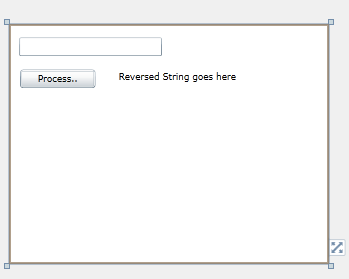
Here’s my simple and the dirty UI, a TextBox, a Button and a TextBlock to show the output.

image

Here’s the code goes under the Button click event , you can do the work in a thread and return the updates to the UI safely using Dispatcher.

{
string name = textBox1.Text;
Thread thread =new Thread(() =>
{  _reversedString = ReverseString(name);
   this.Dispatcher.BeginInvoke(() =>
     {
              textBlock1.Text = _reversedString;
     });
});
thread.Name =Reverse String Thread;
thread.Start();
}

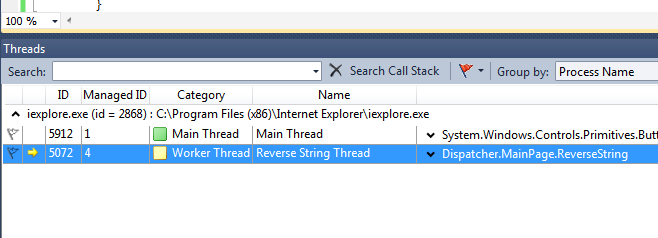
When hitting the debug and break point we can ensure that our thread is really started and running.

1

Code for the ReverseString method

private string ReverseString(string input)
{
     char[] array = input.ToCharArray();
    Array.Reverse(array);
    Thread.Sleep(4000);
    return new String(array);
}

Let’s discuss how Dispatcher can communicate across threads.

You can clearly notice that, I got the Dispatcher object using this.Dispatcher. This gives the Dispatcher of the Page (MainPage).

Dispatcher is a member of the DependencyObject class. So all the elements mainly UI controls have the Dispatcher property.

Silverlight is a Single Threaded Apartment (STA) Model. And as mentioned earlier it is incorporated with the main thread of the Silverlight. It is the thread responsible of the creation of the UI elements.

Trying to create UI elements from custom threads will throw thread exceptions as they try get the one and only Dispatcher from a different thread.

Here I compare the difference Dispatcher obrtained. First I got the Dispatcher of the RootVisual. Second the TextBlock control. Third I get the Dispatcher reference of the Deplyoment.

System.Windows.Threading.Dispatcher appDisptcher = Application.Current.RootVisual.Dispatcher;
System.Windows.Threading.Dispatcher textBlockDispatcher = textBlock1.Dispatcher;
System.Windows.Threading.Dispatcher deploymentDispatcher = System.Windows.Deployment.Current.Dispatcher;
if (appDisptcher.Equals(textBlockDispatcher))
{
    MessageBox.Show(Root Visual Dispatcher is same as TextBlock Dispatcher);
    
    if (appDisptcher.Equals(deploymentDispatcher))
    {
          MessageBox.Show(All three are same indeed);
    }
}

You can see that all Dispatchers equal. So Dispatcher works from one golden rule that is Silverlight is Single Threaded Apartment (STA) model where with that main thread Dispatcher is incorporated.

Adapter Pattern

Adapter pattern is often mentioned as wrapper in normal convention. It is a pattern which introduces loose coupling when creating a middle interface between two unmatched types. The name itself, self describes itself.  Rolling on the floor laughing

Think we have a class which renders a dataset on the screen. So we’ve a working class like this.

class Renderer { private readonly IDbDataAdapter _adapter; public Renderer(IDbDataAdapter dataAdaper) { _adapter = dataAdaper; } public void Render() { Console.WriteLine("Writing data...."); DataSet dataset = new DataSet(); _adapter.Fill(dataset); DataTable table = dataset.Tables.OfType<DataTable>().First<DataTable>(); foreach (DataRow row in table.Rows) { foreach (DataColumn column in table.Columns) { Console.Write(row[column].ToString()); Console.Write(" "); } Console.WriteLine(); } Console.WriteLine("/n Render complete"); } }

Severe bug is, that it renders only the first table of the DataSet, but forget about the bug as of now and let’s focus on the design. Freezing

Simply Renderer does these things.

  • It has a constructor which takes an IDbDataAdapter and set it to its readonly property.
  • The Render() calls the Fill method of the IDbDataAdapter by passing a DataSet
  • Takes the first table of the DataSet
  • Displays the data


So it’s obvious any class that implements IDbDataAdapter would be a perfect candidate for the Renderer class.

Now move on to the scenario. Airplane

Think we have a data object class Game.

public class Game { public string Id { get; set; } public string Name { get; set; } public string Description { get; set; } }

And we have a class for rendering the game objects on the screen.

public class GameRenderer { public string ListGames(IEnumerable<Game> games) { // do the rendering return game.ToString(); } }

We have the Render class to do the rendering work for us. So we do not need to write the same code again. Only thing we’ve to do is connecting GameRenderer to our Renderer.

But we’ve got problems. Steaming mad

  • We need an IDbDataAdapter implementation to use the Renderer.
  • Render() is a parameter less method with no return types, which has to be mapped with the ListGames(IEnumerable<Game> games) which returns a string.

We need to have a class which works between GameRenderer and Renderer. That’s the adapter class we’re going to write. (GameCollectionDBAdapter)

So our GameCollectionDBAdapter should to be an IDbDataAdapter to work with the Renderer. In the other end it should be some other type to conform with the GameRenderer.

Create a new interface called IGameColllectionRenderer. This is the interface which conforms our adapter class with the GameRenderer.

The diagram explains the things clearly.

adapter

Not neat indeed. Shifty

So now you’ve got the idea.

The rest of the code goes here.

Code for IGameColllectionRenderer

public interface IGameColllectionRenderer { string ListGames(IEnumerable<Game> games); }

Code for the GameCollectionDBAdapter which is a IDbDataAdapter and  IGameColllectionRenderer.

public class GameCollectionDBAdapter : IDbDataAdapter, IGameColllectionRenderer { private IEnumerable<Game> _games; public string ListGames(IEnumerable<Game> games) { _games = games; Renderer renderer = new Renderer(this); renderer.Render(); return _games.Count().ToString(); } public int Fill(DataSet dataSet) { DataTable table = new DataTable(); table.Columns.Add(new DataColumn() { ColumnName = "Id" }); table.Columns.Add(new DataColumn() { ColumnName = "Name" }); table.Columns.Add(new DataColumn() { ColumnName = "Description" }); foreach (Game g in _games) { DataRow row = table.NewRow(); row.ItemArray = new object[] { g.Id, g.Name, g.Description }; table.Rows.Add(row); } dataSet.Tables.Add(table); dataSet.AcceptChanges(); return _games.Count(); } }


Here IDbDataAdapter is not fully implemented, Fill method alone enough to run the code. But you have to have blank implementations of the other methods with throw NotImplementedException.

A slight change in your GameRenderer

public class GameRenderer { private readonly IGameColllectionRenderer _gameControllerRenderer; public GameRenderer(IGameColllectionRenderer gameCollectionRenderer) { _gameControllerRenderer = gameCollectionRenderer; } public string ListGames(IEnumerable<Game> games) { return _gameControllerRenderer.ListGames(games); } }

Finally the Main method

Thumbs up

class Program { static void Main(string[] args) { List<Game> games = new List<Game>() { new Game() { Id = "2323", Name = "Need for Sleep", Description = "A game for sleepers" }, new Game() { Id = "w4334", Name = "MK4", Description = "Ever green fighter game" } }; GameRenderer gr = new GameRenderer(new GameCollectionDBAdapter()); gr.ListGames(games); Console.ReadKey(); } }

Singleton Pattern

Singleton pattern is a simple design pattern in software practice and sometimes considered as an anti-pattern due its tight coupling nature.

A very simple non thread safe implementation of the Singleton pattern would be like this.

Singleton non thread safe

class Singleton
{
  privatestatic Singleton _instance;
  private Singleton()
  {
    Console.WriteLine(Singleton instantiated);
  }
 
publicstatic Singleton SingletonInstance
{
  get
   {
        if (_instance ==null)
            {
               // delay the object creation to demonstrate the thread saftey.
               Thread.Sleep(1500);
            _instance =new Singleton();
            }
      return     _instance;
  }
 }
}

Run the above class using Main method shown below, you can notice Singleton constructor is called twice by the both threads, since it is not thread safe. ( You can use the same Main methid implementation for all 3 Singleton implementations)

Main method implementation

class Program
{
staticvoid Main(string[] args)
{
new Thread(() => { Singleton sin1 = Singleton.SingletonInstance; }).Start();
Singleton sin2 = Singleton.SingletonInstance;
 
Console.ReadKey();
}
}

Singleton thread safe

Making the above implementation to a thread safe code is not a complex task, we can use our same old locking technique.

class Singleton
{
privatestatic Singleton _instance;
privatestaticobject _lock =newobject();
 
private Singleton()
{
Console.WriteLine(Singleton instantiated);
}
 
publicstatic Singleton SingletonInstance
{
get
{
lock (_lock)
{
if (_instance ==null)
  {
      // delay the object creation to demonstrate the thread saftey.
        Thread.Sleep(1500);
         _instance =new Singleton();
   }
return _instance;
}
}
}
}

The above is a perfect Singleton implementation in C#. But is there any other way that we can have the Singleton behavior without compensating our performance into locking. Because locking is a performance drop for sure.

Singleton C# way  – The trendy way

This is a neat and a trendy way to implement the Singleton.

We do not use locks in this implementation and it is very fast yet purely thread safe.

class Singleton
{
    privatestaticreadonly Singleton _instance;
 
    static Singleton()
    {
             _instance =new Singleton();
     }
 
    private Singleton()
   {
       Console.WriteLine(Singleton instantiated);
    }
 
   public static Singleton SingletonInstance
  {
     get
    {
      return _instance;
     }
  }
}

The magic is, static constructor.

A static constructor is used to initialize any static data, or to perform a particular action that needs to be performed once only. It is called automatically before the first instance is created or any static members are referenced.

To remeber simply you can think that the static constructor is called when the class is loaded.

More about static constructors in this MSDN article.