2012 in review

The WordPress.com stats helper monkeys prepared a 2012 annual report for this blog.

Here’s an excerpt:

600 people reached the top of Mt. Everest in 2012. This blog got about 9,900 views in 2012. If every person who reached the top of Mt. Everest viewed this blog, it would have taken 17 years to get that many views.

Click here to see the complete report.

Charting with DotNet HighCharts

This post explains how to use the DotNet HighCharts wrapper for the HighCharts Javascript library. You can download the wrapper from Codeplex.

First create an ASP,NET file and add the following Javascript references.

   1: <script type="text/javascript" src="http://ajax.googleapis.com/ajax/libs/jquery/1.8.2/jquery.min.js"></script>
   1:  

   2: <script src="http://code.highcharts.com/highcharts.js">

   1: </script>

   2: <script src="http://code.highcharts.com/modules/exporting.js">

</script>

Download the wrapper and add the single .dll reference to the project and add the following using statements to the code.

   1: using DotNet.Highcharts;

   2: using DotNet.Highcharts.Options;

   3: using DotNet.Highcharts.Helpers;

   4: using DotNet.Highcharts.Enums;

The wrapper provides pure C# methods for generating the charts and has a method ToHtmlString() which returns the JavaScript version of the chart. This can be set to a ASP.NET Literal control for rendering.

Then here’s a sample for creating a column chart with two series.

   1: DotNet.Highcharts.Highcharts chart = new DotNet.Highcharts.Highcharts("chart").SetXAxis(new XAxis

   2:             {

   3:                 Categories = sales.GetSales().Select(list => list.ProductName).ToArray<string>()

   4:             })

   5:             .SetSeries(new Series []

   6:             {

   7:                 new Series()

   8:                 {

   9:                     Type = ChartTypes.Column,

  10:                     Data = new Data(new object [] {125,824,122}),

  11:                     Name = "Sales"

  12:                 },

  13:                 new Series()

  14:                 {

  15:                     Type = ChartTypes.Column,

  16:                     Data = new Data(new object [] { 57,234,67 }),

  17:                     Name = "Freight"

  18:                 }

  19:             });

‘sales’ is the object data source, and we get the product name from it and the values are hard coded. All charts has a name, here the column chart’s name is ‘chart’ itself. Names should be unique for the page. If you have another chart with same in the same page only the last chart will be displayed.

Then chart has SetXAxis method where set the X-Axis properties.  And the chart has number of series. We feed the data to the series through its Data property which takes an object array.

Finally we serialize the chart as HTML content to the Literal control (ltrChart)

Example of a pie chart generation.

   1: DotNet.Highcharts.Highcharts piechart = new DotNet.Highcharts.Highcharts("pie").SetXAxis(new XAxis

   2:             {

   3:                 Categories = sales.GetSales().Select(list => list.ProductName).ToArray<string>()

   4:             })

   5:             .SetSeries(new Series[]

   6:             {

   7:                 new Series()

   8:                 {

   9:                     Type = ChartTypes.Pie,

  10:                     Data = new Data(new object [] {125,824,122}),

  11:                     Name = "Sales"

  12:                 }

  13:             });

  14:  

  15:             piechartLiteral.Text = piechart.ToHtmlString();

Detecting the Windows Phone Theme Background Color

We often need to detect the WP background theme color to switch the color schemes of our apps.

This is very useful when we utilize the application bar and have some metro icons in our app. In built WP apps have this feature and switch between different icons. For example when you use the Messaging app in dark background mode the icons are white and when the background is in light mode. A very simple feature but how to detect the background theme color of the WP.

Here’s the code snippet for this. PhoneBackgroundBrush is a property of the Application.Current.Resources Dictionary object.

private readonly Color _lightThemeBackground = Color.FromArgb(255, 255, 255, 255); private readonly Color _darkThemeBackground = Color.FromArgb(255, 0, 0, 0); private void DetectPhoneTheme() { SolidColorBrush theme = Application.Current.Resources["PhoneBackgroundBrush"] as SolidColorBrush; if (theme.Color == _lightThemeBackground) { btnBack.IconUri = new Uri("Images/backB.png", UriKind.Relative); BtnNext.IconUri = new Uri("Images/nextB.png", UriKind.Relative); BtnShare.IconUri = new Uri("Images/shareB.png", UriKind.Relative); } else { btnBack.IconUri = new Uri("/Images/backW.png", UriKind.Relative); BtnNext.IconUri = new Uri("/Images/nextW.png", UriKind.Relative); BtnShare.IconUri = new Uri("/Images/shareW.png", UriKind.Relative); } } private readonly Color _lightThemeBackground = Color.FromArgb(255, 255, 255, 255); private readonly Color _darkThemeBackground = Color.FromArgb(255, 0, 0, 0); private void DetectPhoneTheme() { SolidColorBrush theme = Application.Current.Resources["PhoneBackgroundBrush"] as SolidColorBrush; if (theme.Color == _lightThemeBackground) { btnBack.IconUri = new Uri("Images/backB.png", UriKind.Relative); BtnNext.IconUri = new Uri("Images/nextB.png", UriKind.Relative); BtnShare.IconUri = new Uri("Images/shareB.png", UriKind.Relative); } else { btnBack.IconUri = new Uri("/Images/backW.png", UriKind.Relative); BtnNext.IconUri = new Uri("/Images/nextW.png", UriKind.Relative); BtnShare.IconUri = new Uri("/Images/shareW.png", UriKind.Relative); } }

Extension Methods

Extension methods in C# is a great way to add functionality to a closed class. Here the word ‘closed’ refers to both the sealed ones and the classes which you do not have the access to their source code.

Some can argue if we can actually add a method to a sealed class then it violates the sealed concept. In way it is but not indeed.

There are plenty few points you have to be aware of whilst implementing an extension method for a class in C#

■ Extension methods must be defined in a  C# public static class.
■ If you define an extension method for a type, and the type already has the same
method, the type’s method is used and the extension method is ignored.
■ Although extension methods are implemented as static methods,
they are instance methods on the type you are extending. You cannot add static methods
to a type with extension methods.

The last point is bit confusing, how come a method marked as static work as a non static method. This is a special case in C# where one of the basic rules is violated.

So let’s see how you can create an extension method for String type.

public static class StringHelper { public static bool IsNumeric(this string num, out double result) { return Double.TryParse(num, out result); } }

Create a helper class like the above one. But note how the IsNumeric is declared and it’s parameters. In an extension method the first parameter should be always the type on which the extension method is targeted on. And should have the ‘this’ keyword before. Other parameters are custom defined.

Just that it’s simple

double value; string myString = "Thuru"; myString.IsNumeric(out value);

You can call the extension method as it is declared in the String. This is really cool.

And also if you consider the last point of the extension method now you can understand why the static – instance violation is made. Because if the extension method is static then all the string values declared in the scope of this IsNumeric would be effected.

So in the extension method declaration the static is a mere format keyword and makes sense because the methods are under a static class. Real sense of static is not considered. As like having an awkward syntax of having ‘this’ keyword in the parameter list.

Few words from Jobs…..

This is an extraction of a set of exact words from Jobs, from his biography – by Walter Isaacson. I just made it available here. The note’s somewhat big and I can either offend this or defend this. But I just like the way it was.

……..

At different times in the past, there were companies that exemplified Silicon Valley. It was Hewlett-Packard for a long time. Then, in the semiconductor era, it was Fairchild and Intel. I think that it was Apple for a while, and then that faded. And then today, I think it’s Apple and Google – and a little more so Apple.

I think Apple has stood the test of time. It’s been around for a while, but it’s still at the cutting edge of what’s going on.

It’s easy to throw stones at Microsoft. They’ve clearly fallen from their dominance. They’ve become mostly irrelevant. And yet I appreciate what they did and how hard it was. They were very good at the business side of things. They were never as ambitious product-wise as they should have been.

Bill likes to portray himself as a man of the product, but he’s really not. He’s a businessperson. Winning business was more important than making great products. He ended up the wealthiest guy around, and if that was his goal, then he achieved it. But it’s never been my goal, and I wonder, in the end, it was his goal.

I admire him for the company he built – it’s impressive and I enjoyed working with him. He’s bright and actually has a good sense of humor. But Microsoft never had the humanities and liberal arts in its DNA. Even when they saw Mac, they couldn’t copy it well. They totally didn’t get it.

I have my own theory about why decline happens at companies like IBM and Microsoft. The company does a great job, innovates and becomes a monopoly or close to it in some field, and the quality of the product becomes less important. The company starts valuing the great salesman, because they’re the ones who can move the needle on the revenues, not the product engineers or designers. So the salesperson end up running the company.

John Akers at IBM was a smart eloquent, fantastic salesperson, but he didn’t really know anything about product. The same thing happened at Xerox. When the sales guys run the company, the product guys don’t matter so much, and a lot of them just turn off. It happened in Apple when Sculley came in, which was my fault, and it happened when Ballmer took over at Microsoft. Apple was lucky and it rebounded, but I don’t think anything will change at Microsoft as long as Ballmer running it.

……

Accessing a WCF Service WinRT vs Silverlight

Hi, last few days I got some questions from few folks that they are confused on how to call a WCF service in WinRT (Windows 8). This confusion occurs mainly if you are Silverlight dev or Windows Phone 7.5 dev and you are used to the traditional async method and the CompletedEvent.

In Silverlight these two are very handy and generated by the VS.

Think a very simple WCF service that you get once you create a WCF Application project in the Visual Studio. It comes with a simple method GetData which accepts an int and returns a string.

In Silverlight, VS generates the async method and the async CompletedEvent method for us. so we can simply call the service and get the results like this.

private void Button_Click_1(object sender, RoutedEventArgs e) { Service1Client proxy = new Service1Client(); proxy.GetDataCompleted += (GetDataSender, Ev) => { TxtName.Text = Ev.Result; }; proxy.GetDataAsync(10); }


But in WinRT if you try do the same thing you soon will find that you are missing the CompletedEvent.

This is handled differently using the await and async keywords in C# 5.0 Read it in detail here.

Here’s the implementation detail of how you can call a WCF service in WinRT. Click to enlarge the image.

image

As you see the GetDataAsync method generated by the VS returns an awaitable Task. So it is simple than Silverlight, this what you have to do. Simple at its best.

Capture1 

But it is better to know how things work, but that is beyond the scope of this article and you can learn about it here

But what if you need to have a separate Application logic layer and wants to do some processing in the data returned by the service. (more often you need that)

Here’s a way to get the CompletedEvent architecture from Application logic and notifying it to the UI. I’m having my own even handler here.

Create a Class1 (your application logic layer)

class Class1 { public event EventHandler<MyWebServiceEventArgs> DataProcessed; public void HandleMethod(int value) { ProcessData(value); } private async void ProcessData(int value) { Service1Client proxy = new Service1Client(); string result = await proxy.GetDataAsync(value); DataProcessed(null,new MyWebServiceEventArgs(result)); } }

Create MyWebServiceEventArgs derived from EventArgs

public class MyWebServiceEventArgs : EventArgs { private string _myVar; public string MyProperty { get { return _myVar; } set { _myVar = value; } } public MyWebServiceEventArgs(string result) { _myVar = result; } }


In your UI layer do this

private void BtnClick_Click(object sender, RoutedEventArgs e) { Class1 c1 = new Class1(); c1.DataProcessed += c1_DataProcessed; c1.HandleMethod(10); } void c1_DataProcessed(object sender, MyWebServiceEventArgs e) { TxtName.Text = e.MyProperty; }


Open-mouthed smile I brought the Silverlight CompletedEvent model to WinRT.

But you can simply live a happy life with async and await keywords.

Microsoft’s confuzzled.

You might wonder what this confuzzled is. It’s a word I heard in a movie or in a TV series (don’t remember exactly where) as a combination of confused and puzzled. Hot smile Cool isn’t it ? But it perfectly suits the current situation of the Silverlight.

Silverlight is a good platform, no one can deny that. MS released it as a RIA plugin for the web. (initially to battle against Adobe Flash and Java FX) then Microsoft realized that HTML 5 is  great and started the promising of open web.

They started campaigning Silverlight is not meant for the web. At that time Mango was in a hype. So Silverlight got a safe shelter under the Mango tree. Island with a palm tree

Microsoft also announced the Lightswitch, which is based on Silverlight. (out of the browser feature).

Lightswitch has its own attention from some ISV’s and has been growing, but not much popular in a broader market. Though it is a pleasing platform to develop applications deployment of a Lightswitch app is little hard.

But now Silverlight got a very serious problem. It doesn’t know where to go and where to exactly fit in ? Because of the new boss – WinRT. Just kidding

We all know that Windows 8 apps are running on top of WinRT, and the Windows phone 8 is also a WinRT platform. No more  Silverlight in Windows phone.

Poor Silverlight it lost one of its major safe houses. Sick smile

So as of now Lightswitch is the only guaranteed place for Silverlight to rest in peace.

But you might wonder still we use the XAML in WinRT, so how come we loss the Silverlight. XAML is a powerful UI standard created for WPF and then ported to Silverlight and now being used in WinRT.

So still you can use the XAML skills you’ve got on layout, user interaction, data binding and so and so in the WinRT, but Silverlight is no longer there. That’s it.

So what about the existing WP7 (Mango) apps written in Silverlight, MS promised an automatic recompile of the apps in the marketplace to WinRT.

And since XAML is there, Silverlight devs no need to panic much, because they can still use the XAML and other features like Command model, Converter model and other patterns in WinRT. ( I think the dependency property is still there, not so sure)

Silverlight also has the promises of BI 2.0 but again in a very limited scope. In SQL Server 2012 the power view has some sort of a Silverlight touch.

So when calculating all the formulas, I think Silverlight 5 would be the last version. Party smile

Styles and Templates in Silverlight

Styles

This post has very short code snippets to explain the styles and templates in Silverlight.

Styles are used to set the properties of a UI control. For example this shows the inline style setting of a Button control.

<Button Content="Direct Styling" Height="30" Margin="12,73,298,197" Width="90"> <Button.Style> <Style TargetType="Button"> <Setter Property="Background" Value="DarkOrange"/> <Setter Property="BorderBrush" Value="Blue"/> </Style> </Button.Style> </Button>

This is not interesting, because you can do this without using a Style tag by directly setting the Background and BorderBrush properties of a Button.

It is very useful when you declare the style definition as a resource. Then you name the style and can use across different Button controls as shown below.

Here you can notice for the Background property I have used the attached properties. It is possible since Value is an attached property of Style.

<UserControl.Resources> <Style TargetType="Button" x:Name="colorfulButtonStyle2"> <Setter Property="BorderBrush" Value="Red"></Setter> <Setter Property="BorderThickness" Value="5"></Setter> <Setter Property="Background"> <Setter.Value> <LinearGradientBrush StartPoint="0,0" EndPoint="1,0"> <GradientStop Color="DarkRed"></GradientStop> <GradientStop Color="Chocolate" Offset="1"></GradientStop> </LinearGradientBrush> </Setter.Value> </Setter> </Style> </UserControl.Resources>

Usage

<Button Style="{StaticResource colorfulButtonStyle2}" Content="I'm Colorful" Width="90" Margin="12,12,298,257" Click="Button_Click" Height="30" />

In the above Style declaration I have named the style as ‘colorfulButtonStyle2’. If you do not use a name then all the Buttons in the page will use the style automatically without the need of explicitly setting the Style. (In some applications it is useful mainly if you want all your buttons look same)

Styles also support inheritance. Though it is not recommended you can inherit a Style who’s TargetType is different from the one who inherits.

If you have a style defined for TextBox where it sets the BorderBrush, you can inherit this from a different style who’s TargetType is Button. This is possible because both the TextBox and the Button have the BorderBrush property.

Inheritance will raise errors only if the controls do not have the matching properties. But as a matter of a convention / good practice inheritance of Styles between two different types is not recommended.

Inheritance is done via BasedOn tag.

<Style TargetType="Button" x:Name="anotherStyle" BasedOn="{StaticResource colorfulButtonStyle2}"> <Setter Property="Background" Value="Green"></Setter> </Style>

Here the child will override the styles of the parent.

Templates

Templates allow you to change the visual “face” of any common control. In other words, if
you can’t get the custom appearance you want by tweaking properties alone (and often you
can’t), you can almost certainly get it by applying a new template.

And although creating custom templates is more work than just setting control properties, it’s still far simpler and more flexible than developing an entirely new custom control, which many other programming frameworks force you to do

In Silverlight every control has a way to be rendered. Controls are consist of other basic controls. Example Button is a complex control which consists of Rectangale, Border and other basic controls. This is known as Control Template.

<ControlTemplate x:Key="RawButtonTemplate" TargetType="Button"> <Border BorderBrush="BlueViolet" BorderThickness="3" CornerRadius="4" Background="Red"> <TextBlock Text="Custom Button Template"></TextBlock> </Border> </ControlTemplate>

Above we have defined the Control Template for the Button. You can see in Template we have the flexibility to go beyond the control’s properties and customize them.

<Style x:Key="ButtonStyle" TargetType="Button"> <Setter Property="Background" Value="Green"/> </Style>


We have a defined a style as well. Let’s see what happens when we apply these two to a Button. Because both the template and the style set the Background property.

<Button Content="Button" Height="46" HorizontalAlignment="Left" Margin="20,26,0,0" Name="button1" VerticalAlignment="Top" Width="166" Style="{StaticResource ButtonStyle}" Template="{StaticResource RawButtonTemplate}" Click="button1_Click" />

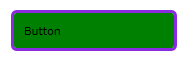
Output image


Few things to notice here, first it is obvious Style is rejected. Next we have set the Content property of the Button as ‘Button’. And it is overridden by the Control Template’s TextBlock control. And if you run the code you can notice that, Button would have lost it’s total Buttonness Open-mouthed smile ( I invented this word).

You can notice that Button would do its work and fires a click event, but you no longer see the visual transition and the hover effect of a typical button.

This is the way template is defined. It overrides all the properties.

But there’s a way to handle that, using the Content Presenter and Template Binding. Template Binding takes the property values from the control and pass it to the Template (Control Template)

<ControlTemplate x:Key="ContentPresenterButtonTemplate" TargetType="Button"> <Border BorderBrush="BlueViolet" BorderThickness="3" CornerRadius="4" Background="{TemplateBinding Background}"> <ContentPresenter Margin="{TemplateBinding Padding}"></ContentPresenter> </Border> </ControlTemplate>

It is used in a Button like this

<Button Content="Button" Height="41" HorizontalAlignment="Left" Margin="20,101,0,0" Name="button2" Style="{StaticResource ButtonStyle}" Template="{StaticResource ContentPresenterButtonTemplate}" VerticalAlignment="Top" Width="166" Padding="10" /

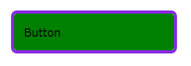
Output
image

You can see the value set on the Style is applied for Background. And Content Presenter wraps the content of a control which also used Template Binding, so the Content value in the Button is used.