Come on let’s talk .. ..

I was reading a book last night and noticed plenty of codes in that book were using ‘ref’ in the methods. Mmm.. plenty in the sense almost all of them except where the example methods have some value type parameters.

Here’s a simple example, (a screen shot of the page)

image

Then I thought we all know that reference types are passed to methods as reference (though the pointer is passed as a copy), there is no any specific need to have the ‘ref’ keyword. (Please correct me if I’m wrong)

Unless you can save few bytes of memory for the new pointer in the stack. 🙂 which will be kicked out immediately after the code/methods returns.

I have already made a post on ‘ref’ and ‘out’ keywords. (See here) These two keywords are really very interesting bits of C#.

Windows Phone–Mango Version 7.1 or 7.5

The next version of the Mango is there.


But there is a small controversy about  the version of the Mango. In some places it is declared as 7.5 where in some other places it is mentioned as version 7.1.

In the SDK it says 7.1.
Read this article for the more info.

MDX (Children and Members)

MDX queries are complex compared to the SQL or TSQL queries. It is perceived as complex because the underlying data source is not two dimensional. But simple MDX expressions are not very complex, 😀 as that is why they are simple.


Members and the Children properties of the MDX provide different set of outputs for the hierarchies.


SELECT [Measures].[Internet Sales Amount] ON columns,
[Product].[Category].Children on rows
from [Adventure Works]
where [Date].[Calendar Year].&[2003]


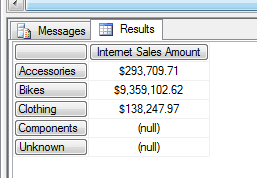
As you see below, when you specify the Children the it excludes the ‘All’ member of the hierarchy.

image


select [Measures].[Internet Sales Amount] on columns,
[Product].[Category].Members on rows
from [Adventure Works]
where [Date].[Calendar Year].&[2003]

‘Members’ brings you the results with the ‘All’.


image

Hotmail Connecting other mail account hidden policies :)

In Hotmail you have the facility to connect other mail accounts of yours. So in a single log on you can check other inboxes as well. This is a cool feature as we can link non Hotmail accounts as well. I have linked my Gmail with my Hotmail.

When you do this you have to provide the credentials of the Gmail account and connect it to your Hotmail. Actually Hotmail does not open the Gmail inbox inside your Hotmail, but it asynchronously downloads the mails from the Gmail. (this is bit not nice, but there might be policy boundaries among the companies).

So the bad side is, if I open and read a mail sent to my Gmail, from the Hotmail; and when I login to the Gmail it still shows that particular mail as unread. So my credentials are used to connect to the Gmail, and not for maintaining any sync, it is just for the download.

And we think this is right. Because what ever happens there might be organizational policies that prevent to do this. Simply Microsoft does not have permissions to edit Google inboxes. 😛

Another scenario is, since this connection is a mere download of the mails there is no impersonation is implemented. I’ll explain my real experience here, I have signed to a Google group using my Gmail ID. So any mails sent by them obviously come to my Gmail account as well as my Gmail folder in the Hotmail.

When I clicked the mail from the Hotmail and it had a link to a shared Google doc among the group members, When I clicked on the link, I was prompted to sign in to my Google account. That’s the point, there is no impersonation. (or my Hotmail has no way to explicitly pass the information that I’m the user of the same Google mail, though it has my Google mail credentials).

They use the credentials only for downloading the mails and not for any explicit impersonations. :D.

Inheritance in relational database

This article describes about the inheritance in the relational database and how we can handle that in the Entity Framework. First let me discuss about the database inheritance.

I searched the Internet and found there are databases which support inheritance natively. PostgreSQL has this feature, something similar to this.

INHERITS FROM (tablename[, othertable...])


Then I read few chapters from some books. I have given the same exact points that I read from the books. I made some statements bold as I have a personal strong vertical nodding with them. :p

From the Book SQL Server MVP Deep Dives


There’s both a technical and cultural impedance mismatch between the object world

and the database world. Relational databases don’t readily represent inheritance……


Too often the solution is to use an application layer object-relational mapper, such

as NHibernate or the Entity Framework. This provides a poor abstraction for the database……


From the Book Beginning Database design from Novice to Professional (Apress)

Inheritance in a data model is not as common as you might think at first. Humans are very good at categorizing things into hierarchies, and once people get hold of the idea of inheritance in data modeling, there can be a temptation to use it everywhere……..

“Is A a type of B?”

only meant that using inheritance might be a possible way of making sense of a problem.


I strongly believe on what is mentioned above. We do not need to use inheritance structure unless we have a very specific need for it. Because the inheritance in the OOP is very different from the inheritance (or what we call the inheritance relationship) in the database.

Let’s have a simple example of Person and  Student and Lecturer. image
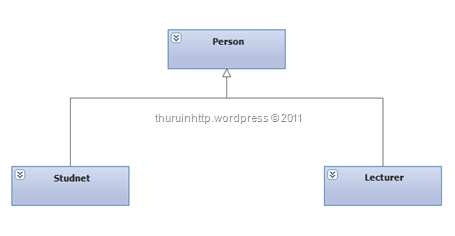
In the context of OOP, most of the cases we have our super classes declared as abstract. So we could have the code as like this.

abstract class Person { }

class Student : Person { }

class Lecturer : Person { }


But in the databases we do not have something called abstract table. Look at this structure which has the inheritance modeled in the database level.

image 

As you can see, though this looks like as it’s having some kind of inheritance it is not clean and not pure.

There can be only person who is neither a student nor a lecturer. There can be people who are students and lectures (of course this makes sense but think a scenario where a person can be either of them, not both)

And just by giving an Id we cannot say what type of a person he is. (we need to perform an OUTER JOIN for this) Just to make things more accurate we have to enforce some constraints.

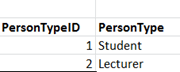
First create another table with two columns (for minimum) with PersonTypeID and PersonType.
image


Add the PersonTypeID as Foreign Key (FK) to the Person table with NOT NULL constraint (Here we enforce that one person can be either Student or Lecturer)
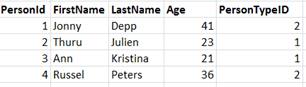
image

So here Jonny and Russel are Lecturers and Thuru and Ann are students.

Still there are some works we have to do. Let me explain, we added the PersonTypeID column with as FK and enforced that a person can belong to one type but we didn’t enforce that a person cannot be in both. I can still have Thuru in lecturer table.

That means I have enforced the rule only in the Person table not in the Student table and Lecturer table.

To overcome this problem, we have to refer the PersonTypeID column in the Person table with the Student table and Lecturer table.

So we add a column in the Student table and in the Lecturer table which refers to the PersonTypeID of the Person table. But we cannot create FK in the student table or in the lecturer table since the PersonTypeID of the Person table is not unique. (as we know to the FK referring column should be unique) So to make them unique we have to create a unique constraint in the Person table.

Like the following.

ALTER TABLE Person ADD CONSTRAINT UQ_PersonID_Type UNIQUE (PersonId,PersonTypeID)

Here the unique key can be constructed with the combination of PersonID and PersonTypeID. (or you can make the combination as Primary Key (PK) as well)

Then we can have the StudentID and PersonTypeID columns in the Student table and LecturerID and PersonTypeID columns in the Lecturer table as FKs of the PersonID and PersonTypeID of the Person table.

Here Student has the PersonTypeID = 1 and Lecturer has the PersonTypeID = 2. This is not going to change, so when creating the Student table (or Lecturer table) we can use the PERSISTED keyword in TSQL


CREATE TABLE Student (

StudentID INT PRIMARY KEY,

PersonTypeID AS 1 PERSISTED,

GPA FLOAT NOT NULL,

CONSTRAINT FK_Student FOREIGN KEY (StudentID,PersonTypeID) REFERENCES Person(PersonID,PersonTypeID)


Here I have used the computed columns for the PersonTypeID, you can use the CHECK constraint as well. As our intention is to not allowing any other values than the corresponding PersonTypeID in the table.

Here is the complete diagram of the tables.
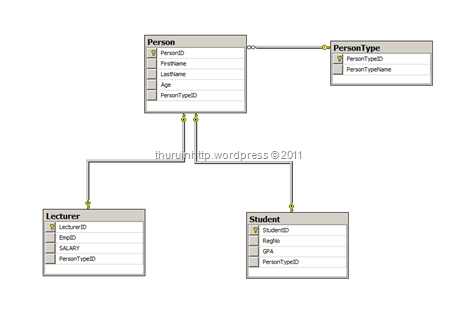
image

The complete TSQL Code

CREATE TABLE PersonType (

  PersonTypeID INT IDENTITY (1,10) NOT NULL PRIMARY KEY,

  PersonTypeName VARCHAR(50) UNIQUE

  )


CREATE TABLE Person (

PersonID INT IDENTITY (1,1) NOT NULL,

FirstName VARCHAR(50) NOT NULL,

LastName VARCHAR(50),

Age INT NOT NULL,

PersonTypeID INT NOT NULL,

CONSTRAINT FK_PersonType FOREIGN KEY (PersonTypeID) REFERENCES PersonType(PersonTypeID)

)

ALTER TABLE Person

    ADD CONSTRAINT PK_PersonID PRIMARY KEY (PersonID)

   
ALTER TABLE Person

ADD CONSTRAINT UQ_ID_Type UNIQUE (PersonID,PersonTypeID)


CREATE TABLE Student (

  StudentID INT NOT NULL PRIMARY KEY,

  RegNo VARCHAR(50) NOT NULL,

  GPA FLOAT NOT NULL,

  PersonTypeID AS 1 PERSISTED,

  CONSTRAINT FK_Student FOREIGN KEY (StudentID,PersonTypeID) REFERENCES Person(PersonID,PersonTypeID)

  )

CREATE TABLE Lecturer (

  LecturerID INT NOT NULL PRIMARY KEY,

  EmpID VARCHAR(50) NOT NULL,

  SALARY MONEY NOT NULL,

  PersonTypeID AS 2 PERSISTED,

  CONSTRAINT FK_Lect FOREIGN KEY (LecturerID,PersonTypeID) REFERENCES Person(PersonID,PersonTypeID)

  )

So implementing the inheritance in the database is tricky and we have to be carful in the CRUD operations. It is recommended to write proper SPs with transactions to handle the situation.

Because though we have conceptually implemented the rules, there can be a situation where there is a Student record in the Person table without the corresponding row in the Student table. (that means we do not have the abstract behavior in the table)

Now let’s take a look where a person can be a student as well as a Lecturer. In this case we have the Person to PersonType as N : M relationship. Where a person can take many person types and one person type can have many persons (sorry here I have to put people, but that creates ambiguity in the context, so let us have plural of person as persons 😀 )

So we had to have a mapping table for the PersonID and the PersonTypeID.

That is the difference we are going to have. And the foreign key constraints of the Student table and the Lecturer table refers the mapping table.

So we can define more flexible inheritance scenarios in the relational databases, but this is full in the context of the database. And I still go with the first saying mentioned in the top of this post. Do not use unless you have a proper need for inheritance.

Some say they go for this kind of database design considering the future extendibility. Database extendibility is big area as far as I know, defining an inheritance structure is not enough for that. And I have very few ideas about that so I don’t discuss that here. Additional reading : http://www.saas-attack.com/DatabaseExtensibility/tabid/161/Default.aspx

This is a complex structure and when using the a ORM framework like EF it has plenty of limitations. I’m not aware of the EF much, so if anyone knows how to map this in the EF while keeping the constraints as they are, feel free to make a comment.


Programming Microsoft Surface

This post contains some high resolution images, please wait till all the images are loaded and click on them to enlarge.

Microsoft Surface computing is awesome and for me the business strategy behind the scenes are very very awesome. Microsoft released surface computer and very limited set people are using it right now. Because it is expensive and needs rich infrastructure as well. But in the business point of view MS released surface because surface computing needs lot of innovation from the hardware vendors. The first release was a big bulk desk, and the second release of Samsung SUR 40 it is slim; just 4 inches. So in the future it will be like a paper and the real surface. So when the world is really ready for the surface, the real surface will also be ready.

microsoft-surface-5


The world is not yet ready for the surface, so as the surface computing. So MS took the above strategy to make the surface mature and available when really the majority of the world is matured to have the surface.

Surface computing provides a software platform as like other devices of the IT industry. The surface software platform is built on top of WPF. It also includes the Power Shell administration.

To develop surface applications we do not need to have a surface computer. 🙂 You can develop and test the applications in your PC like you develop the WPF applications. To do this you have to install Surface SDK and the Surface runtime in your machine.You can download the Surface SDK (still in beta) from here

Once you installed them you will have surface application template in Visual Studio.

image

It offers surface type controls and you can do the programming with that. Some built in controls are really cool. UI is defined using XAML.

A sample application to view pictures and to arrange them in two stacks with a floating interface would be like this.

Note :

Surface computer is a very powerful hardware device. It has infrared sensors in built which can detect the objects placed on it and capable of connecting with them.

It is capable to take 52 touch inputs with pressure at a time. (In the future this may increase). If you consider a person dealing with the surface computer with all his fingers, it can still handle 5.2 people at a time. Mostly we use 2 points. So in a best scenario 26 people can interact with it. And all the touches are measured with the pressure.

When we develop our applications in the machine, we don’t need a touch enabled screen. But if you have a 2 point touch enabled screen it will be nice. (You can resize images, videos and more …) And another major limitation is, most of the PC monitors or laptops which are touch enabled detect the point of a touch. They cannot detect the pressure. SDK provides events and methods we can use with the pressure.

So when we do development in a PC we can neither check those hardware specific methods nor object detection.

But still we can have fun.

This is a sample code shows how you can create movable items in the surface. These are free moving and 2 point resizable objects.

ScatterView is the XMAL snippet for creating this free floating objects.

(Click the image to view the enlarged code)

image

As you can see the code is simple XAML , and we can place any number of and any type of controls inside the scatter view. I have used media element controls to put videos and Image tags to put images inside the ScatterView.

The transforms and the other settings are optional.

This single line create a multi touch enabled drawing panel. (Margins are optional)

image

I created a drawing board embedded with n image where we can color the image. (See how it works in action)

image

In the above image you can see the disadvantage of the point touch. I can draw thin lines (point lines)  since my laptop touch screen is not pressure sensitive. In the real surface you can draw with the thickness of your own finger which gives a real drawing experience. You can also adjust the thickness programmatically.

I tried something more with surface SDK with mixing the scatter view with traditional WPF features and created a stunning floatable windows in the desktop. Where you see only objects no any windows and cross overlaps on each other. It is bit advance and I didn’t explain the code here, but some images are given below.  Enjoy 🙂

Sorry for the white marks on the image and taskbar as I have to hide some files and programs.

Floating objects in desktop. (As you see three of them are media players and two image viewers)

1

They are completely independent and the coolest feature is they are not windows. They act as objects in separate frames. The below images show that, see how I’m interacting with the desktop while they are floating on the desktop.

This picture shows that I’m interacting with the desktop. I’m hovering on a file which is partially covered by one of the floating object, but still I can get the description of the file.

2

Here I’m interacting with the task bar and the start button.

3

Other than this surface SDK offers plenty of nice tools like StackLibrary and Containers. Flexible surface is another feature which creates a water like surface. When touch or click on the screen you can experience ripples.

I’ll try to put a video, I still do not have a YouTube account. 😛

ASP.NET MVC 3 and Async CTP Problem

If you have installed the VS 2010 SP1 in your machine and then if you try to install ASP.NET MVC 3 in your machine, the installation may fail.

If you check the installation log file you can get a detail that says Async CTP is not compatible with ASP.NET MVC 3 installation.

This blog describes a scenario on how to solve this, but unfortunately both methods did not help me. I was missing the 8BC707D3F85BD0B3F9C439FAC38EAE2E key in my registry.

I just removed the VS 2010 SP1 from the machine and installed the ASP.NET MVC 3 and reinstalled the VS 2010 SP1. Fortunately I have the SP1 offline installer with me. Smile

But the problem is when updating the VS 2010 to SP1 it does not give a choice to select the components we need.

Enabling Sandbox solution for SharePoint Web Part in VS 2010

This is an on the fly post, if you are creating a web part solution you’ll prompted by the visual studio whether to deploy that as a sandbox solution or a farm solution. But the sandbox solution option is grayed out.

The below post explains what is the reason for that and how to solve the problem using SharePoint Power Tools.

http://sharepoint2010learnersworld.blogspot.com/2011/04/why-sandbox-solution-will-not-support.html

Direct Link to SharePoint Power Tools : http://visualstudiogallery.msdn.microsoft.com/8e602a8c-6714-4549-9e95-f3700344b0d9/