Complex Event Processing (CEP) with Azure Stream Analytics : JOIN with Reference Data

Part 1 of this series : Getting started with Azure Stream Analytics.

In this post we will combine the reference data from Azure Storage and process the query and write the output events to the Service Bus. These events will be picked by the Azure Logic Apps and the responsible person to maintain the pipe will be notified.

Let’s begin by adding the second input to the Job Topology. The second input is a reference data which is a CSV file stored in the Azure Blob Storage.

Unfortunately testing the CSV inputs in the query window produced some error – this link 

But it is not a blocker to continue the experiment. After adding the input the CSV file, we can add the Service Bus Queue as the output.

After the complete wiring up of the inputs and output, we can write the CEP query.

4

The reference data input is named as ‘maintenance’. You can download the sample file from this location.

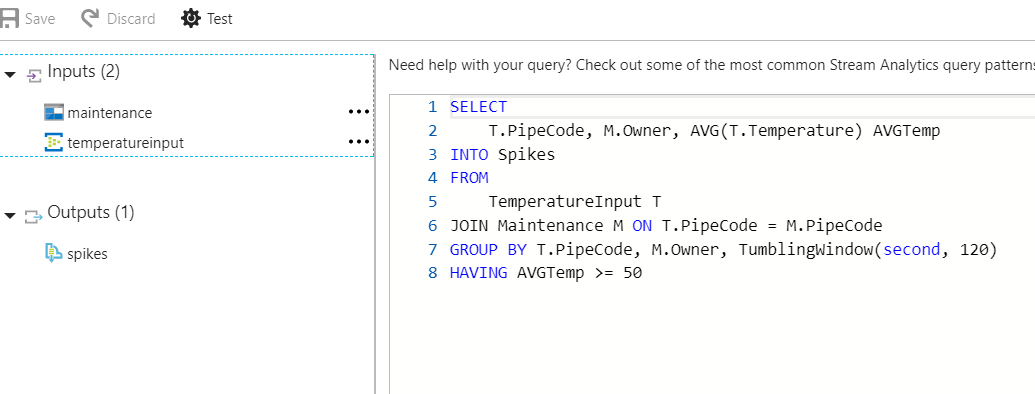
Let’s write the query for the CEP. In the query blade we can specify the query with the simple JOIN with the reference data. Note that the streaming data is in JSON format and reference data is in the CSV format, but Stream Analytics can join them and produce the output.

Query in text

SELECT
 T.PipeCode, M.Owner, AVG(T.Temperature) AVGTemp
INTO Spikes
FROM
 TemperatureInput T
JOIN Maintenance M ON T.PipeCode = M.PipeCode
GROUP BY T.PipeCode, M.Owner, TumblingWindow(second, 120)
HAVING AVGTemp >= 50

Also we have mentioned that output should go to the specific Service Bus connection. This will post a message in Service Bus Queue.

In order to make the sample more interactive let’s create a Even Hub simulator which posts a message (sensor reading) to the Event Hubs. You can access the code for the simulator from this link.

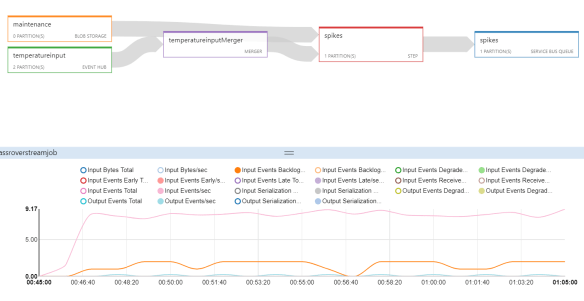
Run the simulator from the local machine and run the job in the portal. You can notice the Service Bus Queue gets the messages from the Stream Analytics Job. We can visualize the live job status in the Job Diagram blade in the portal.

Capture1

Plug a Azure Logic Apps to the Service Bus to listen to the queue and send the alert to the owner. Here the owner’s email address is coming from the reference data.

Capture 3

In the next post we will see how to add custom functions to the Stream Analytics CEP query.


Complex Event Processing (CEP) with Azure Stream Analytics : Getting Started with Streaming Data

Introduction

Azure Stream Analytics is a Complex Event Processing (CEP) Platform as a Service (PaaS) in Azure. In the series of this blog posts we’ll examine a scenario which helps us understand the CEP capabilities of the Azure Stream Analytics.

Before we begin, let’s have a basic understanding of what CEP is. CEP is any technology that can process the streams of events along with static data. The ability to process both the streaming events and the static data in real-time by combining them in some sort of computation is the key for CEP. In addition to this idea, commercial CEP tools have other auxiliary capabilities like storage, event publishing and etc.

Almost all the major public cloud vendors provide CEP as service under different product names. CEP platforms require large memory and computational power – which are abundant in the cloud. This is possible by the economies of scale of data center infrastructure. This makes the public cloud vendors to offer CEP as service at lower cost than on premise implementations.

Case introduction to the series

Azure Stream Analytics is a managed service, which has a simple process model with input, query processing and output pipelining.

Let’s take a case of a nuclear reactor; there are pipes which carry the water used to cool down the nuclear reactors. In one particular nuclear plant assume there are 16 pipes and each pipe has sensors which detect the temperature of the inner shell of these pipes.

These sensors send temperature data to the cloud, in the cloud we analyze the data with reference data which have more details of the pipes like pipe location, owner for the maintenance and etc. When the average temperature of a pipe goes more than 85 degrees of Celsius within 300 seconds window, then the pipe maintenance owner should be alerted.

Getting started with Stream Analytics

Stream Analytics will get the stream of events from Events Hub, it gets the reference static data from Storage. When the specific condition is met, it will post a message in the Service Bus Queue, this can be consumed by any other applications. (Serverless Functions – but I had a real mess with the VS tooling. Read more about that from here) So removing that from the series of this blog post and adding Logic Apps)

In order to do this, first we have to set up the following Azure resources.

  • Event Hubs
  • Storage Account
  • Azure Stream Analytics Unit
  • Azure Storage account
  • Service Bus
  • Azure Functions Logic Apps

The below image describes the high level picture of the explained setup.


In this part of this series. Let’s plug the streaming data input and try the CEP query in a minimalist way. Navigate to the Stream Analytics service and add the Event Hubs (temperatureinput) as input. You can do this by clicking on the Input box and selecting the source in the relevant form in the Azure portal.

After adding the input, select the Query from the Job Topology section.

Before testing on the event data we can upload a sample file which represents the events and try the query. Assume the below JSON object is the sample event which represents a single reading from a sensor.

{
"DeviceId":"4a2afe86-b4e4-4f42-bce6-1b04be499a3a",
"PipeCode":"4",
"Temperature":82,
"DateTime":"2017-08-30T04:50:32.9830513Z"
}

We will feed a sample set of above events from a file and try the CEP query. This sample file has 100 readings like the above one. You can download the sample file from this link.

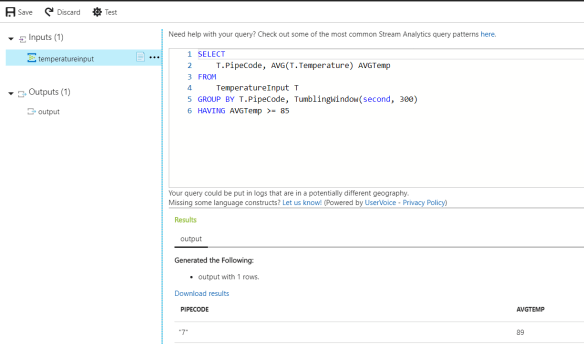
Click on the Query in the Job Topology and you can upload the sample file in the input feed. Then we can write the query to satisfy our condition. Click the Test button to run the query.

3

SELECT
T.PipeCode, AVG(T.Temperature) AVGTemp
FROM
TemperatureInput T
GROUP BY T.PipeCode, TumblingWindow(second, 300)
HAVING AVGTemp >= 85

The query is similar to the SQL syntax. The key aspect is the windowing concept. Since we’re dealing with the stream of data we have to specify a window to get the result of a specific time frame. Read more about windowing from this link.

So in the result you can see one pipe with the pipe code 7 has an average temperature greater than 85. Which is shown in the portal.

Next post will cover the full case of dealing with the simulated streaming data and delivering the results to the Service Bud and alerting the owner with the reference data.


Azure Elastic Pool and EF Core Architecture and Developer Workflow

Introduction to the Azure Elastic Pools and Elastic Jobs

Azure Elastic Database Pool is a service which helps to share the database resources (DTUs) and the management of many databases easy. This is the tool, for solutions which follow the dedicated database tenant isolation strategy. Because apart from the resource elasticity between the database Elastic Pools have Elastic Jobs which is a separate configuration, which allows to manage the databases from a single interface.

Having different databases for different tenants or for any other isolations, comes with the concern of a shared index of those databases. Application get to know which database to connect from this shared index. Often this index is known as master database.

There can be situations where master database is not required in determining which database to connect when application get this information from some other sources like from a cache or from configurations or from request claims and etc.

Azure Elastic Pool has a tool known as Shared Map Manager (which is the master database), this Shared Map Manager works along with the Elastic Client Library. Elastic Client Library has a good support with the Entity Framework.

When it comes to EF Core, the support of the Elastic Client Library seems not actively available, and EF Core has its own differences compared to Entity Framework as well. This blog post addresses these issues.

Architecture Pattern for using Elastic Database Pool with EF Core

Assume we have a multiple tenants with different dedicated databases and they are configured in a pool. Also we have the Elastic Jobs configured in the subscription. (A subscription can have only one Elastic Jobs interface and multiple pools can use the same interface) Read more about Elastic Jobs and how to configure them

The below figure shows the architecture model for the Azure Elastic Pool development.

Elastic Database Pool Architecture

The below points summarize the idea.

  1. Developer generates the code first migrations from his IDE (typically this is VS PMC) pointing to the Developer Db.
  2. Developer Db can be any valid SQL instance – either an Azure SQL instance or a in the developer machine.
  3. EF Core DbContext parameter-less constructor should point to the Developer Db.
  4. In the pool apart from the tenant databases, create a database which holds only the schema – this database is known as Zero Db
  5. Zero Db will be used to generate the delta of the schema. Developers can use VS Database Project to generate the TSQL of delta.
  6. The generated delta script will be executed using the Elastic Jobs interface either by any sort of automation or using the Azure portal itself.


Developers can generate the scripts without having the Zero database, using the EF Core commands, but I highly recommend to have a schema only database in the pool, because of the following reasons.

  1. Zero Db can be used to generate the delta TSQL
  2. At any given point we have the schema only version of the production schema
  3. Creating a new tenant database is easy at any point as we can simply copy the Zero Db

Implementation

In order to operate an enterprise scale solution, addition to the working code the entire flow of the development and deployment should be in place.

In order to make the developer migrations work as seamless with the existing VS PMC based experience and also to trigger the right database connection for the right tenant, we need an implementation of DbContext in the following way.


public class MassRoverContext : DbContext
{
public MassRoverContext()
{
}

public MassRoverContext(DbContextOptionsBuilder optionsBuilder)
{
base.OnConfiguring(optionsBuilder);
}

protected override void OnConfiguring(DbContextOptionsBuilder optionsBuilder)
{
{
if (optionsBuilder.IsConfigured == false)
{
optionsBuilder.UseSqlServer("");
}
base.OnConfiguring(optionsBuilder);
}
}

public DbSet RoverEquipment { get; set; }
}

The parameter-less constructor of the DbContext will be used in the migrations.

The constructor takes a DbContextOptionsBuilder<MassRoverContext> will be used in the applications which points to the right database determined by some logic in the application.

The below code snippet shows a common service which determines the correct DbContext for the application in ASP.NET Core


public class ContextService : IContextService
{
private readonly HttpContext _httpContext;
private readonly ConnectionSettings _connectionSettings;

public ContextService(IHttpContextAccessor httpContentAccessor, IOptions settings)
{
_httpContext = httpContentAccessor.HttpContext;
_connectionSettings = settings.Value;
}

public MassRoverContext MassRoverContext
{
get
{

var sqlConnectionBuilder = new SqlConnectionStringBuilder(_connectionSettings.ZeroDbConnectionString);

// determine the mapping based on some value. In this sample the database mapping is determined by a header value tenantid
sqlConnectionBuilder.Remove("Database");
sqlConnectionBuilder.Add("Database", _httpContext.Request.Headers["tenantid"].ToString());

var dbOptionsBuidler = new DbContextOptionsBuilder();
dbOptionsBuidler.UseSqlServer(sqlConnectionBuilder.ConnectionString);

return new MassRoverContext(dbOptionsBuidler);
}
}
}

Notes:

The shared index data source which holds the mapping of the tenant and the database is not shown in the above figure, since this shared index can be anything. In our example for the simplicity, assume the tenant id is in the request claim and this claim holds the name of the database. This SHOULD NOT BE USED IN PRODUCTION

The registration of the services is not included in this post, since posting the entire flow of how EF Core project and ASP.NET Core project connects is outside the scope of this article. But the full code is available in this repo.

Continuous Deployment & Automation

In this section let’s discover how the continuous deployment can be performed. We have the delta TSQL generated either by comparing the schema between the Developer Db and Zero Db or by any other mechanism.

Now we should prepare an automation script or a running code to submit the delta TSQL to the Elastic Jobs interface. Elastic Job will run the job across the databases in the pool.

I created a simple console application which submits the task to the Elastic Jobs interface. Access the code from this repo

The Elastic Jobs SDK is still in preview of the time of this writing and I will be conintously updating this cosole application and will post a seperate blog on how to plug this with VSTS Build and Release Definitions.


Azure B2C with custom attributes with predetermined values

Azure B2C is a large membership database which also provides the features of tokens, sessions and membership/authentication experience (sign-up, sign-in, forget password and etc). But there are some scenarios which are little tricky based on how the entire solution is handled. Let me explain such a use case and describe different ways to handle that in B2C.

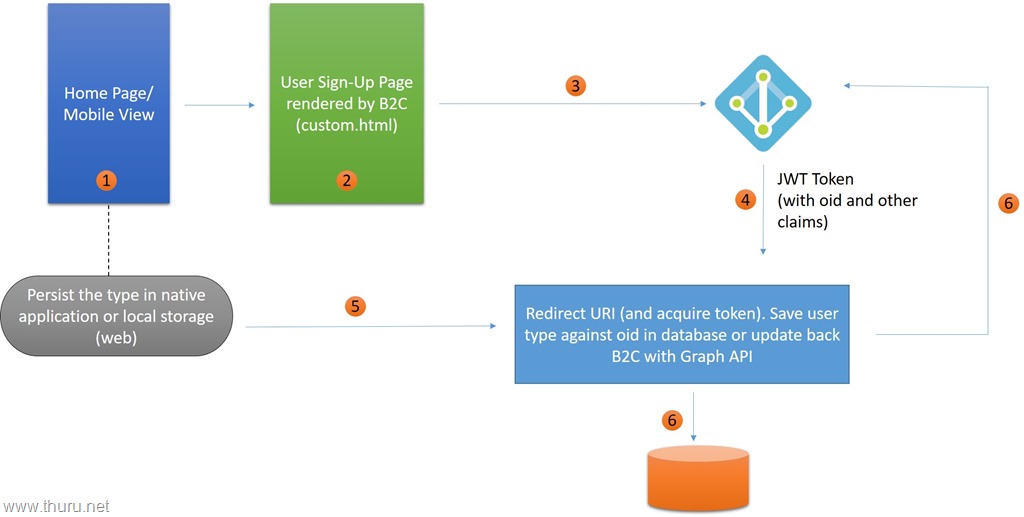
Case : You have an application which is a reselling portal, where a user can either be a seller or a buyer. During the registration / sign-up process user type will automatically be detected by the application, thus the user does not need to select the type. The below diagram explains the case.

Figure 1


Question: In this case why we cannot pass the parameters from step 1which holds the user type value and populate that value in a hidden field in the custom.html or the rendered mobile view in step 2. So it is straight forward to persist that information in B2C.

Answer: Since the rendering is controlled by B2C, any script execution is not allowed in that context. (I’m not sure is there any way to do this). Also the same html view is rendered in mobile or any other native clients passing the information from step 1 to step 2 in any means is not a safe option even if it is possible in any manner.

So we end up having the trouble of passing the user type information from step 1 to step 2 and instruct the B2C to persist that information.

Solutions:

There are different solutions. The trade off is always between how much of control we’re going to take from B2C and how much of control we let the B2C to have. This comes with the cost of development effort and control.

Solution 1: Let B2C handle the case much as possible and application controlled fields like user type to be saved in custom database column. And optionally update the B2C custom attribute using Graph API. Figure 2 explains this.


Figure 2


In this way, we get the benefits of the B2C policies and how to handle the auxiliary authentication services like password management, profiles offered by B2C. Most applications follow this without updating the B2C back using the Graph API.

Solution 2: Take control from B2C to the custom application and use B2C as a membership database.

Figure 3

In this model – In the step 1 some custom attribute values are determined (ex – user type) and passed to the step 2 which is a view controlled purely by the developer. Then step 2 passes the information to the application API in step 3. Server application updates B2C in step 4 and receives the JWT token in step 5. Application updates the database with the oid and other parameters in step 6.

What B2C could do in the future

In the current state of B2C – B2C has applications and policies. Applications and policies can be used many combinations. One application can have many policies of the same type with different settings and also one policy can be used across many applications as well.

In the custom rendering B2C should allow to have hide attributes with the default values. In that way in modeling the above scenario we can have have different policies with different settings and default values.

Primary critical requirement is in the below screen that B2C should add are..

  1. show/hide fields
  2. set default values

image

WADLogsTable missing in Cloud Service project

This is observed in Visual Studio Cloud Service Template (Environment  VS 2015 Enterprise Update 3 and Azure SDK 2.9.6 with .NET 4.6). This could be observed in most of the other versions – probably in Azure SDK version 2.4 and above, but I stated my working environment as soon or later this issue will be resolved.

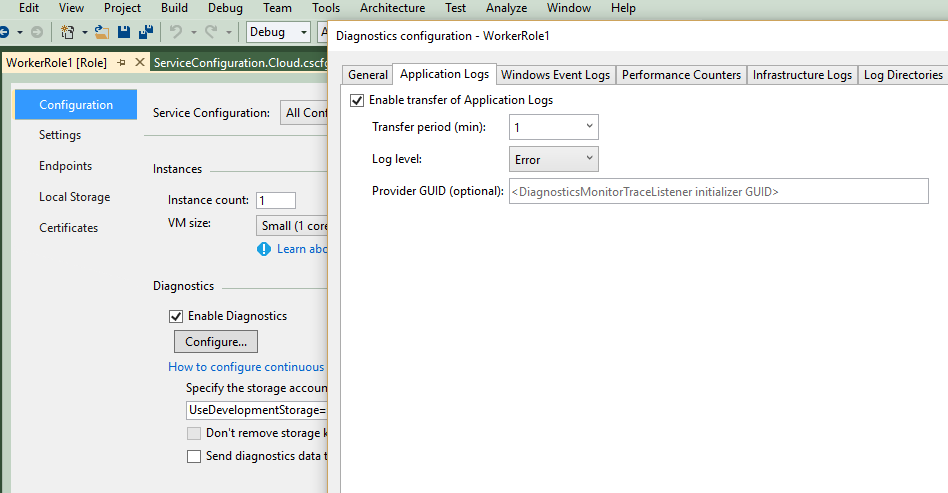
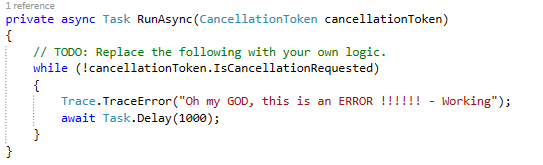
Quick read and the reason : The template has the Trace.TraceInformation as the logging code line, but the configuration is set to log Errors by default. So when you run the application, the service has nothing to log and it doesn’t create WADSLogsTable. By changing the code to Trace.Error or changing the configuration to log information/verbose would solve the issue.

Analysis

Mostly beginners bounce into this issue, and fair reason to get panic because when the just create the fresh Azure Cloud Service out of the box from the available template, it doesn’t work as expected.

Go to the Worker Role properties and you can change the application log level settings to log Information level logs.

default trace log setting - error

or, change the code to this

image

The application creates the table when and only the information need to be persisted, so the available template does not create the WADSLogsTable until you do either of the suggested changes.

Controlling access to your Azure resources using RBAC

Being part of a software services company, customers often ask the question how to restrict access to Azure resources. It is understandable that any organization wouldn’t prefer to give all the rights of the organizational Azure subscription to a person.

In the classic Azure model the only way to give access to Azure portal is, adding the user as a co-admin for the subscription. This gives all the permissions to that user within the subscription except managing the administrators.

But the new Role Based Access Control  (RBAC) helps to solve this problem. Using RBAC we can control the permission scope to either subscriptions, resource groups or to individual resources.

Permissions in the top level scope are automatically inherited to the level below – meaning subscription level users have the same permissions to the resource groups and the resource group level users have the same permission to the individual resources within the resource group.

RBAC has several roles – read more about different roles

Here I’ve explained the flow of adding a new user to a Azure resource group and how his/her experience in accessing Azure via portal. Assume the user doesn’t have any permission in the Azure, and he’s just a developer with a Gmail account.

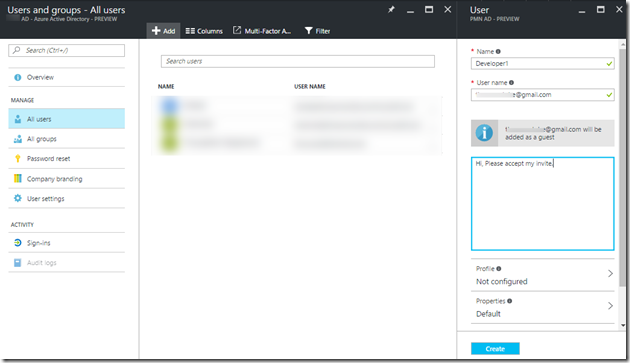
First, a subscription admin logs in to the portal and add this user in the Azure Active Directory of the specific subscription.

1

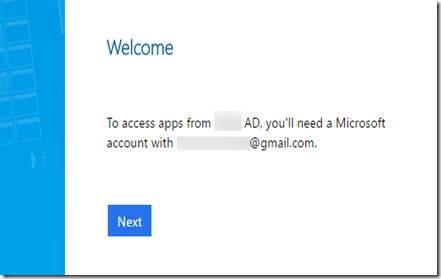
Note at this point, developer1 does not have a Microsoft account. She clicks on the link in the email  she received. She will be directed to create a Microsoft account with the specified email address. (if there’s a Microsoft account already available this step will not be required)

2

After creating the Microsoft account (entering a new password and create the Microsoft account), she can login to the Azure portal using – https://portal.azure.com But within the portal this user cannot create any resources. In case if the user tries to create or try to perform any action she will get the below message. This is a very similar message to the old grey error box in classic portal, as the user exist in the Azure Active Directory but does not have a subscription, in this case does not have any resource.

3

Now let the admin assign a resource group for the user.  Assume you have a resource group DevelopmentRG and in the resource group IAM settings add the user (developer1) as a contributor.

4

Contributor is a predefined role in Azure which has the create/edit/delete permissions of the resources within the specified scope. In this case developer1 has those permissions within the resource group – DevelopmentRG.

5

After setting developer1 as a contributor, you can notice that the access type of the user is set to Assigned, because this is a an assigned permission. Also note that the subscription admins have the permission to the resource group as Inherited permission.

6

Now the developer1 logins to the portal and she will see the assigned resource group. Developer1 can perform actions within this resource group.

7

Also note that since, developer1 has only the specified resource group, she cannot create a new resource group or any permission outside the scope of the specific resource group.

8

RBAC provides more granular permissions with various roles required for the businesses, this helps the organizations to carefully delegate the permissions to the people without exposing the entire Azure subscription.

The feature to limit/set the quota for a resource group is in the request from the community.

Distributed Transactions in Azure SQL Databases–Azure App Service and EF

Are you handing more than one SQL database in Azure for your application ? Most of the times the answer would be YES. In dedicated database multi-tenant systems at least you have your customer information in the master database and dedicated application database for each customers. Some CRUD operations need to touch both the master and customer specific databases.

We need MSDTC (Microsoft Distributed Transaction Controller) for distributed transactions in on premise systems, but in Azure the SQL Databases has the elastic distributed transaction feature enabled and using .NET 4.6.1 we can use them via TransactionScope class from Systems.Transactions.

This link explains how this works, but I wanted to test this with EF and Azure App service as the Azure App service has the target platform option .NET 4.6 and not 4.6.1.

I created two logical Azure SQL servers in two different regions, and enabled the transaction communication link between them using PowerShell.

2016-08-27_18-13-09

Then I created a small Web API project using .NET 4.6.2 (which is higher than the required version) and tested the app from the local machine and things worked well. I deployed the same stuff and things worked fine in Azure as well.

Even the though the target platform is .NET 4.6 in the Azure App Service, when we deploy the .NET 4.6.1 and .NET 4.6.2 projects, the required assemblies in the respected platform version are referenced.

But my swagger endpoint behaved strange and didn’t output the results, no idea why and need to launch another investigation for that.

You can reference the test project from my Github

Conclusion – We can use the Distributed transactions in Azure SQL Database using EF and deploy your projects written in .NET 4.6.1/ 4.6.2 in the Azure App Service platform targeting .NET 4.6

The point of polyglot

Recently I spoke about polyglot persistence in one of the SQL Saturday events. The basic idea of this session revolved around the idea of not getting overwhelmed by the NoSQL boom, but at the same time understanding the modern application requirements which demand more features which side with the NoSQL features.

Enterprise application development is under massive shift than ever before. Enterprises look for more consumer application and social features in the enterprise software. Example – having a chat feature in a banking system, tags based image search, heavy blob handling features like bookmarking, read-resume-state and some go beyond the traditional limits and have AI features with cognitive services.

So the NoSQL technologies would help us in mapping, modeling, designing and developing these applications, sure they would do. But the adaption of NoSQL technologies, how it happens and the mentality of the people is quite interesting to see.

In my opinion there are two major concerns prevail in the industry about the adaption of NoSQL technology. They are

  • NoSQL for no reason  – People who believe that NoSQL is the way to go in all the projects. NoSQL is the ultimate savior.  NoSQL replaces the relational stores. World does not require relational databases. I often hear complains that the database table have more than 1 million rows or the database has grown more than 2 TB and now we think we need to move this to NoSQL, or they say it is very slow, so we need to move to NoSQL.
  • Fear of traditional relational database people – People who have relational database skills and think their skills do not match the NoSQL world and afraid of it. NoSQL is an alien technology that is going to replace relational databases. The fear of these people get worse by the group of people mentioned above who believe NoSQL for no reason.

Both parties miss the big picture. The better option is to use the right technology based on the requirement. The better case is – opting for polyglot persistence as the hybrid of both relational and NoSQL technologies.

Let’s name the decision point of when to make the move to polyglot persistence is point of polyglot. Below I have presented two real cases of polyglot persistence and mainly at which stage it happened.

Scenario of moving to polyglot from relational only – A product used in banking risk analysis, it handles many transactions and Azure SQL database running on premium tier. A feature came that users should be able to create their own forms and collect data (a custom surveys) we needed to store the HTML of the survey template and data filled by the users. At this point we thought about NoSQL, but we sided with relational. We stored the template as HTML and data as JSON in the SQL Database. We made this decision because there is no search required to be performed and the new feature seemed less likely to be used frequently. Later another feature rich chat module came with the ability to send attachments and group conversations. This is the point we decided to use Document DB (Azure based document type NoSQL). The user related data is in SQL Databases and the chat messages are in Document DB leading to a polyglot persistence.

Things to note : We were reluctant to move to NoSQL when the survey requirement came because, though it is dynamic during creation very much static after creation. And we didn’t want to add up NoSQL just because of this feature which is a part of a big module. But we readily made the decision of using Document DB for chat because it is a replacement of internal email system and not a good candidate to model using the relational schema.

Scenario of moving to polyglot from NoSQL only – This is a backend service and persistence of an emerging mobile app. Loads of unstructured data about places and reviews. Started with Azure Document DB. Later the app expanded and wanted the places and restaurants to be able to login using a portal and adjust their payment plans for promotions. We required to persist meta data and payment information – that’s the point we set up a Azure SQL Database and everything is smooth.

Things to note : It’s not that a NoSQL database cannot handle those transaction / accounting based information but it is  not a natural fit for any reporting and auditing purpose.

As you see there’s no strict rule on when one should decide to move to a NoSQL or to relational schema. I mention this balance as the natural fit.

Having strict demarcations of relational and NoSQL wouldn’t help to achieve the best use cases. As it’s hard to define the crossing point but it easy to see the overall business case and decide.

The below figure shows, the point of polyglot (author’s concept)

image

Natural fit plays a major role in deciding the point of polyglot. But it doesn’t mean it is always somewhere in the middle, it can be anywhere based on the product features, roadmaps and team skill. There are products which have polyglot persistence from the beginning of the implementation.

Though point of polyglot can be mapped like above, the implementation of polyglot is influenced by two major factors – they are cost of implementation and the available skills. The below figure shows the decision matrix (author’s concept).

image

Conclusion – There are two groups of people with opposing mindsets in adapting either NoSQL or relational stores. At some point most of the projects would go through the point of polyglot but this is not the implementation point. In the general ground, implementation decision is highly influenced by the decision matrix.