Everything about Windows Processes

This is a great web site which has almost all the information we need to know about the processes running on Windows operating system.

http://www.neuber.com/taskmanager/process/index.html

Time to time we wonder looking at our Task Manager, and thinking what that process if for ? Is it a Windows Process or a 3rd party one or a virus. The above link gives you all the data about the Windows processes.

Here I have listed some of them, (summarized version from the above the site) which seems suspicions but are not dangerous.

igfxsrvc.exe

Igfxsrvc.exe is installed along-side Intel Graphics Accelerator cards and with on-board graphics chipsets. It is the Common User Interface and starts with the Operating System and occupies a slot in the System Tray. It provides the graphical interface for all the display settings of the chipset including color quality and screen resolution.http://www.neuber.com/taskmanager/process/igfxsrvc.exe.html

csrss.exe

This is the user-mode portion of the Win32 subsystem; Win32.sys is the kernel-mode portion. Csrss stands for Client/Server Run-Time Subsystem, and is an essential subsystem that must be running at all times. Csrss is responsible for console windows, creating and/or deleting threads, and implementing some portions of the 16-bit virtual MS-DOS environment.

hkcmd.exe

"hkcmd.exe" is Intel’s "extreme" graphics hot key interceptor. If you never use the Intel hotkeys. You can turn off the hot keys and close this process.

dwm.exe

One of the new features in Windows Vista/7 is the Desktop Window Manager (DWM). It responsible for the graphical effects such as live window previews and a glass-like frame around windows (Aero Glass), without draining your CPU.

rundll32.exe

This program is part of Windows, and is used to run program code in DLL files as if they were within the actual program. However, many viruses also use this name or similar ones. This file is also commonly used by spyware to launch its own malicious code. http://www.neuber.com/taskmanager/process/rundll32.exe.html

Workgroup and Domain

If you are working on a Windows environment you might get some simple questions about what are they ? Here I have listed some simple questions and the answers I found by exploring things by own and referring the Internet. Please make a comment in case if I’m wrong.


What is a Computer Name and the Full Computer Name in Windows OS ?

A computer name in Windows is just the name of the computer. It is something like you have a name. For example Thuru-PC.

A Full Computer name is also known as fully qualified domain name (FQDN), a full computer name includes the host (computer) name, the domain name, and all the higher-level domains. For example elixir\thuru-pc


What is the difference between Domain, Workgroup and a Home group ?

Domains, workgroups, and homegroups represent different methods for organizing computers in networks. The main difference among them is how the computers and other resources on the networks are managed.

Computers running Windows on a network must be part of a workgroup or a domain. Computers running Windows on home networks can also be part of a home group, but it’s not required.

Computers on home networks are usually part of a workgroup and possibly a home group, and computers on workplace networks are usually part of a domain.


In a Workgroup

  • All computers are peers; no computer has control over another computer.

  • Each computer has a set of user accounts. To log on to any computer in the workgroup, you must have an account on that computer.

  • There are typically no more than twenty computers.

  • A workgroup is not protected by a password.

  • All computers must be on the same local network or subnet.

In a Home group

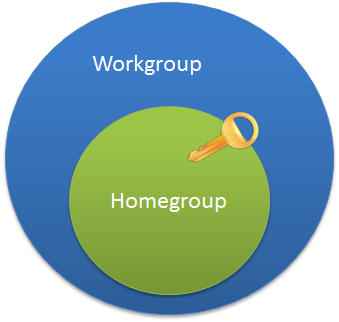
  • Computers on a home network must belong to a workgroup, but they can also belong to a home group. A home group makes it easy to share pictures, music, videos, documents, and printers with other people on a home network.

  • A home group is protected with a password, but you only need to type the password once, when adding your computer to the home group.


    image
Note

Home groups aren’t available in Windows Server 2008 R2.


    In a domain
  • One or more computers are servers. Network administrators use servers to control the security and permissions for all computers on the domain. This makes it easy to make changes because the changes are automatically made to all computers. Domain users must provide a password or other credentials each time they access the domain.

  • If you have a user account on the domain, you can log on to any computer on the domain without needing an account on that computer.

  • You probably can make only limited changes to a computer’s settings because network administrators often want to ensure consistency among computers.

  • There can be thousands of computers in a domain.

  • The computers can be on different local networks.

SharePoint Configuration Error

This is small post regarding an error which might occur while configuring the SharePoint 2010 for the first time in your PC. The exception says

sharepoint.upgrade.spupgradeexception

And you might get a screen like this ..

image


This occurs because you do not have the Microsoft .NET chart controls installed in your PC.

You can get the Chart controls setup here. Download and install that and continue the configuration.

Let’s JOIN

JOIN is one of the common task we perform against databases. This post explains it using TSQL.

INNER JOIN

In a simple JOIN condition we normally do not specify the word INNER, so when we write just JOIN it means an INNER JOIN. INNER JOIN returns only the matching the rows of the tables.

The queries can be executed against the Adventure Works LT database

A simple INNER JOIN between two tables

SELECT SP.ProductID, SP.Name, SPC.Name AS ‘Category’
    FROM SalesLT.Product AS SP INNER JOIN SalesLT.ProductCategory AS SPC
        ON SP.ProductCategoryID = SPC.ProductCategoryID

INNER JOINs can be specified in the WHERE clause as well, but it is recommended to keep them in the FROM. This has no performance issues at all, because even when you specify the JOIN condition in WHERE clause SQL Server executes an INNER JOIN internally.

OUTER JOINS

OUTER JOINS are used to return all rows from one table and matching rows from the other tables. It fills the NULLS where the matching rows cannot be found.

Again the keyword OUTER is optional, but we have to specify whether it is LEFT, RIGHT or FULL OUTER JOIN. When you specify LEFT OUTER JOIN the table in the left side of the JOIN clause is considered as the outer table; means that all rows from this table will be returned with the matching rows of the other table and NULLs replaces where the matching is not there.

Same applies to RIGHT OUTER JOIN, when you use the RIGHT OUTER JOIN the table in the right side of the JOIN is your outer table. So you can get the same results in both LEFT and RIGHT outer JOINs by changing the place of the tables.

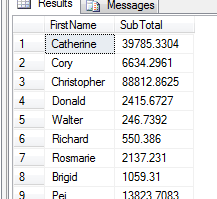
SELECT SC.FirstName, SH.SubTotal FROM SalesLT.Customer AS SC
    INNER JOIN SalesLT.SalesOrderHeader AS SH
        ON SC.CustomerID = SH.CustomerID

This results only the Customers who have placed orders with their first name along with the sub total. (It returns 32 rows)

image

When specify a LEFT OUTER JOIN like this

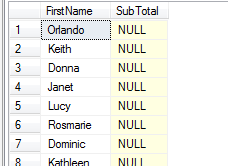
SELECT SC.FirstName, SH.SubTotal FROM SalesLT.Customer AS SC
    LEFT OUTER JOIN SalesLT.SalesOrderHeader AS SH
        ON SC.CustomerID = SH.CustomerID

It returns all the rows of the Customer table with the sub total where filling NULLs against the customers who have not placed any orders. Since OUTER JOIN pulls all the rows from the outer table, this returns the exact number of rows that the Customer table has. (847 rows)

image


In this case if you specify the RIGHT OUTER JOIN it pulls all the rows from the OrderHeader table and matching rows from the Customer table. Since the OrderHeader table has FOREIGN KEY of CustomerID and it is NOT NULLABLE, it returns the same result as the INNER JOIN does.

As a generic decision we can say that if the table has a referential integrity defined with NOT NULL constraint, when we specify the OUTER JOIN based on that table (either LEFT or RIGHT) this gives the exact results as INNER JOIN does.


Apart from LEFT and RIGHT OUTER JOINs FULL OUTER JOIN returns all the rows from all the tables specified, by filling NULLs in both sides. This is useful in finding the unmatched rows when there is no referential integrity is defined among the tables.

CROSS JOIN

CROSS JOIN is another type which is the Cartesian product. It matches all rows from one table with all rows from the other table, thus returning m * n rows where m is the number of rows of the first table and n being the number of rows in the second table.

Since CROSS matches every row with all the rows, it does not have an ON condition. (apparently it doesn’t need to have one)

SELECT SC.FirstName, SH.SubTotal FROM SalesLT.Customer AS SC
    CROSS JOIN SalesLT.SalesOrderHeader AS SH

The above query returns 21104 rows (847 rows from Customer table and 37 rows from OrderHeader table)

SELF JOIN

SELF JOIN can be used in the scenarios where the same table has to be joined with itself. For example if you want to find the name of the employees and the name of their supervisors (where the supervisor also an employee) you make SELF JOINs.

There is no any special keyword for SELF JOIN. (as it is not a special operation, it is just a special case where we can use all the other JOIN types)

SQL Server recommends to use CTEs when there are complex and recursive SELF JOINs scenarios occur.

Silverlight and WPF Browser Application

You can see there 2 templates in Visual Studio. One is Silverlight Application in the Silverlight category and the other one is WPF Browser Application in the Windows category.

We know both the Silverlight and the WPF use XAML to define their UI logic, and Silverlight is for web and browsers (not for sure, you can have Silverlight out of the browser applications).

So what is WPF Browser Application ? What is the difference between Silverlight and WPF Browser Application ?

WPF Browser Application needs .NET Framework 3.0 or above to run the application. It has full functionality from .NET Framework. If you develop XBAP, which means your whole web application is written in XAML and WPF.

Silverlight is a small subset of .NET Framework, but it does not need .NET Framework, it has its own small runtime engine. It is a browser add-in, and used for displaying rich contents on the web page. It can also interact with JavaScript. If you develop Silverlight, which means your web page can contains more rich contents, just like Applet or ActiveX control on the web page.

Since WPF Browser Application uses installed .NET Framework of the local machine, it can leverage the libraries that Silverlight does not. Though conceptually that is right WPF Browser Applications run inside a sandbox where it has limited privileges. So to read or write data to the local machine the Application has to be set in the Full Trust mode.

For example you can have access to the ADO.NET library in WPF Browser Application.


image

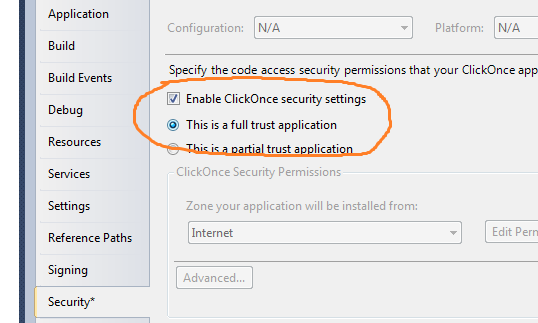
It throws a SecurityException, because by default WPF Browser Application is set to Partial Trust mode. Go to the Properties of your project and change the security settings to Full Trust and then your code will run.

image

But this is not preferable and a solution unless your client can allow the application to be Full Trusted. This is OK to do an intranet environment.

Windows Phone All in One Kick Start => Meet Jack Sparrow

Hi this is a quick and simple WP7 application, which demonstrates some of the advanced features within very few steps.

If you are already familiar wit h WCF and Silverlight then WP7 development is very easy for you.

This application explains the following features.

  • Accessing the WCF service from the WP7 application.
  • Handling Cross reference threads in Wp7 and create responsive UI.

Application

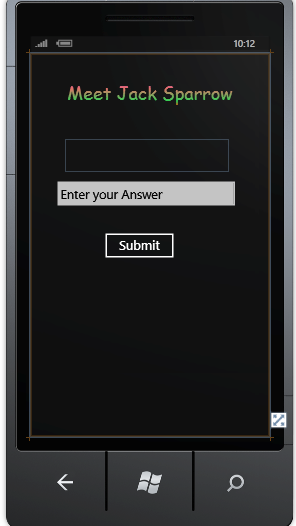
The application asks you simple question, and if you answer correct then you will be taken to meet Jack Sparrow. If you do not answer correctly, then the application asks another question and this process repeats.

WCF service is responsible for generating the questions and evaluating the answer. Thread is used to load the web browser.  Browser object is in the Collapsed Visibility mode, and the thread used to navigate the page, and bind the delegate of Navigated event.

Since the web browser is created in the main thread and accessed in another thread, this creates the cross thread reference problem. It is solved using the traditional way of the BeginInvoke() call. But the BeginInvoke() call is made from the Dispatcher object of the current thread.

Code Implementation

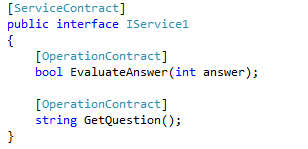
In my WCF service I have 2 operational contracts. One is to generate the question and the other one is for evaluate the answer. (Read the comments within the code blocks)

Code for my IService1.cs

image

Code implementation of those methods are mentioned here, You can download the complete solution here

As like Silverlight we have to call the WCF service through asynchronous method calls and binding a delegate to that. But we do not have to worry much since VS generates the Async methods for us.

Build the service, and the reference of the Service to the WP7 application.

The below image shows my WP7 application interface in the design mode.

image


In the MainPage.xaml.cs file we have code logic of the application.

Here is the code for calling a service in WP7. It is 100% similar to Silverlight applications. (Read the comments ..)

image

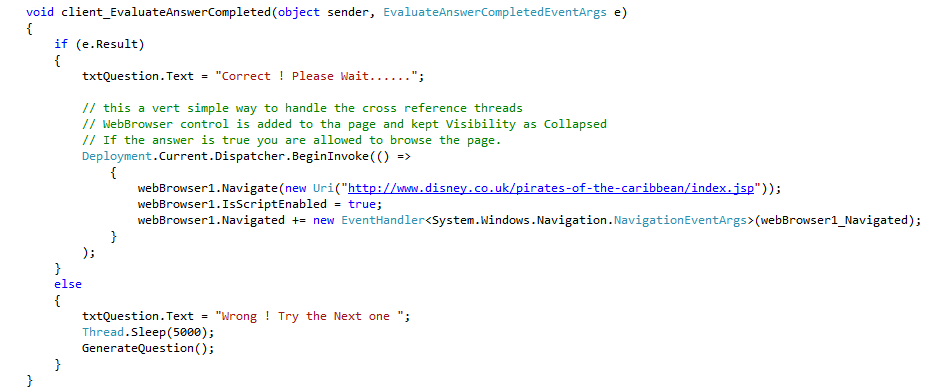
Once the Method call is returned from the service, the following method will be fired. (Note that GetQuestion() is the method we created. GetQuestionAsync() is generated by VS. We have to simply call that. (If you are familiar with Silverlight then this is not a big deal for you)).

image

The following method handles the cross thread reference problem, and provides a responsive UI. (Note that I didn’t code any explicit Threads. In .NET you can do this with simple delegates, .NET handles the thread for you).

image

Notice that in the BeginInvoke() I’m again making a call to my main thread for the Navigated event.

After the application completes it happily displays Jack Sparrow Winking smile


image

Sequence Column and IDENTITY

When you design tables you need a column to be updated automatically with a sequence number, ultimately which you may use as a Primary key of the table. (Some we use other columns as primary key)

But in case if you haven’t included a sequence column how you can include one.

Take a look,

Create a table in a database

image

Insert 10 rows

image


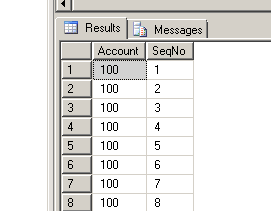
Now the table is populated like this

image


We have to Edit the SeqNo column but no way, since we don’t have any way identify the row uniquely.

First delete the SeqNo column

image

Now Add an IDENTITY column

image

Now the work is done

image


To make the new SeqNo column as Primary Key

image

Work Done Winking smile

MSDN Trackback : http://social.msdn.microsoft.com/Forums/en-US/csharplanguage/thread/158d58b0-0f3a-4d34-bff5-b51d2fad5416

Visual Studio SP1 and upgrade (Oh.. what the heck is that ?!@#)

I’m a go getter when any of the new upgrades available to the products I use, and I feel it is a very good way to keep ourselves updated and it makes our life easier. (But not always….)

I installed VS 2010 SP1 immediately after they have launched it. It was fine. Last week I installed the WP7 developer tools for VS 2010 SP1 from the link provided in the MSDN. After installing the WP7, when I opened the VS 2010 it threw a message saying that some of the features of the VS 2010 has been upgraded to the SP1 and some are not, so please install the SP1 again. Until that I cannot use VS.

OK, then I downloaded the SP1 online installer again, and executed that. When installing it was asking me awkward questions like specify the ADO.NET RIA Services .msi and Silverlight 4 .msi and all that.

I don’t know where are they ? I know I have installed them and no longer have the access to the .msi files as I don’t keep them in my junk box. I specified the path where they have been installed and it says that, the path is incorrect.

Oh.. God it was a huge time killer, the bad side is, I have to submit a  project that day. But I don’t have the access to the VS.

Then I decided to repair the VS, and I did it. But no use. Even after the repairing process the same thing happened. It’s like I got stuck in an infinite loop.

Then I tried removing the SP1 one completely and tried to open the VS. Any guesses what happened ?

Again the same problem. I feel like kicking off the VS team. They couldn’t provide a support file that detects the installed SP and downloads the correct version of WP7 (or any sort of plugin or tool we add to VS).

(Here I didn’t remove the WP7 which can fix the problem, as conceptually because the I need WP7 to continue my work)

I think the problem might be this…

When I install the WP7 development kit, it has no information about the SP I use in VS. It installs the available version of the WP7 to the VS.

Then when I start the VS, it detects that one (newly added) component does not have the required features (at least few lines meta configurations) to run in the VS SP1.

That’s why it was throwing a message saying, that some components of the VS are not upgraded to SP1 while some being upgraded. And asks me to run the SP1 setup again.

When run the SP1 setup, it starts the fresh new installation of SP1 upgrade (because it asks whether remove the SP1 or to reapply that). When we select the reapply the SP1, it keeps on asking the files for SP1 upgrades (like Silverlight .msi and RIA Services .msi). Which I cannot provide because we installed them from various setup files and we don’t keep them. (at least me..)

Actually MS should have provided a neat installation pack that detect the current VS version of the machine (whether VS or VS SP1) and installs accordingly.

Because it will be a nightmare for the users who are using VS SP1 and whenever they try to install a new feature it asks for SP1 setup and it is a time consuming work to do.