Redis on Azure : Architecting applications on Redis and its data types

Redis is the recommended option in the Azure PaaS caching techniques (Read why). Still Azure provides and supports other caching options too (What are the other available options)

Redis cache is available in Azure. View the Azure Redis Documentation and Pricing details.

When talking about caching, often we think of key value pair store. But Redis is not just a key value store, Redis has its own data types and support transactional operations.

Having a clear idea about the Redis cache and Redis data types will certainly help us designing applications in more Redis way.

Clone this git repository to get the idea about Redis data types. https://github.com/thuru/azure-redis-cache

The application demonstrates a crude sample of posting messages. Users can post messages and like the posts. Most recent posts and most liked posts are shown in different grids. Also users can tag posts.

Key Value pairs, Lists, (capped lists), Redis functions, Hashsets and Sets are used in the sample.

Read more on Redis data types

I will update source with more samples and information. Apart from the Redis features in the Azure portal we get comprehensive dashboards about the cache usage, cache hits, cache misses, reads, writes, memory usage and many more.

Azure Key Vault setup and usage scenarios

Introduction

At the time of this writing Azure Key Vault is in preview.  Azure Key Vault is a secure store solution for storing string based confidential information.

The reason I’ve mentioned that the string based confidential information is that you can store a key used for encrypting a file, but you cannot store the encrypted file itself as a file object; because some people have the confusion what could be stored inside the Key Vault.

Azure Key Vault – http://azure.microsoft.com/en-gb/services/key-vault/

Key Vault store 2 types of information

  1. Keys
  2. Secrets

Secrets– This could be any sequence of byte under 10 KB. Secrets can be retrieved back from the vault. Very much suitable for retrievable sensitive information like connection strings, passwords and ect. From the design point of view, we can either retrieve the keys every time we need or retrieve it once and store in the cache.

Keys – Keys could be imported to the vault from your existing vaults, also if your organization has Hardware Security Modules (HSM) you can directly transfer them to HSM based Azure Key Vault. Keys cannot be retrieved from the vault. For example if you store the key of a symmetric encryption which encrypts the files, you should send the files to vault ask the vault to encrypt / decrypt the data. Since keys cannot be retrieved from the vault this provides a higher isolation.

Keys could be stored in 2 different ways in the vault

  1. Software protected keys
  2. Hardware protected keys

Software Protected Keys – This is available in the standard tier of the vault. Compared to the Hardware protection this is theoretically less secured.

Hardware Protected Keys – HSMs are used to add premium hardware based circuitry secure storage for the keys. The most advanced key vault system available.


Provisioning Azure Key Vault

As Azure Key Vault is used to store sensitive information the authentication to the Azure Key Vault should happen via Azure AD. Let me explain it in simple steps.

  1. First a subscription administrator (either the service admin or co-admin) will create a Azure Key Vault using PowerShell.
  2. Then the admin registers an Azure AD application and generate the App Id and the App Secret Key.
  3. Admin grants the permission (trust) to the App to access the Key Vault using PowerShell.
  4. The subscription where the Vault is created should be attached to the Azure AD where the accessing app in the above step is created.
  5. This ensures that accessing app is an object of the Azure AD on which the subscription where the Vault is created is attached to.

Sometimes the 4th and 5th points might be bit confusing and you might face them especially when dealing with the multiple Azure subscriptions. See the below image for a clear picture.

Picture5

Assume that you have two subscriptions in your Azure Account, if you create the Vault in the Development subscription the app which can authenticate to the Vault should be in the Default AD. If you want to have the app in the Development AD you have to change the directory of the Development subscription.

Usage

Assume MassRover is a fictional multi tenant application on Azure.

ISV owns the Azure Key Vault

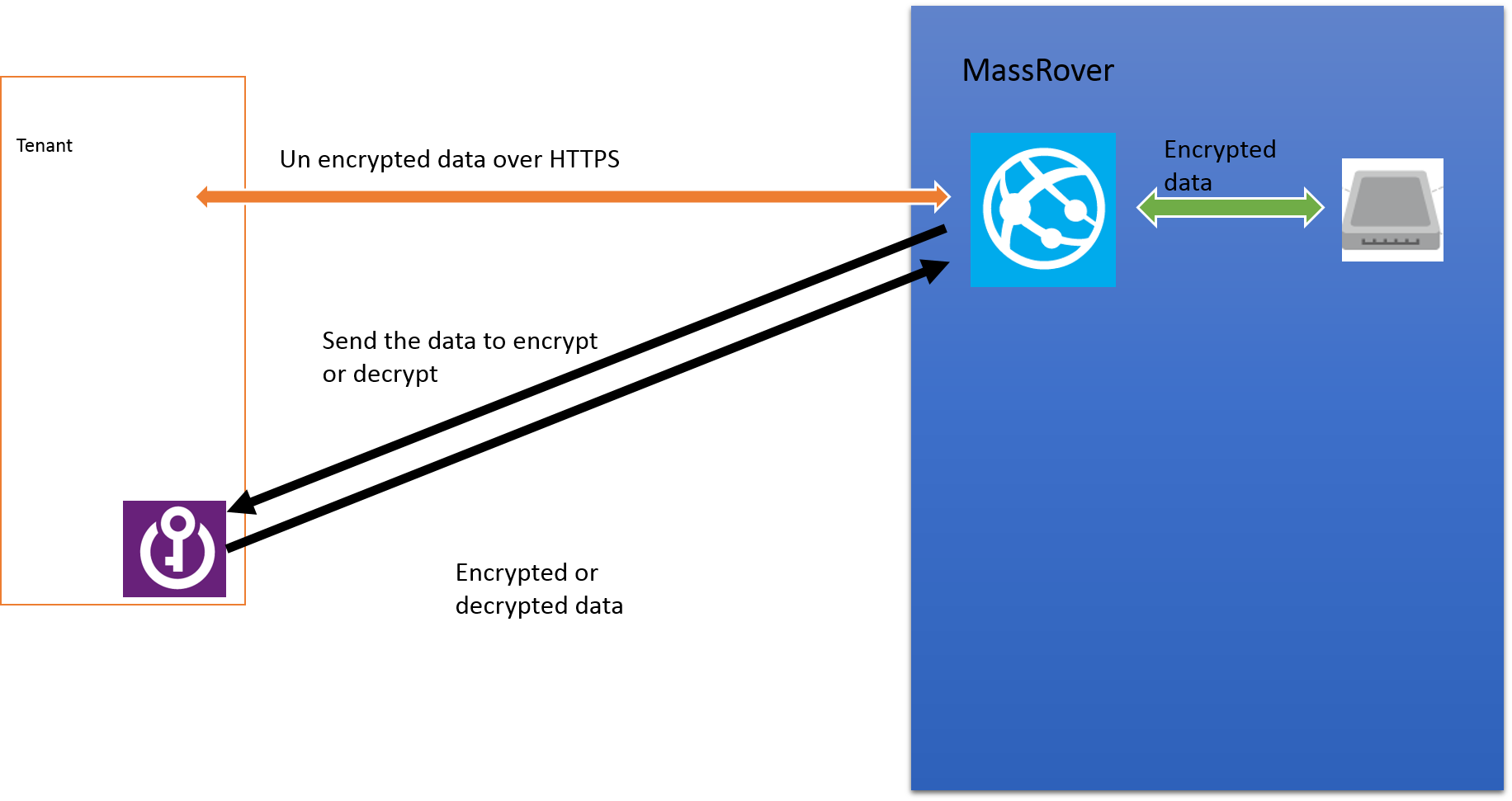
Scenario 1 (using secrets to for the encryption) – MassRover allows users to upload documents and it promises high confidential data security to its tenants. So it should encrypt the data at rest. MassRover uses it’s own Azure Key Vault to store the secrets (which are the encryption keys).  A Trust has been setup between the Azure Key Vault and MassRover AD client application. MassRover Web App authenticates to the Azure Key Vault retrieves the secrets and performs the encryption / decryption of the data.

Picture1


Scenario 2 (using keys) – MassRover Azure Key Vault stores the keys which cannot be retrieved out of the Vault. So the web app authenticate itself with the Vault and sends the data to the Vault to perform the encryption of decryption. This scenario has higher latency than scenario 1.

Picture2


Tenant owns the Azure Key Vault

Tenants can own their Key Vault and give access to MassRover by sharing the the authorized application Id and application secret. This is an added benefit if the tenants worry about ISVs keeping the keys in their subscription and administrative boundary. Tenant maintained Key Vaults give additional policy based security for sure but latency is high since data transfer has to happen across different wires. (this could be solved to certain extent if the tenant provisions the Key Vault in same region).

Tenant maintained Key Vault also has 2 scenarios explained above, as either to go with the secrets or go with the keys.

Scenario 3 (using secrets)

Picture3

Scenario 4 (using keys)

Picture1


Useful links

Azure Key Vault NuGet packages (at the time of this writing they in pre release stage : http://www.nuget.org/packages/Microsoft.Azure.KeyVault/

PowerShell for provisioning Azure Key Vault and .NET code sample : https://github.com/thuru/AzureKeyVaultSample

Channel 09 – http://channel9.msdn.com/Shows/Cloud+Cover/Episode-169-Azure-Key-Vault-with-Sumedh-Barde

Azure Active Directory, Microsoft Azure accounts, Graph API and Multi tenant application development.

Last week I did a session about Azure AD and multi tenant application development using Azure AD. Azure AD is a big topic and when we combine that with the other services and account provisioning it becomes huge. In the session I managed to cover the common scenarios in Microsoft Azure account management and application development.

Feeling gloomy and lazy to write all of them in the blog – I have shared the topics I discussed and the presentation. Please feel free to throw your questions here in the comment section. Following list contains the topics covered in the session.

  • Provisioning Azure AD
  • How Azure AD is related to Microsoft Azure and how not.
  • Accessing Azure AD using PowerShell
  • Directory Integration (on premise AD) with Azure AD
  • Azure AD with Office 365
  • Multi tenant application development with Azure AD (both federated and non federated scenarios)
  • Azure AD Graph API and .NET client libraries
  • Branding Azure AD

Contribution of cloud computing to the Agile

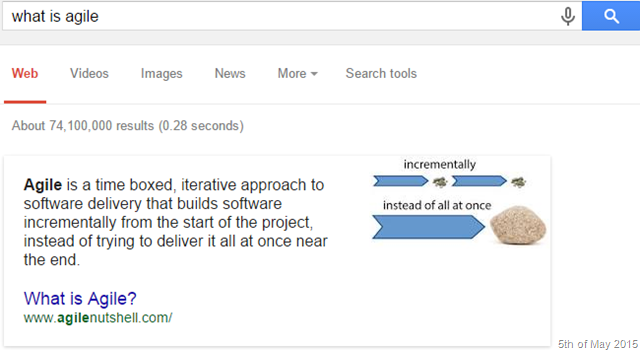
I can be pretty sure that almost all the times we hear the word Agile our mind relates that to the Agile software development process rather than the English word agile. Even Google thinks so. True enough that the semantic of the English word agile is they key to name the so called process as agile.

image

The reason I gave such an introduction to the agile is to bring out how much popularity the process has gained overtime. There’re different ways to implement agile, I don’t know any of them properly by the rules. But I have an understanding that the core of the agile is iterative thinking in an incremental delivery mode. That’s the key rest is how you do that.

Thinking about the current software delivery, the process of agile and how it evolved from the well blamed waterfall model, I felt little happy about myself for knowing some old school stuff. I think I was lucky enough to work with computers with huge keyboards which make sound of a shutting clam with green monochrome screens. They used to run the so called DOS 6.2. I have written programs in GW Basic and FoxPro and used 5 1/2  inch floppy disks.

Software used to be developed and  delivered totally different in those days. An ISV  had to write the software and ship it through some hard media (floppy disks or optical drives) mostly with a serial key for licensing purposes. We couldn’t think of iterative delivery on that model. A huge complex software would have ended up with 100s of CDs delivered to the client every two weeks; probably requiring a delivery service like DHL or FedEx.

So the delivery and the development practices were forced to lock up in the boundary of water fall model because frequent deliveries were mostly impossible due technology limitations. And those days most of the software were written for desktop computers.

With the time, industry evolved and cloud computing has become the heart and soul of the IT. Software development practices started to change and most of the development occurs for the cloud.

Cloud not only facilitates the different licensing models and how organizations manage their resources, cloud also has changed the entire software development process. It brought the trends of continuous delivery, online build automation, continuous integration, cloud source control and much more features which are the core part for the iterative development and agile methodologies.

Without those tools and technical processes we cannot think of implementing agile in software development in the modern day. Cloud facilitates the modern Agile Software Development and Dev Ops.

Each and every line of change is reflected to the customers in near real time with entire automation. Iterative development is fueled by the fast feedback loops. In order to gain the faster feedback loops continuous delivery is vital. Cloud computing facilitates this phenomena.

image

The developer and operations work flow is seamless with the cloud computing. Platforms like Microsoft Azure provides end to end DevOps workflow with tools like Visual Studio online, Azure Web Apps and Application Insights which exactly maps to the above diagram.

Cloud not simply a platform it’s the trend setter.

Project Oxford – Behind the scenes of how-old.net

http://www.how-old.net has been trending recently in social media. Simply you can upload a picture in this website and it will detect the faces in the photo and tells you the gender and the age of the person the face belongs to.

The site uses Face API behind the scenes, which is available here http://gallery.azureml.net/MachineLearningAPI/b0b2598aa46c4f44a08af8891e415cc7

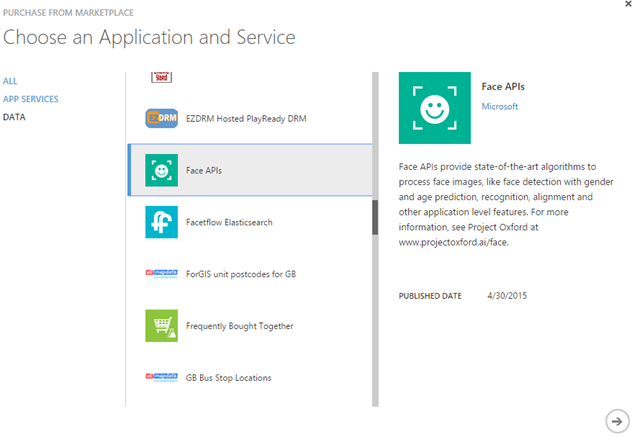
You can try this service by subscribing to the service. It’s an App Service in Microsoft Azure and you need to have a Azure subscription to subscribed to that. Currently it is free and you are allowed to make 20 transactions per minute for the subscription.

image

image

Once you are done with the purchase like any other service Face API is available in the Azure Marketplace section.

image

In the management section you can get the key for the API, the Face API is managed by Azure API Management (read more about Azure API Management here)


image

Face API teams also provides a sample WPF application with the portable client library as a wrapper for their REST service.

Getting Started with the Face API .NET client SDK

A simple face detection method would be very similar to this.

var faceClient = new FaceServiceClient("<your subscription key>");

                        var faces = await faceClient.DetectAsync(fileStream, false, true, true, false);

                        var collection = new List<MyFaceModel>();

                        foreach (var face in faces)
                        {
                            collection.Add(new MyFaceModel()
                                {
                                    FaceId = face.FaceId.ToString(),
                                    Gender = face.Attributes.Gender,
                                    Age = face.Attributes.Age
                                });
                        }

A direct JSON output would be like this. (test it here – http://www.projectoxford.ai/demo/face)

image

Face detection is made immensely easy by this research project. 🙂 Happy face detection.

The library has loads of other features like matching faces, grouping highlighting and all.

Azure Blob Storage Data Security

The question of security and cloud computing is one of the very well argued discussed and debated topic. It’s also one of the very common question I get in my sessions.

What ever said and done I personally believe that talking about security regardless of in the cloud or not it has 2 major characteristics.

  1. Security is a policy based feature
  2. Security is a shared responsibility

Ok, leaving the arguments of security, let’s jump into the Azure blob storage data security.

What would be the concerns of data security in Azure Blob storage

  1. How much secure the Azure data centers are ?
  2. What is the security for the data in transit ?
  3. Does Microsoft look or access my data stored in Azure Blob ?
  4. What are the policies should I follow in order to store data securely in Azure Blob ?

Let’s discuss each point one by one

How much secure the Azure data centers are ?

If you’re concerned that Azure data centers aren’t secured enough that physical security breach easily be possible, then you are not going to use the Azure in the first place. And there are tons of articles and videos in the Internet explaining the data center security features of Microsoft Azure.

What is the security for the data in transit ?

All the communications with the Azure and also within different data centers in Azure happen via https so it’s secured via TLS. There are some services which can be accessed (blob service included) with the http but by default this is turned off and it is not recommended to turn it on unless specifically required.

Does Microsoft look or access my data stored in Azure Blob ?

The direct answer from Microsoft is No, and indeed it’s true to my knowledge. But as per in the agreement Microsoft might collect the telemetry data of your blob storage  in terms of billing, usage patterns and service improvement parameters.

What are the policies should I follow in order to store data securely in Azure Blob ?

All your cooperate policies that you apply on premise and also additional policies that you have defined in your organization to store the data outside the cooperate firewall should be applied when using Azure Blob storage. But this is very unique and different to each company.

With all that information Why do you need to encrypt the data at rest from any public cloud provider ?

This is a question I ask from the customers when they request me to encrypt the data. Of course there’re several reasons mostly it is due to the cooperate policies which state any data at rest outside the cooperate firewall should be encrypted and also there’re cooperate policies that define the data should be in a specific political and geographic boundary. This is another concern in architecting the applications and selecting appropriate redundancy policies.

Other than the above reasons some customer have complained that we want to protect the data from our public cloud service provider, and prevent them reading the data. This is acceptable for some extent but again this raises plenty of other arguments like how and where to keep the encryption keys and how to secure them.


Encrypting data at rest in Azure Blob Storage

Azure blob storage does not provide any inbuilt mechanisms to encrypt the data at rest. We have to handle this in our application.

First selection of the encryption is very important. Since we’re talking about encrypting the data at rest symmetric encryption serves the purpose well, we do not need to put asymmetric encryption and overwhelm the situation.

Second where to keep the private keys – In most of the application design scenarios keeping the private keys in a database either encrypted or unencrypted format is a common practice. If you’re encrypting your private keys then you should have a master key.  You can design your own key management policy for you application or use Azure Key Vault for the key management which is still in preview.  One of the concerns I’ve been researching is having an algorithm as a master key which can create master keys for given parameters and handles master key expiration policies this will help us from the problems of persisting keys. (will write another separate post about this)

Third we should be aware when and how to apply the encryption – As the best practice always encrypt and decrypt the memory streams of your blobs. So you ensure that data is encrypted before hitting the disk.

In a web application encryption and decryption happens in the web server. The following diagram explains a scenario where there’s a web app and a blob storage in place and how encryption/decryption happens for the data at rest.

blob encryption diagram

Azure encryption extensions is a great library (https://github.com/stefangordon/azure-encryption-extensions)

Nuget – Install-Package AzureEncryptionExtensions


Performing the encryption and decryption in the stream helps to protect the data before it hits the disk. See the code below.

You can access the sample code with Web API service for upload and download content to Azure blob storage with symmetric encryption from my git repo

https://github.com/thuru/azurestorageencryptionsample

Which Azure Cache offering to choose ?

The above is one of the burning questions from Azure devs, and with all other cache offerings from Microsoft Azure along with their sub categories the confusion gets multiplied on what to choose.

Currently there are (and probably not for a much longer in the future) 3 types of cache services available in Azure.

  • Azure Redis Cache
  • Managed Cache Service
  • In-Role Cache (Role based Cache)

Ok now let me the answer the question straightly (especially if you’re lazy read the rest of the post) – For any new development Redis cache is the recommended option

https://msdn.microsoft.com/en-us/library/azure/dn766201.aspx

So what is the purpose of the other 2 cache offerings ?

I blogged about the Managed Cache Service and Role based Cache some time back. (I highly recommend to read the article here before continue the reading) . The below diagram has the summary.

Picture1


Read this blog post to get to know how to create and use Role based cache and Azure Managed Cache service.

Pricing, future existence and other details

Role Based Cache :

Since the Role based cache is technically a web/worker role regardless of whether it is co-located or dedicated, it is a cloud service by nature. So you create a cloud service in Visual Studio and deploy it in the cloud services, you can see and manage these roles under the cloud service section in the portal. And cloud service pricing is applied based on the role size. Role based cache templates are still available in Azure SDK 2.5 and you can create them, but not recommended. The future versions of the Azure SDK might not have the Visual Studio project template option for the Role based cache.


Azure Managed Cache Service :

The blog post shows how to create the Managed Cache in the Azure management portal and how to develop applications using C#.NET. But if you try to create the Managed Cache service now you will not find the option in the Azure management portal, because it’s been removed. At the time of writing of that blog it was available. The reason why it’s been removed is very obvious because Microsoft recommends Redis cache as alternative. The apps which use the Managed Cache service will continue to function properly but highly recommended to migrate to Redis Cache. Still the creation of Managed Cache option is available in Azure PowerShell. I’m not discussing about the pricing of the Azure Managed Cache service since it’s been discontinued. I have a personal feeling that Managed Cache service will soon be eliminated from Azure services, Microsoft might be waiting for that last customer to move away from Managed Cache Service 😛


Azure Redis Cache :

This is the newly available feature Redis on Windows cache option. The below link has information about the usage pricing and other information about the Azure Redis Cache.

http://azure.microsoft.com/en-us/services/cache/

Deleting all unused Azure Resource Groups

Execute this PowerShell script to delete all the unused empty Resource Groups from Azure. 

Resource Groups helps us to logically group the Azure resources together and monitor them. In the new Azure Preview Portal you can view the Azure Resource Groups. When ever you create a resource in the Azure it’s created under a Resource Group.

New preview portal allows us to create Resource Groups and visualize them. But the pain point is Resource Groups are not deleted even after you delete all the resources attached to a Resource Group. The idea behind this is, that you can reuse them without creating them from the scratch.

But sometimes this is annoying because most of the Resource Groups that are listed in the new Azure Portal do not have any resources and most of them were created automatically when you provision a resource in the old portal.

I had a huge list of empty Resource Groups so I created this PowerShell script to delete them all.


Read more about Azure Resource Groups here