Crossdomain.xml – Flex

When accessing the web services in Flex you need a crossdomain.xml file in the root of the web server which hosts the web service. In the file you can mention whether to accept the connections from all the domains or the connections from the specific domains to be accepted.

Here the sample for a crossdomain.xml file which allows the access from all the domains.

   1: <?xml version="1.0" ?>

   2: <cross-domain-policy>

   3:    <allow-access-from domain="*" secure="false" />

   4:    <site-control permitted-cross-domain-policies="all"/>

   5:    <allow-http-request-headers-from domain="*" headers="*"/>

   6: </cross-domain-policy>

For .NET guys, this is the exact similar version of the clientaccesspolicy.xml file we deploy in the root of the web server when working with Silverlight.

Creating a custom formatted DataGrid in Flex

This post explains how to create or at least begin to create a custom formatted DataGrid in Flex. I used the spark DataGrid for this sample. Two format settings are applied here; first is formatting the numbers as comma separated groups and format the color based on the value and second formatting the DataGrid column headers.

We have to write ItemRenderers for the above purposes. Flash Builder provides ItemRenderer template for Spark DataGrid. Just right click on your project folder and in the ‘New’ items list you will get an option for ItemRenderer and when you select it you will be asked for the option for which control you need to create the ItemRenderer for, Spark DataGrid is there on the top of the list.In the template you can add and edit required styling elements.

The Grid has a two columns Name and Score respectively. Name column is simple and displays the data and the Score column’s header is formatted in red color. Writing a HeaderRenderer for the Spark DataGrid is tricky; we’ve to write the HeaderRenderer and the correct Skin file to make it work properly. And also this column displays the positive values in black (default color) and the negative values in red color.

Download the source code here

image

Accessing a WCF – SOAP service from Flex

Flex development for a .NET guy

I’ve been working on Flex for last couple weeks using Flash Builder 4.7. I touched the second Adobe product in my life first is Dreamweaver, not Photoshop. I know that’s quite surprising but the truth is I haven’t used Photoshop yet and I don’t even know how to use it.

Leaving my history aside; I started Flex and soon I had to create some complex controls for the project. I did them and now I think I do fairly good. I write this post in order to help the newbies like me who jump into Flex development without any clue and for my personal reference.

As a developer you can put some basic controls and do simple development. You can find plenty of beginners tutorials for Flex. This post  explains how to make a web service call from Flex and access data.

Flex make it very simple to connect to a SOAP based services.

   1: <?xml version="1.0" encoding="utf-8"?>

   2: <s:Application     xmlns:fx="http://ns.adobe.com/mxml/2009" 

   3:                    xmlns:mx="library://ns.adobe.com/flex/mx" 

   4:                    xmlns:s="library://ns.adobe.com/flex/spark"

   5:                    creationComplete="application_creationCompleteHandler(event)">

   6:     <fx:Script>

   7:         <![CDATA[

   8:             

   9:             private var serverServiceUrl:String = "http://localhost/yourservice.svc?wsdl";

  10:             

  11:             [Bindable]

  12:             private var prodSAH:Object;

  13:             

  14:             protected function application_creationCompleteHandler(event:FlexEvent):void

  15:             {

  16:                 productionService.GetProductionData("SAH","","","Month To Date");

  17:             }    

  18:             

  19:             

  20:             protected function productionService_resultHandler(event:ResultEvent):void

  21:             {

  22:                 prodSAH = event.result as Object;

  23:  

  24:                 Alert.show(prodSAH.CompanyName);

  25:             }

  26:             

  27:             

  28:                    

  29:         ]]>

  30:     </fx:Script>

  31:     

  32:         

  33:     <fx:Declarations> 

  34:         

  35:         <s:WebService id="productionService" wsdl="{serverServiceUrl}" result="productionService_resultHandler(event)">

  36:         </s:WebService>

  37:             

  38:     </fx:Declarations>

  39:     

  40:     

  41:     

  42:     

In the code above [Bindable] attribute makes the variables responsively coupled with the controls, if you’re from Silverlight background you can understand this as a INotifyPropertyChanged interface implemented variables. Any change to those variables would reflect in the UI.

“Declarations” section contains the declarations of the MXML application, web service reference sits here. GetProductionData is one OperationContract of the WCF service and it returns a Production object as SOAP message. Production object contains several properties, here I have shown how to access the properties. It is simple, just put a dot(.) and type the property name (in this case CompanyName). But when you put the dot don’t expect Intellisense to be popped out and give you suggestions. It will never happen, so be careful about the spelling.

If you’re getting a collection from the service you can simply load it into a ArrayCollection in Flex.

I haven’t included any UI controls in this sample, but they’re straight forward as XAML markup (probably MXML came first).

Flash Builder IDE

This section discusses about the Flash Builder as an IDE.

In my Boolean world if some one asks me how do I rate Flash Builder as an IDE either god or bad it’s definitely bad.

I use Flash Builder 4.7. As an IDE it has plenty of glitches and personally for me as a person who spend entire work time with VS this is a direct kick on my midriff as a new developer for Flex. The IDE continuously eats up your heap. There’s an option that you can enable to view the heap size of the IDE. In my 4GB work station my OS allocates 740 ~ 760 Mb for Flash Builder. But after few builds during development the entire heap is full and IDE stops responding and goes dead slow. I often have to restart the IDE in order to work in my pace. I checked with other developers as well, same story.

And mainly there’s a disastrous problem there’s no design view. Believe it of course no design view. I got to know that they removed the design view from this version onwards. 

When you create a project Flash Builder creates a default MXML application in the name of the project. One project can contain multiple MXML applications. But if you delete the MXML file in the name of the project you cannot export any other MXML files. This is really a stupid and senseless bug.

As a VS lazy guy Intellisense is the god of development, in Flash Builder it’s there for the sake. Almost all the time I have to bring it up after putting a dot using Ctrl + Space. There’s a hell lots of improvements needed for Flash Builder as an IDE.

Uploading a file to Azure Blob

Windows Azure storage provides flexible storage services. Blob storage is one of them which is used to store binary large objects. 

Windows Azure blob has the concepts of containers (which you can think like partitions of a disk). Containers are either private or public.

Private containers are only accessible to the user and application developer with proper storage access keys. Public containers are accessible to all. So just by URL you can access a file stored in the public container.

You can use the Azure Storage Explorer to create and manipulate your Azure storage. It is a handy tool available for free from codeplex. Download link : http://azurestorageexplorer.codeplex.com/

The below code sample demonstrates how you can upload a file to a private container named ‘privatecontainer’ in Windows Azure.

   1: private void UploadFileToPrivateContainer()

   2: {

   3:     // get the storage (blob) connection string from the config file

   4:     var storageAccount = Microsoft.WindowsAzure.Storage.CloudStorageAccount.Parse

   5:         (CloudConfigurationManager.GetSetting("StorageConnectionString"));

   6:  

   7:     // creates a blob client

   8:     CloudBlobClient blobClient = storageAccount.CreateCloudBlobClient();

   9:  

  10:     // creates a container :: container name should be small otherwise you'll get Error 400 Bad Request Error.

  11:     CloudBlobContainer container = blobClient.GetContainerReference("privatecontainer");

  12:     container.CreateIfNotExists();

  13:  

  14:     // gets the physicall file path to be uploaded from ASP.NET FileUpload content.

  15:     string path = FileUpload1.FileName;

  16:     

  17:     // creating a blockBlob, if a block blob exists witht the same name then it will be replaced.

  18:     CloudBlockBlob blockBlob = container.GetBlockBlobReference(Path.GetFileName(path));

  19:  

  20:     var stream = FileUpload1.FileContent;

  21:  

  22:     // uploads the stream.

  23:     blockBlob.UploadFromStream(stream);

  24:  

  25:     stream.Close();

  26:  

  27:     Label1.Text = "Upload Success";

  28: }

I used the Azure Storage Explorer to create the container, you can create it using the code as well.

In order to run the above sample you should have Azure SDK installed and use Nuget Package manager to install the Windows Azure Storage assemblies.

Here’s the code for transfer a file from a private container to public container. Azure storage SDK doesn’t have an operation for move. So here we copy the file to the public container by downloading and re uploading it and deleting the file from the private container.

   1: protected void BtnMove_Click(object sender, EventArgs e)

   2: {

   3:     var storageAccount = Microsoft.WindowsAzure.Storage.CloudStorageAccount.Parse(CloudConfigurationManager.GetSetting("StorageConnectionString"));

   4:     CloudBlobClient blobClient = storageAccount.CreateCloudBlobClient();

   5:  

   6:     CloudBlobContainer privateContainer = blobClient.GetContainerReference("privatecontainer");

   7:  

   8:     CloudBlobContainer publicContainer = blobClient.GetContainerReference("testpubliccontainer");

   9:  

  10:     /*

  11:      * Moving is not available directly, so we download from priavte blob and upload to public blob.

  12:      * and delete the file from private file from private blob

  13:      */ 

  14:  

  15:     // getting the blob to move.

  16:     // based on my UI user has t type the name of the file he/she wants to move.

  17:     var prblob = privateContainer.ListBlobs(null, false).OfType<CloudBlockBlob>().FirstOrDefault(b => b.Name == TextBox1.Text);

  18:  

  19:     var stream = prblob.OpenRead();

  20:  

  21:     var blobref = publicContainer.GetBlockBlobReference(prblob.Name);

  22:     blobref.UploadFromStream(stream);

  23:  

  24:     stream.Close();

  25:  

  26:     prblob.DeleteIfExists();           

  27: }

Finally the below code samples how to query the files in a blob.

   1: protected void BtnGetVideos_Click(object sender, EventArgs e)

   2: {

   3:     var storageAccount = Microsoft.WindowsAzure.Storage.CloudStorageAccount.Parse(CloudConfigurationManager.GetSetting("StorageConnectionString"));

   4:  

   5:     // creates a blob client

   6:     CloudBlobClient blobClient = storageAccount.CreateCloudBlobClient();

   7:  

   8:    

   9:     CloudBlobContainer publiccontainer = blobClient.GetContainerReference("testpubliccontainer");

  10:     List<BlobDetails> list2 = new List<BlobDetails>();

  11:  

  12:     foreach (IListBlobItem item in publiccontainer.ListBlobs(null, false))

  13:     {

  14:         if (item.GetType() == typeof(CloudBlockBlob))

  15:         {

  16:             CloudBlockBlob blob = (CloudBlockBlob)item;

  17:             list2.Add(new BlobDetails() { BlobName = blob.Name, URL = blob.Uri.AbsoluteUri });

  18:         }

  19:     }

  20: }

Installing SQL Server 2012 on Windows 8

Installing SQL Server 2012 on Windows 8 is a pain, because SQL Server 2012 needs .NET 3.5. The problem is activating .NET 3.5 in Windows 8 via Turn On/Off Windows features won’t help because .NET 3.5 is considered as an on demand installation feature. Windows Update also fail to address the need. There are good articles describing the exact problem in detail.

You can install the .NET 3.5 in Windows 8 using your installation media and activating the feature. Simple. Insert your installation media or mount the Windows 8 image in a drive.

Open CMD as administrator

Type the following

DISM /Online /Enable-Feature /FeatureName:NetFx3 /All /LimitAccess /Source:J:\sources\sxs

Here J:\ is the drive of my installation media.

You will see a similar screen like this, wait for the installation completes.

sql 2012 installation failure - solution [installing .net 3.5 from media ]


Done ! Now .NET 3.5 has been installed successfully on your Windows 8 PC.

Office 365 – SharePoint app development using Napa

This post contains few important screenshots of Office 365 SharePoint app development using Napa.

Napa is a free Office 365 app which brings a development environment within the browser, though this not enough for most of the advanced developments this is quite handy it has debug mode, intellisense and other cool features. And also you can download your project to your machine along with all the deployment settings and edit in your Visual Studio as well. Napa is a good place for a beginner to start and to do quick tweaks in the code.

Once you activate your Office 365 account you can start jump into development (your Office 365 subscription should be Microsoft Office 365 Enterprise Developer).

Since all the developers do not have the subscription I captured few screenshots and put it here.

1) First you have to install Napa in your Office 365. It’s free.

2) You select what app you are going to develop.

Selecting the app to develop


3) Napa opens the app template for you in the browser.

2

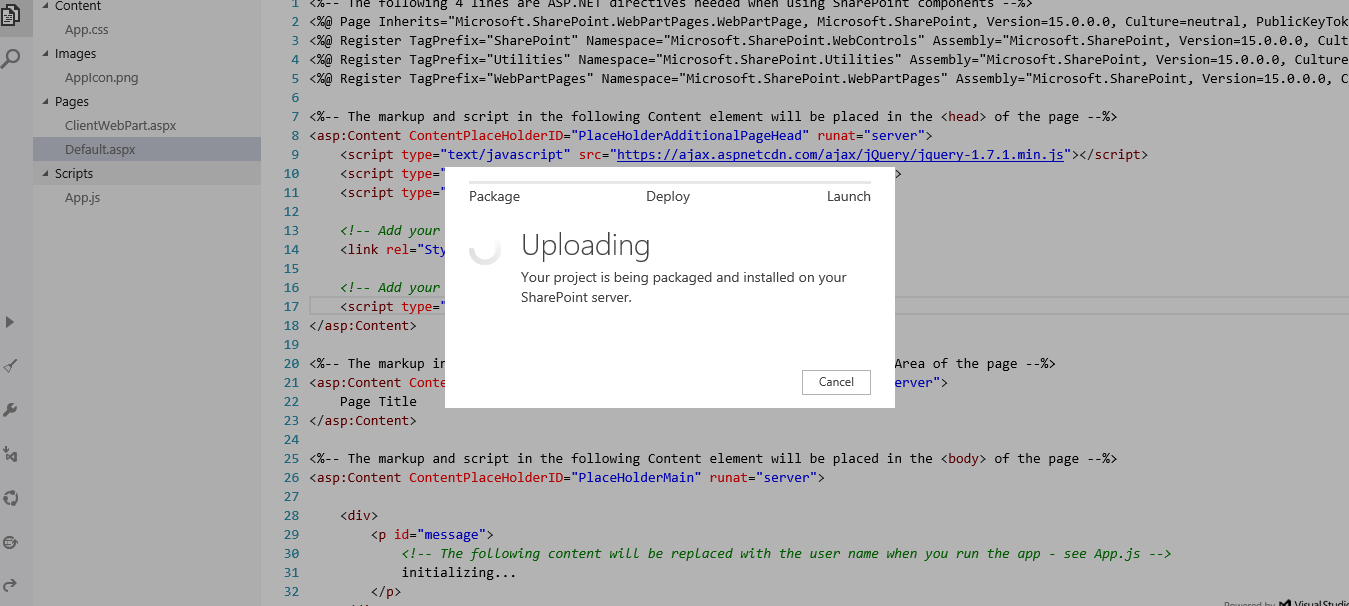
As you can see in the left hand side we have a toolbox (thin gray layer) with commands for debug, run in local Visual Studio, Publish and more. Next to that another thick light gray bar which serves the purpose of the Solution Explorer of the VS. Here the SP app have a file named App.js. This is the startup file for our SP apps. Then we can have our custom ASPX pages as we want.

When I click the debug, a pop up comes to show the progress of packaging and deploying for the debug. (as shown in the screen).

4) First Run

3The template is configured to print the logged in username in the app, this code is set in the App.js. So when I ran the app without making any changes in the code I got the above screen.

5) Editing and Debugging

4I edited the code and put some controls and ran the app. Wow I’m a techie now 😛


6) Connecting to Local Visual Studio to download the project

5

When you try to connect to the local VS the above popup is shown, and you can choose your preferred language and continue. (Wait, if I were to select the language now so far I developed the app. The point is when you create a project in Napa it creates the project for you based on the JavaScript development. – Remember I get the App.js) So when I try to import my project to the local VS and edit it asks what is my preferred language of development.

When you first import a project from Office 365 Napa we need some additional plugins to be installed in our local machine. This is mostly based on what pre installed VS configurations. But need not to worry MS Web Platform installer will take of your download.

Forget the web parts and develop the Apps. 🙂

I think along with Office 365 and SharePoint MS has framed their development sector ‘Office Development’ properly. Earlier though we say Office Development, SharePoint development was going in a different way and Office module development was going in another way. Now things are merged not only in words but also by the scenarios and environments as well.

HTTP Headers

This is a quick and a small post on reading the HTTP headers in ASP.NET. Code gets the HTTP header key – value pairs and write it to a text file.

   1: protected void Page_Load(object sender, EventArgs e)

   2: {

   3:     var headers = Request.Headers;

   4:     StreamWriter writer = new StreamWriter(Server.MapPath("~/data.txt"));

   5:  

   6:     foreach (var item in headers.AllKeys)

   7:     {

   8:         string data = item + "---" + headers[item];              

   9:         writer.WriteLine(data);

  10:     }

  11:  

  12:     writer.Flush();

  13:     writer.Close();

  14: }

Output text file as follows.

   1: Connection---Keep-Alive

   2: Accept---text/html, application/xhtml+xml, */*

   3: Accept-Encoding---gzip, deflate

   4: Accept-Language---en-US

   5: Host---localhost:24859

   6: User-Agent---Mozilla/5.0 (compatible; MSIE 9.0; Windows NT 6.1; Trident/5.0)

Microsoft doesn’t embrace it own products

I have noticed few things that makes me feel that MS doesn’t embrace its own products sometimes. For example when MS launched Windows Phone 7 and 7.5 there were massive marketing campaigns about the phone.

But in the Live / Hotmail (now Outlook) login page iPhone was in the middle as a highlighted smartphone which supports Hotmail / Live. Then thankfully someone noticed it and changed it. Later WP was in the middle.

Yesterday I came across a big frustrating problem when dealing with Windows Azure websites. MS has been doing a really great job with Azure and Azure websites deployment provides plenty of options to host the websites. We can pull the website files from various sources and Dropbox is also available. But they don’t have an option to pull a folder from Skydrive to Azure websites, they still have an option for Dropbox.

I cant believe this. Really confused.

Capture

After few minutes I saw this tweet.

c2

I really don’t know what’s going on.  But I think this is the real problem in MS now. There’s no communication, everyone does something in their own. But MS is not a company which became big yesterday. They should have and I hope definitely they should be having processes for integration and a streamlined communication between products. I wonder whether they don’t have the processes or someone has forgotten it in the middle.