Getting the Radio Button Value in Windows Forms

I came across a question in the MSDN forums about accessing the Radio Buttons in Windows Forms. After reading the question I realized that radio buttons in Windows Forms are little tricky compared to the HTML or ASPX ones.

We can group the radio buttons using GroupBox control or the Panel Control. Then the set of radio buttons works together. The following code snippet explains on how to access the clicked radio buttons and their value when a button is clicked.

Radio buttons have the Click event and CheckChanged event, which we can use to get the value, but programmatically this snippet explains how to access the radio buttons inside a GroupBox.

image

Selecting the Top N in each Category

When we write queries in TSQL selecting the top ‘n’ number of rows is easy. It can be achieved by a query similar to the following.

SELECT TOP(10) Names FROM [Users]
WHERE IsActive = 'True'
ORDER BY ApprovedOn DESC

But when selecting the items which are from different tables and with subcategories this is quite tricky.

I had a scenario where Users can comment on each service/product. Each service/product is listed under a sub category. The need is the query should list down the recent 5 comments under each service sub category with the details of who made the comment.

Apparently I have to JOIN 4 tables. Selecting the TOP(n) from each category is challenging. I searched the Internet and some solutions say that execute the queries to get the top 5 in each category and combine them using the UNION. That doesn’t sound good and in my scenario the number of categories is dynamic. (So If I have to go with the above solution I have to write COUNT for sub categories and then follow that with bulky TSQL stored procedure).

This is a method I tried by combining some techniques mentioned in the Internet.

Table Structure (Tables contain more fields, but in the picture only the related fields are shown)

Capture

There two ways you can write the query. First using a temporary table which is not advisable in terms of efficiency. Second is using sub queries.

Using Temporary tables.

DECLARE @Temp TABLE
(
    Row INT,
    RealServiceID BIGINT,
    CategoryName VARCHAR(100),
    ServiceName VARCHAR(100),
    Comment VARCHAR(MAX),
    Username VARCHAR(50)
)

INSERT INTO @Temp
SELECT ROW_NUMBER() OVER
(PARTITION BY SC.CategoryID ORDER BY SC.CategoryName) AS Row, 

RS.RealServiceID, SC.CategoryName, RS.ServiceName, CM.Comment, US.Username
    FROM RealServices AS RS
              JOIN Comments AS CM ON
        RS.RealServiceID = CM.CommentOn JOIN
            ServiceCategory AS SC ON RS.CategoryID = SC.CategoryID
        JOIN Users AS US ON CM.UserID = US.UserID
    ORDER BY SC.CategoryName, CM.CommentOn

SELECT * FROM @Temp WHERE Row <= 5

Using Sub queries

SELECT RowNumber, RealServiceID, CategoryID, CategoryName, ServiceName,
    Comment, Username, SubmissionDate
FROM (
    SELECT ROW_NUMBER() OVER
(PARTITION BY SC.CategoryID ORDER BY SC.CategoryName, CM.CommentOn) AS RowNumber,
        RS.RealServiceID,
        SC.CategoryID,
        SC.CategoryName,
        RS.ServiceName,
        CM.Comment,
        US.Username,
        CM.SubmissionDate

    FROM RealServices AS RS
        JOIN Comments AS CM ON
        RS.RealServiceID = CM.CommentOn JOIN
            ServiceCategory AS SC ON RS.CategoryID = SC.CategoryID
        JOIN Users AS US ON CM.UserID = US.UserID
    ) AS InnerTable
WHERE RowNumber <= 5
 ORDER BY ServiceName, SubmissionDate DESC

Feel free to make comments on this Smile

Microsoft Technical Communities

Setting the standard for Sri Lankan IT Professionals to become globally competitive, Microsoft Sri Lanka invites you to join its vivid technical communities set out to cater to all spheres of Microsoft’s technologies. Interact with over 8000 software developers, designers, technology enthusiasts, industry experts and students from around the country. Stay ahead of the game with the latest technologies, trends, tech-news and developments worldwide while sharing your ideas and networking with the Sri Lankan IT Industry.

These communities are headed by a group of Independent experts on Microsoft Technologies – Microsoft Most Valuable Professionals (MVPs) who have been recognized for their contribution and talents. The Student Community, which is exclusively for Undergraduates is headed by team IT Undergraduates across the Island – the Microsoft Student Ambassadors (MSAs).

These communities are the best available opportunity for Microsoft technology enthusiasts to connect, share and grow all in one place. So, register now to keep yourself updated with the latest happenings!

.NET Forum
www.dotnetforum.lk
www.msdnsrilanka.net
Monthly Meeting
Date: 1st Thursday
Time: 6.00 – 8.00 PM

IT Pro Forum

www.itproforum.lk
www.technetsrilanka.net

Monthly Meeting
Date: Last Wednesday
Time: 6.00 – 8.00 PM

SQL Server Universe

www.sqlserveruniverse.com

Monthly Meeting
Date: 3rd Wednesday
Time: 6.00 – 8.00 PM

SharePoint Sri Lanka

www.sharepointsrilanka.org

Monthly Meeting
Date: 2nd Wednesday
Time: 6.00 – 8.00 PM

Student Champs

www.champs.lk

Monthly Meeting
Date: 1st Friday
Time: 4.00 – 6.00 PM

Web Services Simplified

This article will give you a compact explanation of web services. I explained the things in a compact manner because nobody want to read paragraphs of explanation 😀

Let’s start the discussion with a real world example, we all know the role of the web applications. We also know the shopping cart apps. But the question is, if we really want to create a shopping cart for a company (let’s say M-entertainment online music store) we build our web site with high security concerns. We take the credit card number of the customer, then what ? Is it finished with that ? No.

The real work yet to be started. You take the credit card number then you have to validate that. Contact the specific bank or financial institute and make sure the availability of the account. Then you have to make sure whether the customer has enough credit limit. Then the company has to authenticate itself to the bank (it may be another bank). Then the system has to deduct the amount from the customer account and add it to it’s account. (If there are commissions to the bank it has to be allocated).

OOPS..There’s whole lot of things have to be done. :(. Just think we are a company and we build our website, we have a own database server (or hired one) and we have direct access to it. (we have the authentication). But to check whether the credit is there in customer’s account we have to connect to the bank’s database. Will they provide you the access to their database ? Definitely not.

So what is the solution ? To make your application work perfectly in a real world scenario you need the above functionality. And all the available web applications have the above functionality. So how this is possible ? The answer is web service. The bank gives an interface to interact with their data, this is a simple example for the web services. So web services are interfaces which can be used to interact with third party web applications.

Most commonly web services are implemented with XML and its derivatives. The main reason for this is, XML and XML based standards are platform independent and they are open standards recognized by the industry.

When it comes to interoperability and communication XML is not only the way to do that, but it is a well known and a leading way of describing data. So mostly the communication with the web services happen in the format of XML and derivatives. The derivatives in the sense it includes the other protocols like SOAP,WSDL and much more…

So as explained in the above example if you want to check the available balance of the customer, you have to communicate with the service provided by the bank. You pass the relevant detail of the customer as a parameter (credit card number or account number) to the web service and request the balance and you will get a web service response for your request in an XML format.

Again XML is not only the way to create the web services but it is commonly used because of its open standard and industry wide recognition. The XML based web services are called XML web services but when it is normally referred to as web services it means the XML web services.

Modern Browser . . .

Yesterday I made a status update in the Facebook as ‘Modern Browser ?’. I didn’t get any comments under that as I expected. Because it is a senseless update for the people for who are not aware of the real browser war going between Mozilla 4 and IE9 RC. (Of course browser war is not new but this something different, funny and interesting)

I’m not supporting any of the browsers here (I use IE, Mozilla and Chrome for different purposes), but it is a fun to listen to these arguments.

I got theses two blog articles via an email subscribed to Codeproject, both are very interesting. Especially the IE9 blog article where the guy gives explanation on what is meant by a modern browser. This is really cool. I’m not supporting but it looks like linguistic studies and IT pros are banging each other on the words they used. (This makes a feeling of they can be in a law suite department rather being in the IT field Smile with tongue out)

Just as a fun have a look on these two blogs

http://people.mozilla.com/~prouget/ie9/

http://blogs.msdn.com/b/tims/archive/2011/02/15/a-modern-browser.aspx

Calendar in ASP.NET

We all know that .NET provides us rich set tools for us. Calendar control is one of them. We can simply use the calendar control for date input. But it is more powerful and we can simply create a complete application using calendar control which shows the tasks that have been scheduled.

To use the calendar control in a such way we should have to know about, how the calendar control is rendered in the HTML. Calendar control is rendered in as a table in HTML and every day is rendered in the order.

And calendar control provides a DayRender event as well. That’s enough for us to create the application.

Simply drag drop the calendar control inside your ASP.NET page. Make it big enough to fit to the screen.

And put the code behind as described here. I hardcoded the tasks in a HashTable but if you want, you can keep them in a data source.


image


In the Page_Load we load some data into the HashTable. This scenario may vary based on where you keep your data source. (As I mentioned earlier here it is simply hard coded).

DayRender method is triggered for each day that is rendered for the month. First in the if condition we check whether the rendered date is in the HashTable. Here we are providing the key and check whether value of the key is null or not. If it is not null then the key is available in the HashTable so a task has been assigned on that day.

Then we proceed inside the if condition.

We create a Literal control and make gives the text as <br/> (I don’t need to explain this as we all know why ?) And I add the Literal Control to the specific cell of the calendar control. (because as I explained earlier calendar control is rendered as a table in HTML)

Then I add a Label and feed the task of that particular day. Here DayRenderEventArgs object is very useful in getting the rendered day.

image

The above is simple and yet powerful. 🙂

Me and my Computers

I suddenly thought of writing about my experiences with computers. At first when I was 10 (in 1997) I joined a computer class which was primarily owned by Rev.Millar (who is from USA). At the very beginning there were very few of us. I can remember there were only 5 machines, and only 3 of them were capable of running MS Windows. Other 2 were used for DOS, PASCAL and GW Basic programming.

One was a Compaq a fully branded machine with the dial up Internet connection and the other was Asus (If I remember correctly). Both were P1 machines. But the Compaq was faster than the other one. I don’t remember the third one but it had a weird black and white monitor. Lotus was installed on that. Those 3 were capable of running Windows 95. Other two were with big keyboards and each key was popping out one inch above the key board.

On the first day of the class we were taught the components of the system. And for few weeks it was DOS commands. Perfect when you really install DOS 6.2, I can still say it’s perfect.

It was a very hilarious time when I first started using the mouse. I can still remember the fun. On the first day, just to point the Start button I took around 2 minutes. :D. Then we improved learning Windows then Office 97. Then the GW Basic programming. I still remember some codes in GW Basic. 🙂

Soon my father bought me a computer. I got one when I was 11. (in 1998) It was a nice and a fast machine when compared to the ones in my class. It was P2 550 MHz, 64 Mb RAM, 8 GB HDD with 16 Mb VGA, CD ROM drive. The OS was Windows 98. For me it was decent enough to run my favorite games. Street Fighter, MK4, Doom, Sky Rover were few among them. (I still miss a game a like Street Fighter; Guy was my favorite character with dual kick combo powers :D).

I used to repair my machine and reassemble it by my own. Some times I used to format it 3 time a day. Crazy !@# ( I can’t even dream about formatting my lap now). I used to write batch files to delete the .sys and .dll files in the System32. I even went and copied them in the nearby Internet Café  using a floppy disk. (On that time one 1.44Mb, 3.5” Imation floppy disk was Rs.45.00).

After 2 years we sold that machine and bought another one. It was my dream machine. It was with 17” LG Flat Studio Works monitor. P3 800MHz ~ 1000MHz. 128 Mb 333MHz RAM, 20 GB HDD, 64 Mb VGA, 52X CD ROM Drive, Creative Sound Card with external speakers and the package includes HP 610C Deskjet Color printer and Vugeo Color Scanner with 300dpi.

It was WOW.

I got everything I needed from a machine. I still remember my mom was upset about that why my dad spends much on these gaming tools. 🙂 For her computer is another version of PlayStation.

Then my gaming trends were upgraded. The Gunship and the Unreal Gold were the top games on that time. Other than that Vitro Cop from SEGA. (real bullshit game, but no choice).

When I got selected to the University my family bought me a laptop.

She fixed to me closely and averagely spends around 6 hours a day with me. I again regained all the stuff and programming after coming here. I just love my laptop now. So far she made me feel nice and great and she will do in the future as well.

Cloud OS

After a long interval I write this post in my blog. I’m very glad to write this because it came true what I predicted.

Google announced the Chrome OS soon after the Chrome browser. Most of the people simply thought it would be another OS. No body thought it will change the hardware as well. Some how I managed to predict like this.

Imagine a computing environment where we switch on a computer and it directly connects to some cloud service (cloud OS) and we do our work. The local hard disk would be a mere storage for files.

Read the full article

First I asked this from Mr.Wellington Perera (Director DPE, Microsoft Sri Lanka) for fun.  I simply asked him; if some thing happen like this what would be the situation of Microsoft in terms of the OS market. (Personally I can say, he is an interesting person to talk to and who can patiently answer this kind of awkward questions)

He replied wisely that; a situation like that may come one day. But using a computer is not just what you do with that. It is an experience. It’s full of experience and feelings as yours. Providing that kind of an experience is challenging when considering the existing web technologies.

It’s true. I’m not marketing here. Think as you purchase a Windows 7 or you are an Open source techie and using a version of Linux. You simply install it and use it. You can say; it’s my Windows PC or Linux Machine or Mac book.

But with the Chrome OS I do not think you can get a feeling like this. Owning a house and renting one is totally different. Isn’t it?

I believe Cloud will totally change the things and it is the future. (It has already proved that).

But I’m reluctant to accept some thing called a Cloud OS.


Let’s now have a look on the Chrome OS – The First Look

Google announced a pilot program as it will offer us a note book and asked to test the Chrome OS. They offered a note book named Cr-48.

Chrome OS – http://www.google.com/chromeos/index.html

If wanna apply for the free Cr-48 note book to test the Chrome OS – https://services.google.com/fb/forms/cr48advanced/

(But you need a valid US mailing address). With some little greediness I did try to apply for it. but certainly I’m not going to get it. 😦

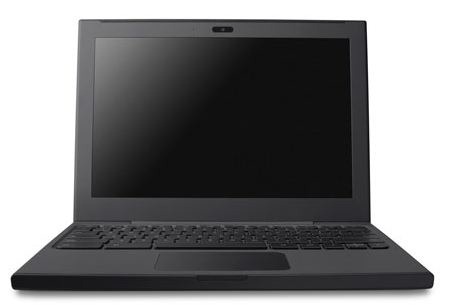
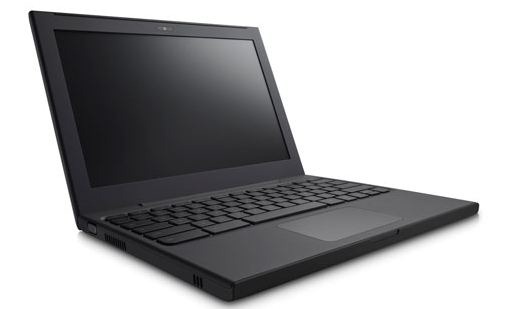
Images of Cr-48


Capture1Capture2


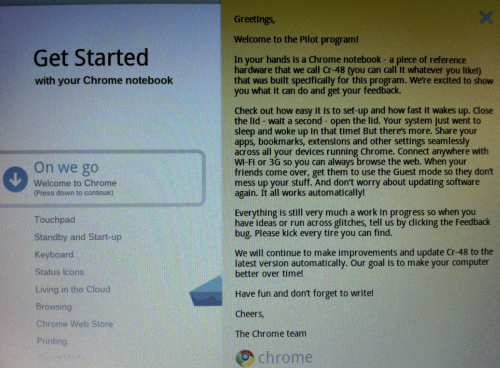
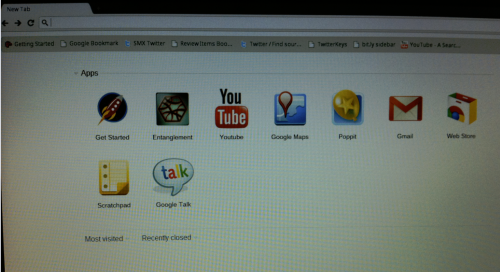
Screen shots of the Chrome OS


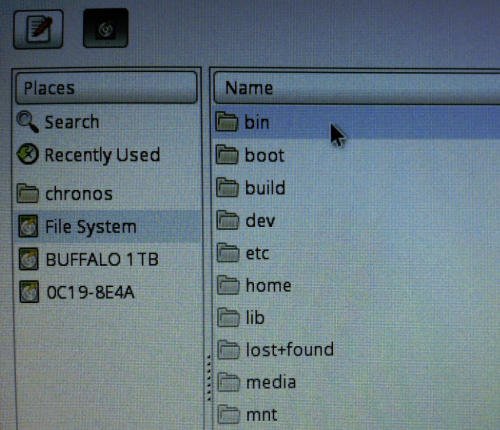
image image


image

OK what if we can ask some real experiences from a person who did all these things and tested the Chrome OS yesterday. Then hit get into this blog. (Read below before click the link)

Currently Cr-48 bears no logos or brand names. Actually the hardware is not exposing who is its manufacturer. (But if somebody breaks the device and check the internal we can may get an answer :D).

It has plenty of differences from a normal note book we use. The above blog describes them in detail. It is only equipped with wireless Internet connection. No Ethernet  (Or you have to go for a USB to Ethernet connector)

I don’t know when I’m going to have my hands in Chrome OS.